


In large engineering organizations, the operational tempo never slows. Engineering teams are shipping updates faster, managing incidents under tight SLAs, and operating across globally distributed environments. Traditional DevOps practices remain essential, but they’re no longer sufficient on their own. To keep up with this pace, many enterprises are extending DevOps workflows with models that combine automation, communication, and transparency. Among these, ChatOps stands out as a practical approach to streamlining operations and unifying development, cybersecurity, and infrastructure work.
ChatOps brings automation tools and operational tasks into chat platforms such as Slack and Microsoft Teams. It turns ordinary chat into real-time collaboration environments where teams can execute commands, monitor systems, and resolve incidents using natural language. For CTOs and VPs of Engineering, adopting ChatOps isn’t about chasing trends—it’s about reducing the gap between awareness and action. ChatOps creates a single environment where communication and execution converge.
Moving Beyond Traditional DevOps Pipelines
Most DevOps apps automate CI/CD and provisioning, yet many critical processes—incident management, rollbacks, approvals, and audits—still depend on manual coordination. This separation slows work and limits visibility.
ChatOps tools extend DevOps pipelines into the chat interface where team collaboration already happens. Engineers can trigger automated workflows, check logs, and review alerts without switching windows. ChatOps doesn’t replace DevOps apps; it augments them by connecting automation and communication. The result is a workflow that is transparent and reduces switching between contexts and improves efficiency across the entire organization.
One 2024 study found that a single interruption costs developers more than 20 minutes of focus. A streamlined ChatOps working environment minimizes those interruptions and gives engineers a measurable productivity boost.
The Cost of Context Switching
For engineering leaders, switching between applications and contexts is an invisible drain on output. Each time developers move between a monitoring dashboard, a ticketing system, and a chat channel to complete one task, focus resets and work slows. ChatOps tools consolidate those steps. Alerts, diagnostics, and responses happen in the same chat interface, so users can stay in flow and collaborate instantly.
Key Insight: A unified ChatOps environment allows engineering and business teams to work on the same page. Less tool-hopping means faster decision making, better incident resolution, and fewer delays in software development.
Streamlining Incident Management
Incident management is one of the clearest areas where ChatOps improves efficiency. In a traditional workflow, an alert from Splunk On-Call might trigger a flurry of emails, group chat posts, and ticket updates before action begins. Each handoff adds latency.
In a ChatOps environment, that alert appears directly in the team’s chatroom with contextual information and suggested next steps. A bot can prompt for diagnostics, provide runbook links, or even trigger workflows for rollback or restart. The devops team can resolve incidents without leaving the conversation, keeping all documentation and decisions in one place.
Reducing Mean Time to Recovery (MTTR)
Teams using DevOps ChatOps models often report faster MTTR. When a major issue occurs, ChatOps operates as both a communication layer and an execution platform. Engineers can execute commands, collaborate in real time, and confirm actions without waiting for access or switching tools.
| Role | Traditional Incident Response | ChatOps Incident Response |
| Developer | Logs into multiple systems to check code, then posts updates manually. | Runs /check-health <service> or /restart-node <cluster> in chat using a bot. |
| Operations | Receives alert, creates ticket, starts an out-of-band call. | Alert appears automatically with triage data; uses chatroom integration tools to trigger /deploy-rollback <version>. |
| VP/Stakeholder | Waits for periodic updates. | Watches the full transparent workflow unfold in real time. |
Embedding Security into Everyday Workflows
Security often struggles to maintain visibility across fast-moving release cycles. ChatOps tools provide shared collaboration that embeds checks directly into daily operations. Vulnerability alerts, failed compliance scans, and policy violations can appear in the same channel where deployment approvals happen.
For example, if a container fails a scan, ChatOps can block the CI/CD pipeline, notify the DevOps team in Slack or Microsoft Teams, and present remediation options. Every action is timestamped and stored, creating an auditable record for compliance frameworks such as SOC 2 or ISO 27001.
These built-in logs reduce the burden of manual reporting and strengthen the organization’s overall cybersecurity posture.
Improving Coordination Across Distributed Teams
In large enterprises, coordination across distributed teams is often fragmented. Developers, QA, and operations might each use different tools, dashboards, and ticket systems. ChatOps helps bridge these divides.
By using a shared chat interface as a command center, all participants see the same data, commands, and results. When a new feature deploys, engineering, QA, and product can observe progress, identify issues, and document outcomes in one conversation thread. That transparency reduces missed dependencies and streamlines operations across time zones.
Conversation-Driven Collaboration in Practice
A developer uses a bot—perhaps built with AWS Lambda—to deploy a feature to staging. The GitLab CI pipeline runs automatically and posts updates. A QA tester identifies an issue and reports it in the same thread. The SRE runs a diagnostic command and posts logs right there.
This conversation driven model keeps all relevant data, context, and decisions together. In heavily regulated industries, it also provides an auditable record of every command and result.
Enterprise Use Cases with Measurable ROI
For CTOs evaluating ChatOps adoption, real-world use cases show clear returns:
| Deployment Coordination (CI/CD) | Deploy to staging or production directly from chat platforms using bots. Each deployment is logged and traceable for audit purposes. |
| Incident Resolution (MTTR Reduction) | Notification systems like Datadog or Splunk On-Call post alerts to chat with remediation options. Engineers can run commands and resolve incidents instantly. |
| Release Validation | QA teams can trigger test suites via chat and coordinate approvals without leaving the conversation. |
| Access Management | Temporary permissions can be requested and approved within the ChatOps working environment, ensuring accountability. |
| Automating Repetitive Tasks | Teams can automate tasks like cleaning temporary environments, rotating logs, or generating status reports using bots and Lambda. These small automations remove friction and free senior engineers for higher-value work. |
Each example demonstrates how ChatOps offers measurable gains in speed, quality, and transparency while improving collaboration across technical and business teams.
Governance and Risk Management
Every collaboration model introduces new risks. Poorly configured bots or missing safeguards can cause problems in production. Effective ChatOps implementation includes strict governance.
Key Features of Secure ChatOps Adoption
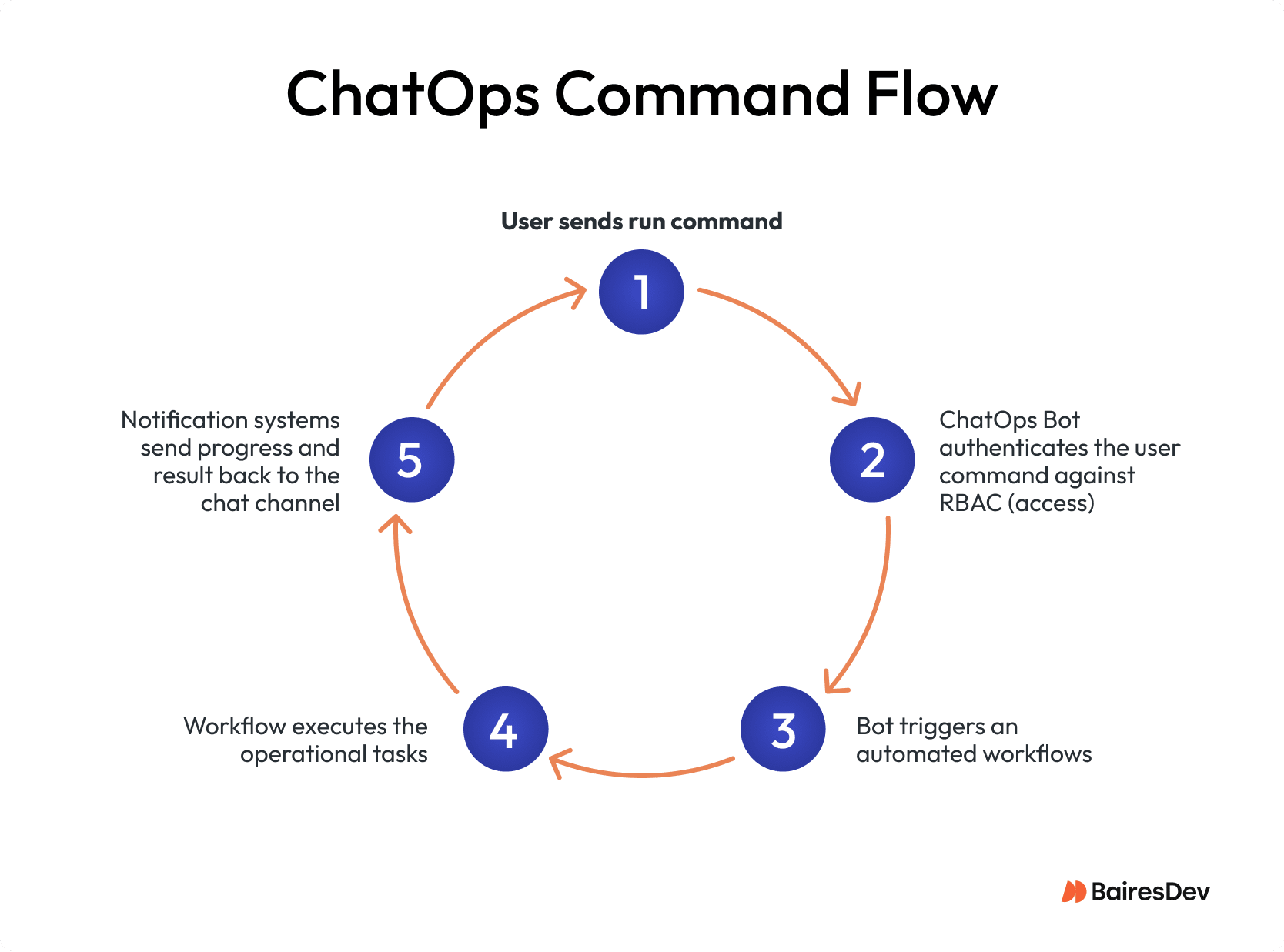
- Authentication and RBAC
Ensure only authorized users can run sensitive commands. Role-based access control is essential for safe operations. - Approval Workflows
Use confirmation steps for critical actions like rollbacks or deletions. Automated workflows should remain visible to oversight teams. - Logging and Retention
Store chat transcripts and command logs in secure, immutable storage for compliance. - Bot Validation
Treat bots as production code. Review, test, and version them like any other DevOps tool.
Strong controls don’t just prevent risk—they enable the transparency and accountability that make ChatOps valuable at scale.
Operational Maturity, Not Just New Tools
ChatOps succeeds when the organization embraces cultural as well as technical change. Chat should become the default venue for operational work.
Start small with call resolution or deployment approvals. Encourage documentation and decision making in shared channels. Provide short training sessions to help non-technical teams understand how ChatOps works. As comfort grows, extend automation to more operational tasks.
ChatOps operates best when communication, transparency, and shared accountability are the norm. It ties together existing automation tools—CI/CD, monitoring, cybersecurity, and observability—into one model.
The Path to Unified Execution
Implementing ChatOps is a strategic investment that helps organizations streamline operations and improve reliability. It takes planning, integration, and discipline, but the returns are tangible: faster recovery, clearer accountability, and stronger alignment across Dev, Sec, and Ops.
For VPs and CTOs managing distributed development environments, ChatOps offers a scalable way to reduce latency and unify execution. It’s not about replacing DevOps—it’s about connecting them so teams can collaborate, decide, and act in one shared space.
Key Takeaways for Engineering Leaders
- ChatOps extends DevOps workflows into the chat layer for real-time collaboration and faster decision making.
- Consolidating tools into chat platforms reduces context switching and improves productivity.
- Built-in audit trails, authentication, and approval workflows enhance compliance and cybersecurity.
- ChatOps supports both technical and business teams with a single transparent workflow.
- The model scales gradually—start small, refine, and expand as the organization matures.