

Most software implementation plans don’t fail loudly. They get approved, then quietly unwound. The board sees a confident timeline, while the team is already pricing the slip three months in. Two plans can read identically at kickoff and end in opposite places by go-live.
Key Points
- A real software implementation plan forces early decisions on project scope and sequencing, before the team commits to dates.
- Data migration is where implementation plans most often fail in practice.
- Adoption is the failure mode that kills business value even when the software ships.
- Post-launch stabilization is a distinct phase of the project implementation process, with its own owners and exit criteria.
An effective software implementation plan forces hard decisions before the project timeline gets committed. Project scope, sequencing, named ownership, and risks all get pinned down in the document while there’s still time to argue about them. The plan’s real job is to surface failure modes early: data migration risks, adoption gaps, and post-launch handoff. Heavy plans suit multi-team or regulated work, while pilots and managed SaaS need lighter versions.
What Does a Software Implementation Plan Actually Do?
A real plan enforces decisions early, before anyone owes a board a date. It’s the artifact where scope gets fenced, sequencing gets argued, ownership gets named, and risk gets priced. If those four things aren’t resolved in the document, they get resolved later under deadline pressure, which is the worst possible time.
I’ve watched plans get approved that nobody could actually defend in a hallway conversation. They had timelines, budgets, RACI charts, the works. But they also had no owner for the data-migration cutover, no acceptance criteria the business actually believed in, and an integration list that turned out to be wrong. That’s a project plan that exists only on paper.
Effective project management looks different in week one. The named owners can be reached. The out-of-scope list is uncomfortably specific. And the risks each have an owner’s name beside them.
The Key Components of an Effective Implementation Plan
The components that move outcomes are unglamorous:
- Named owners, with a specific person tied to each decision.
- An explicit out-of-scope list.
- An integration plan that enumerates the systems actually being touched, with sign-off from each owning team.
- A data-migration plan with a validation strategy and a rollback gate.
- A training plan organized by role.
- A contingency layer with budget and time attached, because unbudgeted contingency is just hope.
- Key performance indicators (KPIs) tied to business objectives the implementation is supposed to move.
A project can ship on time and on budget and still leave the actual business metric flat.
The components that decorate weak plans are familiar too. A generic Gantt that nobody updates. A risk assessment register full of vague entries like “user adoption” with no owner and no mitigation. Roles and responsibilities listed without names attached. Success criteria with no measurement plan.
Vague requirements are mostly an ownership failure dressed up as a documentation failure. When a name sits next to every project task and decision in the plan, vague requirements get caught at the source.
Build, Buy, or Extend a Platform?
The old COTS (Commercial Off-The-Shelf) versus custom argument doesn’t hold up against how enterprise software actually gets bought in 2026. Most decisions now sit in a four-way space: SaaS, COTS, platform with extensions, or custom software solution. The question for an engineering leader is where the differentiating workflow lives, and which approach lets you put engineering capacity there rather than spending it on capability the vendor already ships.
The five criteria that decide which approach fits: engineering capacity, customization depth, vendor lock-in tolerance, cost shape, and time to production.
For the custom-build column, the canonical reference is McKinsey and Oxford research on large IT projects. On average, large IT projects run 45% over budget and only 7% over time, while delivering 56% less value than predicted. The asymmetry matters as organizations are usually better at hitting their dates than their budgets or their value targets, which is why “we shipped on time” is the wrong success metric for a development team running a custom build.
| Approach | Time to production | Engineering capacity required | Customization depth | Vendor lock-in | Cost shape | Choose when |
| COTS | 3-12 months | Medium | Configuration only | Medium | License + integration | Off-the-shelf features cover most requirements and on-premise control is required |
| SaaS | 1-3 months | Low | Configuration only | High | Subscription + integration | Standard process fits the vendor model and cloud delivery is acceptable |
| Platform + extensions | 3-12 months | High | Extensions | High | Subscription + extension dev | Core process fits a platform but specific workflows need code-level extension |
| Custom | >12 months | Very high | Full | None | Build cost, no license | No vendor covers the differentiating workflow and the build is strategic |
Cost shape descriptors for COTS, SaaS, and Platform + extensions are rough estimates based on available public industry sources. The cited references support the cost-model framing; precise cost-decomposition figures sit behind paywalled primary research. Treat these descriptors as directionally accurate, not financially precise.
Building the Implementation Plan, Step by Step
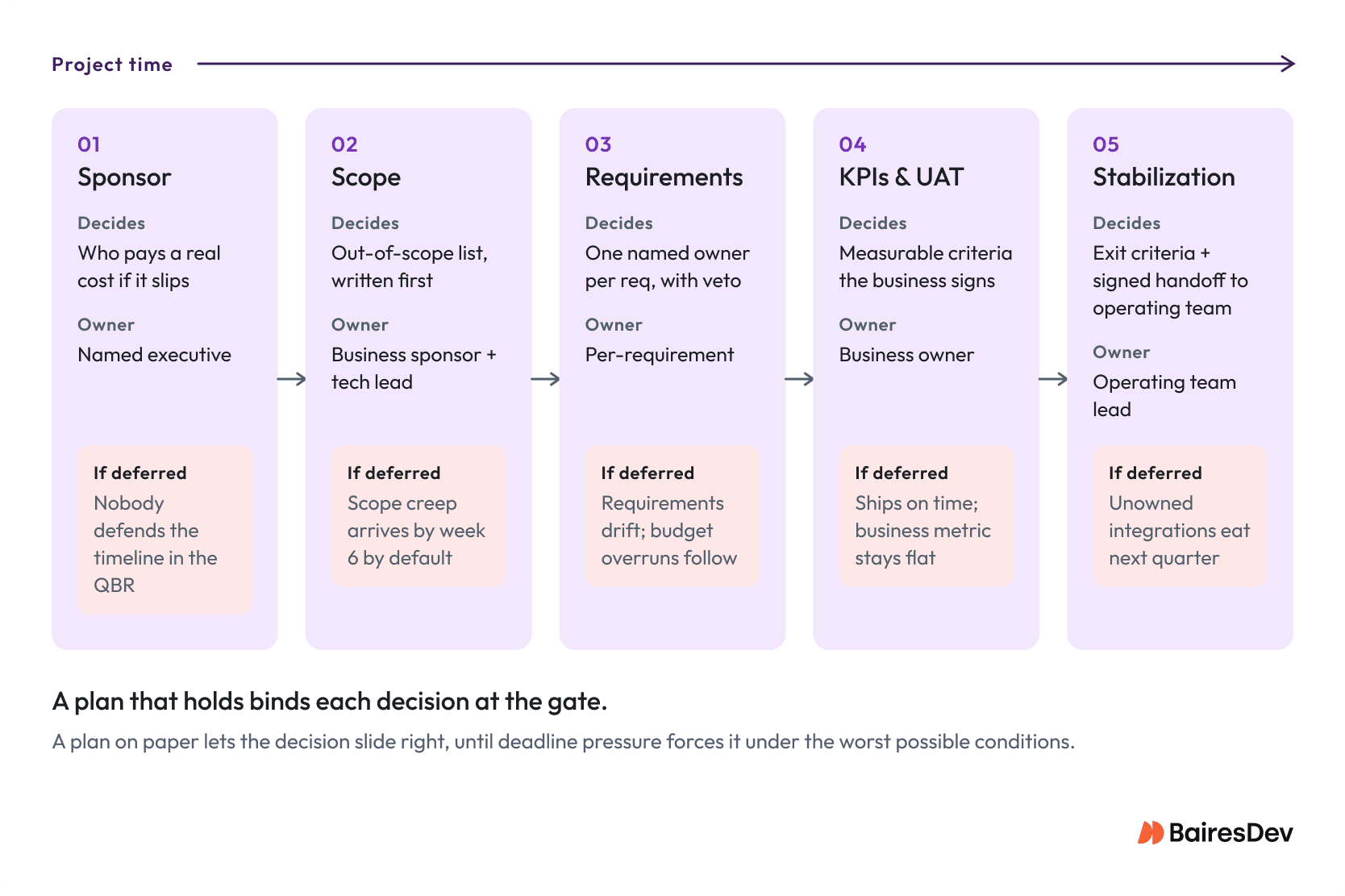
Plans collapse during project execution because the document never forced the hard decisions. Teams write plenty down; that’s never the problem. So when I describe the key steps below, treat each move as a decision the team can’t dodge. Checklist thinking misses the work that actually happens here. Each move defends against a specific failure mode I’ve watched chew up otherwise capable teams.
- Start with the sponsor.
Before requirements, before scope, before anyone opens a Jira project. The single most reliable predictor of whether a plan holds is whether one named project sponsor will pay a real cost if it slips. The sponsor test is simple: who walks into the QBR and defends the implementation schedule when the numbers go sideways? If the answer is nobody specific, the plan already has its main failure mode locked in.
- Write the scope statement, with out-of-scope first.
Worth saying out loud: scope creep is almost always scope that was never explicitly excluded. If “mobile” doesn’t appear on the out-of-scope list, somebody will ask in week 6 whether mobile is “part of this,” and the answer will be yes by default.
- Name an owner for every requirement.
Here I’d flag the McKinsey and Oxford research on large IT delivery. The 45% budget overrun usually stems from requirements that drifted between sign-off and build. The fix is uncomfortable: name an owner for every requirement, responsible for assigning tasks and resources with veto authority. If that feels heavy, that’s the point. Vague ownership is what produces the drift in the first place.
In practice, this is a risk register with every identified risk assigned to a person, a stakeholder map that distinguishes deciders from informers, and an effective communication plan with a cadence that survives someone’s PTO. Most plans never get this far. They have all the artifacts but no real owners. Ask for a project status update in week two and nobody agrees on the answer.
- Define KPIs and UAT gates once the body of work is clear.
KPIs come later than people expect. Writing them well requires knowing what the implementation is actually doing to the business, which usually means you can’t draft them in the kickoff. “Reduce ticket resolution time by 20%” works as a KPI; “improve service efficiency” sits closer to a wish. UAT gates close out the loop by aligning acceptance criteria and success metrics with the project goals that the business owner will actually sign off on.
Phased vs Big-Bang vs Parallel: Which Rollout Fits?
The rollout shape question is really a risk-tolerance question, and a VP of Engineering evaluates it across four dimensions: rollback feasibility, blast radius, resource intensity, and time to full deployment. Real-world rollouts hybridize almost always. A Salesforce or ServiceNow rollout might be phased by business unit, with a big-bang cutover within each phase. A Workday HCM migration might run in parallel for payroll specifically (the one workflow nobody can afford to lose) while everything else cuts over together.
The Panorama 2026 ERP Report shows that phased and hybrid models dominate, with only 15.9% of organizations choosing a big-bang approach. The Panorama comparison of Big Bang and Phased approaches maps the tradeoffs in more detail.
| Rollout shape | Cutover pattern | Rollback feasibility | Resource intensity | Time to full deployment | Failure blast radius | Choose when |
| Phased | Multi-event | Moderate | Sustained | 3-12 months | Phase-scoped | User cohorts or modules can go live in independent waves with per-wave rollback acceptable |
| Big-bang | Single event | Hard | Concentrated | 1-3 months | System-wide | Cross-system dependencies prevent partial cutover and a maintenance window is available |
| Parallel run | Gradual | Easy | Doubled | 3-12 months | Narrow | Output parity must be proven before retiring the legacy system |
The 1-3 month band for big-bang covers only the post-build deployment phase; the end-to-end project duration is well above that.
Why Data Migration Kills Implementations
Data migration is where most plans go from looking healthy to looking dead, and the failure usually looks the same. The source system has been running for years. Nobody fully knows what’s in it. Somebody decided in 2017 to overload a “notes” field with structured data; then somebody else built three integrations against that field; and now the new software’s data model has no place for any of it.
The mechanisms are predictable once you know how to look for them. Data-model drift between source and target, hiding inside fields people stopped reading. Integration dependencies nobody documented. Validation gaps that surface only when a finance user notices a quarterly number is wrong. Schema reconciliations that turn out to be irreversible, often without anyone noticing until the legacy system has been decommissioned.
The defense that holds is audit-and-clean before migration. Sample testing is rarely enough; the long tail is where the bad records live. A full validation pass with named acceptance criteria, signed by the data owner on the business side, catches what sample testing misses. The rollback strategy is the contingency plan that matters just as much: what’s reversible, what’s a one-way door, and who decides at each gate.
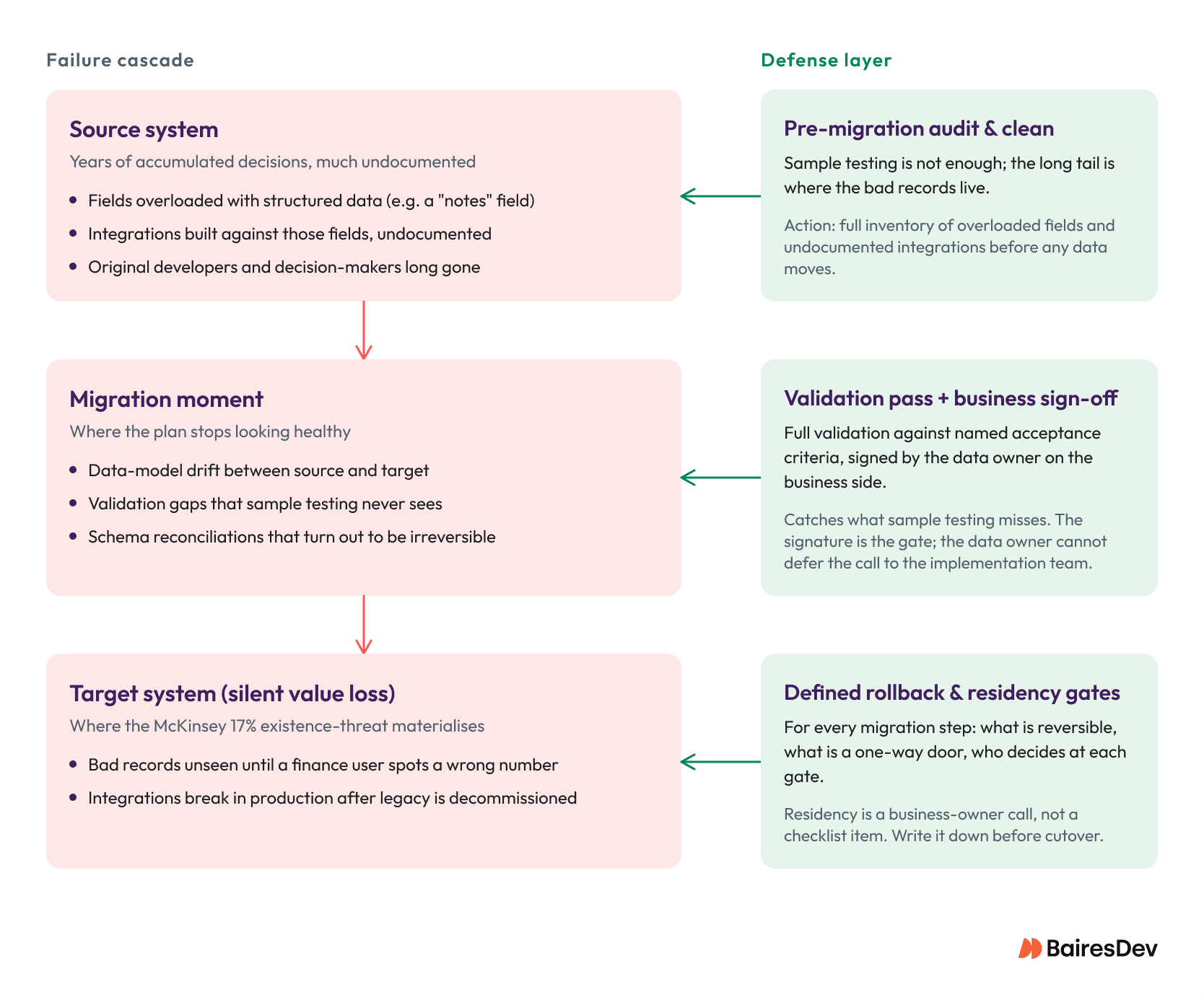
The McKinsey and Oxford research on large IT delivery projects puts a sharper edge on the failure picture: 17% of large IT projects go so badly that they threaten the very existence of the company. In the engagements I’ve watched, data migration is where most of that catastrophic value loss comes from. And yes, this happens to good teams.
The 2026 wrinkle is jurisdictional. Cross-border data residency rules tend to land late in the cutover plan, if at all, especially when source data has lived in one region for years, and the target SaaS instance defaults to another region. SAP, Snowflake, AWS, and the major cloud vendors publish residency guidance, but the residency call sits with the business owner. Treating it as a checklist item is how good project progress turns into a regulated incident.
Training and Change Management: The Adoption Layer
Here’s the thing nobody tells you about training plans: most are written by human resources or L&D teams who’ll never use the software. The plan gets approved, the LMS modules get built, and nine times out of ten the rollout still lands on a team that can’t operate the thing on Monday morning.
Adoption is where good delivery still flunks the business case. The system goes live, the dashboards turn green, and nobody actually uses it the way the value model assumed. Prosci’s 2025 Unlocking ERP Implementations study put a number on the misalignment that I keep coming back to: organizations invest 92% of their ERP budget on technical activities and 8% on change management, while practitioners say 36% of what they would do differently is on the people side. That’s the gap role-based training is supposed to close. Generic, one-size-fits-all training does not close the gap.
BairesDev’s Q1 2026 Dev Barometer surveyed 1,329 developers across 61 countries and found that 51% say accountability for AI-driven outcomes sits primarily with the individual, not the team. That’s the AI-tooling version of an older truth: in any rollout where adoption matters, the failure mode is individual, not collective. A team doesn’t fail to adopt a tool. A specific person on Monday morning either uses it the way the value model assumes or doesn’t.
What works in engagements I’ve watched land well: stakeholder engagement that begins before kickoff, keeping the right people informed throughout, training mapped to the specific roles touching the workflow, a cadence that survives someone’s PTO, and adoption metrics richer than login counts. Feature usage. Workflow completion. User satisfaction at week eight. Sustained behavior at month three.
Regarding AI-assisted training materials, Gartner predicts 40% of enterprise apps will ship task-specific AI agents by the end of 2026. Some of those will draft training material faster than your enablement team can. Probably useful. Doesn’t change the underlying argument: somebody owns adoption as a real workstream, with a name on it.
What Does “Done” Look Like After Go-Live?
Treat post-launch as its own phase. It has its own owners, its own exit criteria, and its own way of going sideways. The “stabilization is the tail end of cutover” framing is how unowned integrations get inherited by a team that never agreed to inherit them.
Exit criteria worth writing down:
- Performance stable under real load
- Defects burning down
- Adoption sustained and customer feedback channels open
- A documented hand-off that the operating team has signed
That last one is where I see most project implementation plans quietly skip the work. The implementation team disbands, integrations end up unowned, and the project schedule for next quarter loses capacity to issues nobody planned for. I’d guess most engineering orgs are running 15% to 25% of capacity on stabilization work that should have been a hand-off. Hard to say without more data, but the pattern shows up across rollouts of very different shapes.
On security, 2026 has shifted the picture. Gartner predicts that about 10% of large enterprises will reach mature, measurable Zero Trust programs by 2026, with Universal ZTNA (Zero Trust Network Access ) forecast to exceed 40% adoption by 2027. Stabilization is when the post-cutover security review actually gets attention. ZTNA decisions belong inside the runbook alongside escalation paths.
When a Heavy Implementation Plan Is the Wrong Tool
A full plan is an over-investment in some situations and under-investment in others. The honest read:
Skip the Heavy Version When:
- The project is single-team and sub-month
- A vendor owns the playbook end to end (most managed SaaS rollouts)
- The work is a time-boxed pilot you’ll throw away
- It’s an internal tool with no compliance or external surface
Run the Heavy Version When:
- Multiple business teams or business units are in scope
- Cross-system integration touches systems of record
- Regulated workloads are involved (HIPAA, SOC 2, PCI, government)
- Public-facing systems or customer-data residency rules apply, particularly on cross-border deployments
- Parallel-run or custom-build engagements are on the table
Even the light version still wants the components that change outcomes: named owners, an out-of-scope list, an integration map, a data-migration plan, and a training plan. Just smaller. The components carry the work. Process efficiency follows from getting these right. Plan thickness is a side effect.