Oscar is a product designer with 15+ years of experience making technology simple and accessible. He has worked with Burger King, Tim Hortons, and Popeyes, winning industry awards for user research. At PDHI, he created design systems used by hundreds of wellness companies.
Expertise



Key Points
- Your first step should be defining what you need to know so the right method becomes obvious.
- For B2B products, recruiting participants who lack domain knowledge can produce misleading evidence about real user behavior.
- Your team can catch design problems earlier by testing prototypes before any code is written.
What is Usability Testing?
Usability testing is a specific research method where you watch representative users attempt realistic tasks on an interface. It’s one method within the broader field of UX research, which includes interviews, surveys, card sorting and other approaches. Usability testing is conducted throughout the design process and continues into the development process.
The goal is to understand how to best design an interactive system that allows users to use an interface effectively and efficiently, creating a user experience that supports their needs. Testing validates the design and development of the interactive interface and the overall user experience.
Understanding usability is not as simple as asking a user what is best, although that might be part of the research process. Asking a user what they want is a good way to understand their attitude towards a product, but does not give much insight into their behavior. Usability testing focuses on directly observing a user interact with a design. This gives researchers evidence about use that can then inform the design process.
Focus on Understanding, not Tests
As mentioned above, usability testing encompasses many research methods. Thus, it can be difficult to understand which test to use when.
Instead, it is best to start with: what do we need to know about the system? Then build backwards. What evidence is needed to answer our question? Once it is clear what needs to be known and what data is useful, it is easier to understand which research method best fits.
Focused research questions matter. Clear questions make it easier to select appropriate testing methods and define metrics.
Recruit the Right Users
The quality of your results will depend on the quality of your participants. The participant pool should match the anticipated target audience as closely as possible. This will increase the likelihood that their behavior will be predictive of the end user.
This is particularly important for B2B and enterprise software. People are diverse and all come with different levels of domain knowledge, technical experience, and familiarity with workflows. And all of these differences impact how a user is able to complete tasks. Therefore, usability testing with participants that lack institutional knowledge can provide misleading evidence.
The more specialized the product and the more narrow the target audience, the more selective participant recruitment needs to be. Before recruiting participants, the characteristics of the target audience need to be defined. Focus on characteristics that could impact results and matter to the research question.
The number of participants you need depends on your research goals and the method those goals require. Understanding your goals first makes the right participant count clear. Quantitative studies (e.g. questionnaires) need a sufficiently large participant pool to produce reliable findings because they extrapolate results to a broader population. More participants increase confidence, but the number must balance reliability with recruitment cost.
A high number of participants are required because this type of research extrapolates findings to the larger population. The lower the number of participants, the lower the confidence level.
Behavior-based assessments that directly evaluate an interface to find where users struggle with tasks require fewer participants, though surfacing bugs is a common side effect. Around five participants per user group is a common recommendation, because most major problems tend to appear in the first few sessions. This applies to each distinct group: if admins, managers, and end users work with the product in different ways, each group needs its own small sample. It also works best as part of repeated rounds of testing rather than a single study.
Choosing the Right Testing Method
Some research methods require more investment than others. Moderated usability testing requires a researcher to be present during the testing. This requires more investment, but also allows the researcher to ask additional questions and clarify unexpected behavior. Most moderated sessions ask participants to think aloud, describing what they are looking for and what they expect as they work, which is what lets the team understand why a problem happens and not only where. Moderated testing is best when “why” is central to the research question.
Unmoderated usability testing scales more easily, but is limited. It works well when tasks are clearly defined and the data can be captured adequately automatically. The trade-off for easier testing is less qualitative data.
| Approach | Research
Depth |
Facilitator involvement | Ability to probe behavior | Participant requirements | Cost and effort | Ideal use cases |
| Moderated usability testing | High | Researcher guides the session | Strong | Representative of the target audience; available for a scheduled session. Works well for less technical or hard-to-reach users. | Higher | Complex workflows, prototypes, unexpected behavior, specialized products |
| Unmoderated usability testing | Lower | Minimal or none | Limited | Representative of the target audience and able to work independently with written instructions. Needs careful screening and quality checks. | Lower | Larger samples, straightforward tasks, benchmarking, distributed users |
Either moderated or unmoderated usability testing can be completed remotely. The benefit of remote testing is that it allows recruiting across locations and can be less onerous on the participant. Moderated testing can also benefit by being able to observe the participant in their normal environment.
Qualitative and Quantitative Usability Testing
Qualitative usability testing focuses on understanding why and how the interface is creating problems for the users, including the effect on user satisfaction. These types of insights require rich data about how the user is interacting with the design. Are users making errors, hesitating, misunderstanding something, or abandoning a task before completion? The focus is on the user’s reasoning.
Quantitative usability, on the other hand, focuses on metrics. Metrics are useful for understanding how behavior changes over time or in different circumstances. Common usability metrics include task completion rate, time on task, and error rate. This type of research is useful when a researcher wants to establish a baseline and then monitor how behavior changes based on an intervention (e.g. a design change, or A/B testing).
Neither approach is better. The approaches complement each other. Quantitative usability testing can identify an area of friction by surfacing patterns in user behavior, and then qualitative testing can help develop a hypothesis for the friction. Later in the design process, quantitative testing can be used again to validate the new design.
Qualitative usability studies use small samples on purpose. The goal is to find problems and understand why they happen, not to measure how often they occur across the full user base. A few sessions per user group are usually enough to surface the most common issues, though rare or role-specific problems can still be missed. When a team needs to measure or compare performance across users, a quantitative study with a larger sample is the right tool.
If usability is a critical aspect of the application, the system should be designed to continue to gather feedback on user behavior post launch. This will require a solid understanding of what metrics are useful and what actions in the systems capture data relevant for the metrics. This post-launch data, including user feedback, can then be combined with usability testing and other user research to validate designs and guide further improvement.
Design Realistic Tasks and Create a Usability Testing Script
Users do not complete tasks in isolation, so testing should reflect this. The tasks should represent realistic user interactions. For example, “Find the invoice for [customer] and resolve the discrepancy” aligns better with how a user approaches software than “Click on the invoices menu and find [customer].”
Tasks should also not hint at how they are to be completed. The goal is to determine if a naive user can navigate the interface without assistance. That blind approach must be mirrored in testing. If the test is to determine if a user can find a customer on the invoice page, the task “Click on the invoices menu and find [customer]” cues the user to use the menu and invalidates the results.
Wording of tasks is important, so usability testing scripts should be used. The script describes the purpose of the research, participant instructions, the list of tasks, and follow up questions. The script is not meant to make the testing process rigid; it is to improve consistency across tests.
Piloting the test is essential. A dry run can reveal if any instructions or tasks are unclear. It can also uncover assumptions or technical issues that might affect the results. Iterative design is as central to usability testing as it is to user-centered design.
During the test, the researcher should observe behavior without helping the test participants. This is harder than it sounds, and it’s one of the clearest differences between trained UX researchers and everyone else. People assume user research is easy to run, but avoiding bias during a session takes real experience. A trained researcher knows when to stay quiet, when to probe, and how to ask a neutral follow-up question. In these situations, it is more helpful for the researcher to ask the participant what they expected would happen than to explain what they should have done. That skill comes with practice, and it’s a core reason to involve a professional UX researcher rather than assuming anyone can facilitate a session.
Analyze Findings Before Prioritizing Them
Not every problem identified by a usability study needs to be fixed. Look for patterns across testing and consider how severe each issue is. A single participant having issues with a task might be an outlier. But if the task is critical, then it still might be worth considering.
Consider four factors when prioritizing findings:
- Frequency: How often did users encounter the problem?
- Impact: Does it prevent users from completing an important task?
- Reach: How many users or workflows could it affect?
- Cost: What would be required to address the issue?
Other data can also be considered when trying to determine if an observed problem is isolated or part of a larger pattern. Product analytics, support tickets, conversion data, user feedback and other research can all provide insight and guide decisions.
The focus is to create actionable insights. Connect the observations to affected workflows and then to potential design changes.
Test at the Right Point in the Development Process
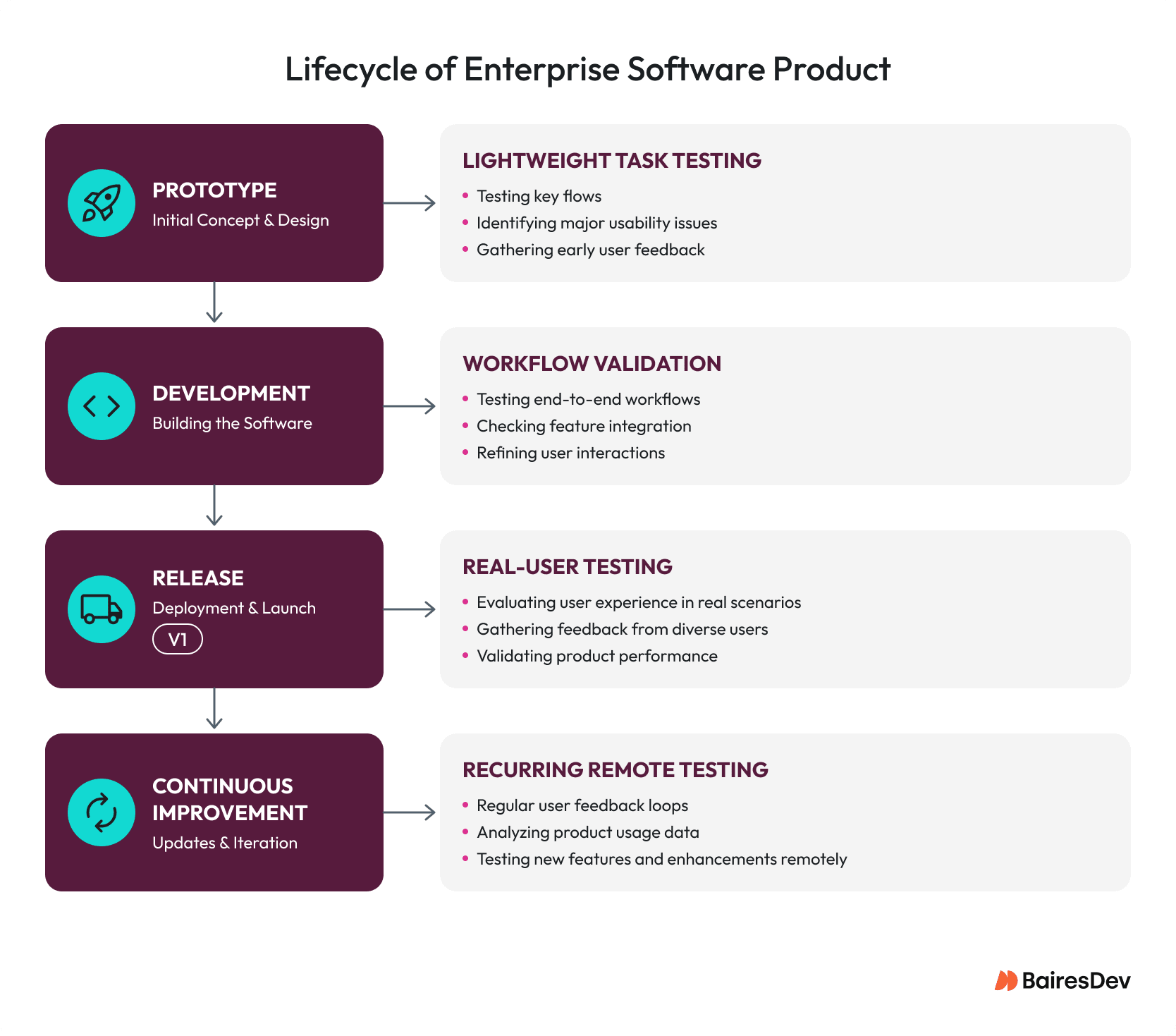
Testing early can save money and time. Interactive prototypes are useful when designing the information architecture, navigation, and interactive behavior. At this stage, changes can be made quickly and no code has been committed.
Once the feature is developed, usability testing can reveal usability issues that a prototype cannot. Performance, validation messages, system state, permissions, data quality and integration behavior can all affect user expectations and how users interact with a real system.
Testing should continue even after the product is live and in production. But the focus of the testing can be shifted towards investigating features that generate frequent user questions, problems with feature adoption, or monitoring if changes improve usability.
Usability Testing is Part of Product Development
Usability testing or lightweight user testing does not need to become a large research project. Repeatable lightweight testing is sufficient to discover most usability issues for most people. But it is important to identify appropriate participants and validate testing methodology.
User testing maps well to the Agile development process. A prototype can be tested before a major feature moves to development, making user testing a natural fit for sprint cycles. A complex interaction can be tested during implementation. If analytics or support data suggests a problem, consider validating a released feature through additional usability testing, whether remote or in-person depending on what your team has access to.
This iterative process reduces the risk of treating usability as a final quality check and helps teams identify problems while there is still time to change the design. The user should not have to adapt their behavior and create workarounds to compensate for poor design.
Not every team has the UX capacity to complete this work internally. UX design services can supplement an existing product and engineering team with research, testing and design expertise.
The key is to make usability part of how product decisions are made. Not every feature or release needs to be tested with users, but usability testing is essential when the user experience is at risk. User testing is a reliable way to gather evidence when a user’s experience is uncertain.
Frequently Asked Questions
What is usability testing?
Usability testing is how you observe real users attempting specific tasks on your product or prototype. It gives your team direct evidence about where the interface breaks down, where users hesitate and where they fail to complete a task. That evidence is different from asking users what they want because it captures behavior rather than attitude.
How many users do you need for usability testing?
It depends on what you’re trying to learn. For qualitative behavioral testing, five participants is the standard recommendation. Beyond five sessions, you hit diminishing returns on new issues discovered. For quantitative studies where you need findings that generalize to your broader user population, you’ll need at least 40 participants to get a reliable confidence level.
Is remote usability testing effective?
Remote usability testing can be effective when participants can complete realistic tasks in the environment relevant to the product. It is particularly useful for distributed target users and recurring studies, although some research questions benefit from in-person testing.
When should teams conduct usability testing?
Test whenever your team is uncertain about how users will experience a decision and the cost of getting it wrong is meaningful. Prototype testing makes sense before development starts because changes are cheap at that stage. Once a feature is built, testing the working product surfaces problems that prototypes can’t replicate, things like performance, validation messages and real data. After launch, your team should revisit features that generate support tickets or show poor adoption data.
Oscar is a product designer with 15+ years of experience making technology simple and accessible. He has worked with Burger King, Tim Hortons, and Popeyes, winning industry awards for user research. At PDHI, he created design systems used by hundreds of wellness companies.
Expertise