

Here’s the short version, plus four ideas worth carrying into your next steering committee conversation, before we get into the details.
Key Points
- A DevOps pipeline is the end-to-end automated path code takes from ideation through to production, with a feedback loop that weaves development and operations teams into one system.
- CI/CD is a subset of a true DevOps pipeline. CI/CD covers integration, testing, and delivery or deployment; a DevOps pipeline extends through deployment, operation, continuous monitoring, and the feedback loop back into planning.
- Continuous delivery isn’t continuous deployment. Delivery keeps a human approval step; deployment doesn’t. Most teams don’t know the difference and default to continuous delivery.
- The hard part isn’t building the pipeline. It’s staying honest about what the pipeline actually enforces, what it catches, and what it hides.
The good engineering teams I’ve seen have a DevOps pipeline. The great ones have a pipeline that actually supports them. And the rest sit on a tangle of jobs, gates, and dashboards that automate the easy parts while the hard parts stay untouched.
A DevOps pipeline automates the end-to-end path code takes from commit to production, then back into the team’s feedback loop.
That path spans planning, coding, building, testing, release, deployment, operation, and monitoring, one continuous software development process. CI/CD, continuous integration paired with continuous delivery or continuous deployment, is only a subset of the full DevOps pipeline: it covers integration, build, test, and delivery or deployment. The DevOps pipeline goes further, into operation and monitoring, plus the collaboration that closes the loop back to planning.
Why the Definition Matters
Yes, I’m being pedantic about the difference between a DevOps pipeline and a CI/CD pipeline, because confusion between the two has a real cost. When teams treat them as interchangeable, they tend to declare victory on automation far too early. Build automation, a green dashboard, and a sense of completion become the trap. Those automations aren’t wrong, but they’re not enough to qualify as a DevOps pipeline. Risk and time still sit in the stages governed by tribal knowledge and a Slack channel, and those non‑automated stages never appear on the DevOps dashboard.
The way I keep the distinction straight is simple: CI/CD is the rails, and it stops at release or deployment. DevOps is what runs on those rails, and what happens to the train after it arrives. That includes the operate and monitor stages, plus the collaboration a functional DevOps pipeline actually requires.
Martin Fowler is precise about this, and his definitions of continuous integration and continuous delivery remain the clearest I’ve read. They predate most of the flatly wrong content circulating today. When someone asks me what CI and CD are, I point them to Fowler.
This distinction becomes expensive when I sit in on steering committees. When a CTO says they “need a DevOps pipeline,” I start with a tight definition and an hour and a half of analysis before anything else. Skip that groundwork and move straight to needs and expectations, and the entire effort is set up for missed expectations and difficult questions about spend.
Those early decisions determine the how. Better specifications lead to delivering on those specifications, because each path solves a different problem, requires a different budget, and demands buy‑in from different teams.
The Canonical Stages
When you map the DevOps process end to end, eight stages provide useful scaffolding for understanding the pipeline. Here’s what each one looks like in practice.
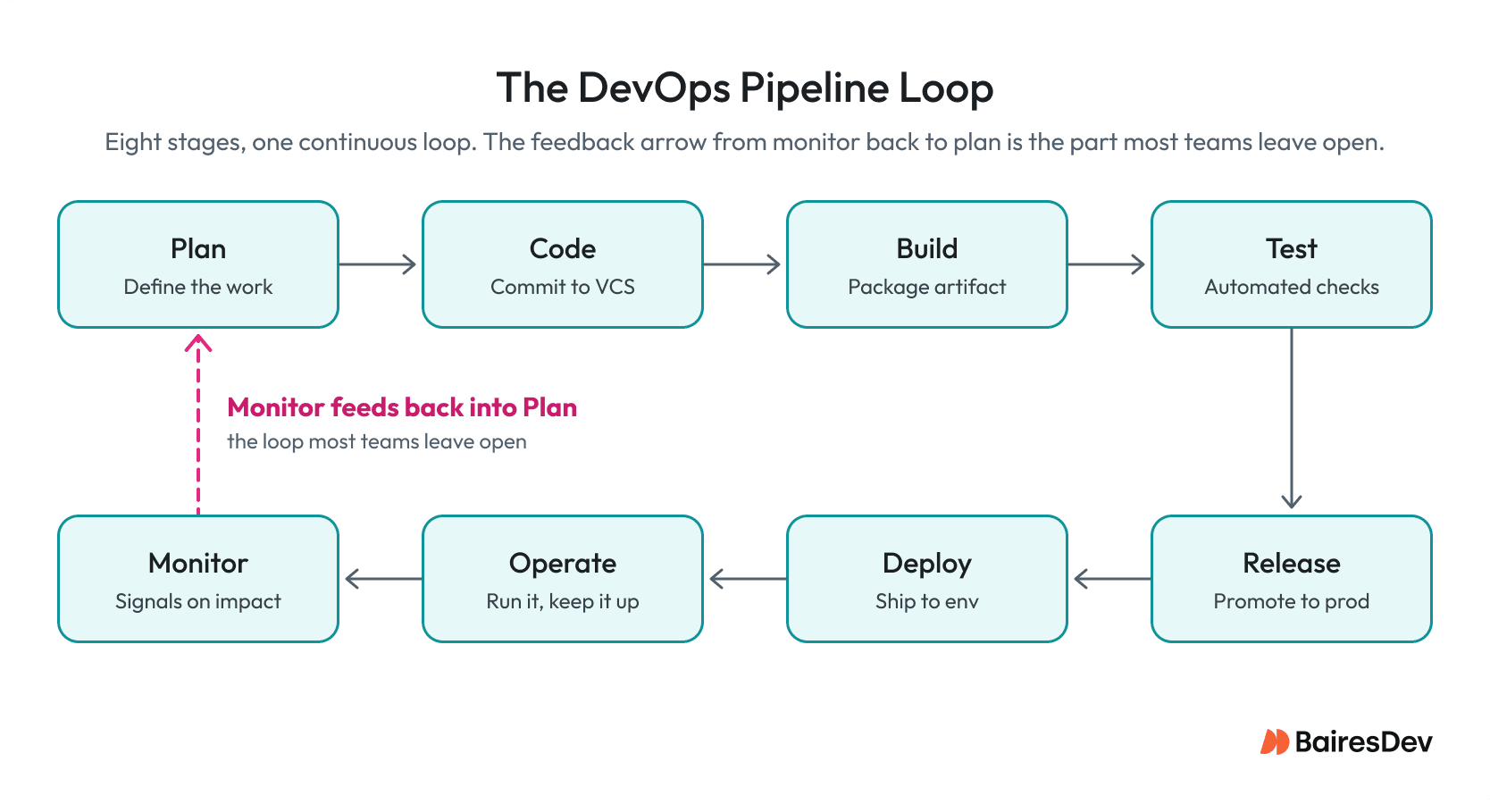
- Plan: Define the work, including tickets, designs, and a real conversation with operations and stakeholders.
- Code: Developers write and commit. Source control is the single source of truth.
- Build: Code changes get compiled or packaged into an artifact, using Maven, Gradle, npm, or whatever your toolchain requires.
- Test: Automated tests run against the artifact, including unit, integration, smoke, contract, and, where appropriate, user acceptance testing before release.
- Release: The artifact gets promoted toward production. It’s versioned, signed, and parked in an artifact repository, often on a schedule so teams can schedule automated releases instead of shipping ad hoc.
- Deploy: The release goes to a production-like environment or production itself, using patterns like blue-green deployment or a canary slot.
- Operate: The system runs. Infrastructure as code keeps environments reproducible; and on-call keeps them upright.
- Monitor: Real-time signals on application and infrastructure performance, user behavior, and security feed back into planning.
I treat this list as scaffolding. Skip any one of these stages and you’re not covering the full scope of a DevOps pipeline. And don’t forget the looping edge: without it, your DevOps is just a straight pipeline. No loop means you have a long release script.
The Loop That Closes the Pipeline
Most dev shops feel their DevOps system is effective, but look at DevOps in the wild and the looping edge is often missing. Skip that arrow and the pipeline still runs, it just stops learning. You ship faster and faster in whatever direction you were already pointed. Dashboards exist, alerts fire, on‑call hates Tuesdays, but none of it changes what gets prioritized in the next sprint.
When teammates confuse monitoring with observability, I point them to Google’s SRE Book. It hammers home the point: stop treating green infrastructure metrics as the answer, and dig deeper into what user-impact signal you’re actually trying to catch.
The 2025 DORA research backs this up from a different angle. DORA retired its familiar four-tier elite, high, medium, and low model this year and replaced it with seven team archetypes that pair delivery speed with human factors like burnout and friction. This is a sign that a fast pipeline without a feedback loop isn’t actually a healthy one. Under the new model, roughly 20% of teams land in the top archetype, and about 10% sit in the lowest, while 45% score at the fifth level or better.
Then comes the part too many organizations skip: continuous feedback. Monitoring is built to identify problems when they occur. Without a feedback loop, those findings never make it back into the roadmap conversation at the speed they’re needed. Close the loop and you stay proactive instead of reacting to issues you could have caught earlier.
The Four Core Practices
These four practices carry most of a real DevOps pipeline, and they get conflated way too often. That conflation is exactly where teams hurt themselves.
| Practice | What It Does | What It Does NOT Do |
| Continuous Integration | Developers merge to a shared repository frequently. Each merge triggers an automated build and an automated test run. | Guarantee code works in production. CI proves integration, not correctness under every production condition. |
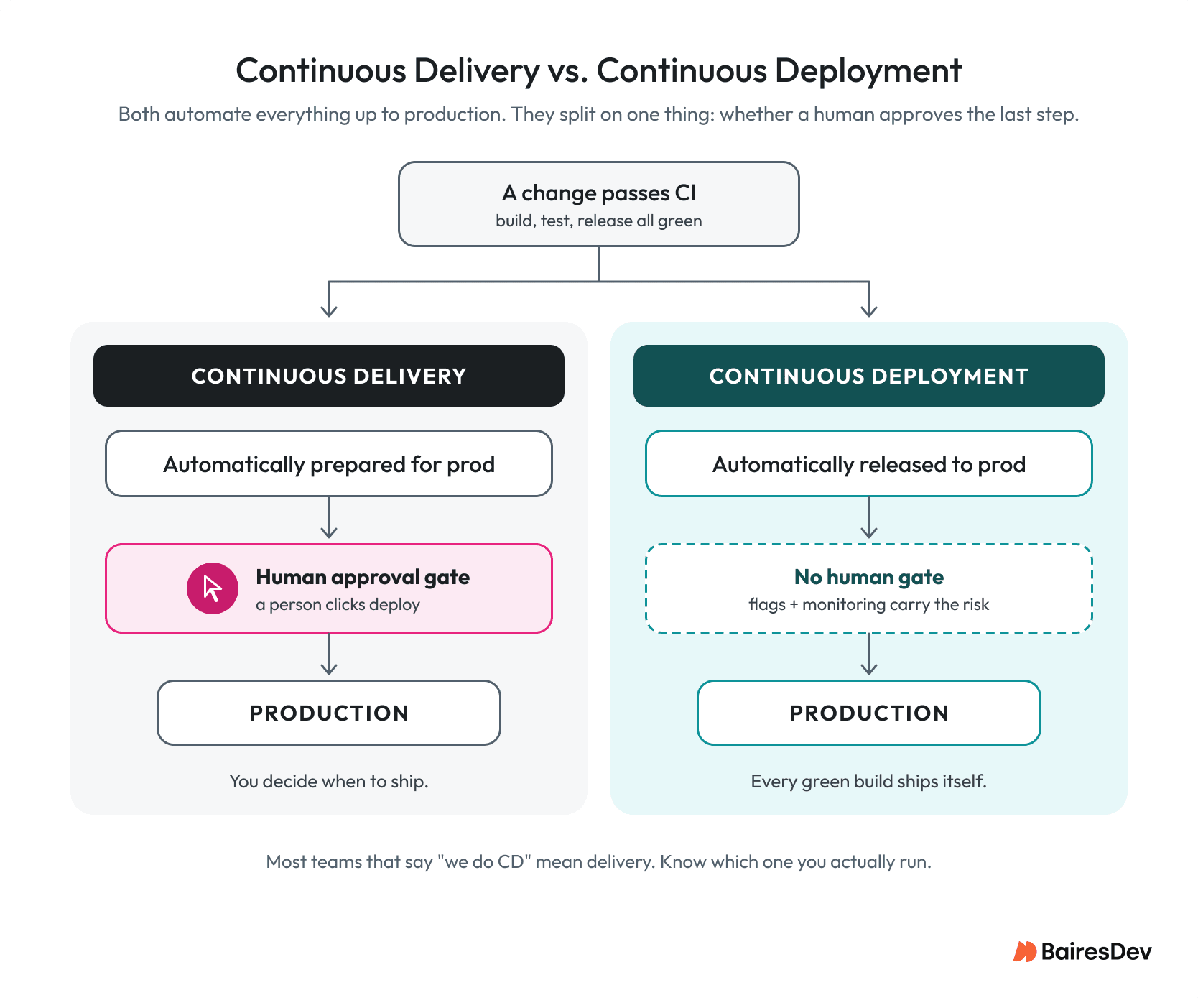
| Continuous Delivery | Every change that passes CI is automatically prepared for a production deploy. A human still pushes the button. | Auto-release to production. Delivery preserves a human gate by design. |
| Continuous Deployment | Every change that passes the required pipeline checks is automatically released to the production environment. | Work safely without effective monitoring, rollback capability, testing, and appropriate release controls. |
| Continuous Testing | Tests run continuously across the pipeline: unit tests at commit, integration tests at build, contract tests before release, and synthetic checks in production. | Replace exploratory or manual testing in a testing environment that mirrors production. |
The delivery‑versus‑deployment line is the one I see confused most often, both on teams and in technical writing. I point teams to Atlassian’s write‑up as a starting point, especially since the CD acronym carries real ambiguity. Muddy definitions between delivery and deployment lead to bad specs and missed expectations.
Supporting Capabilities
Now, let’s look at your DevOps pipeline foundation, the plumbing you shouldn’t underfund because everything else in your pipeline is built on it.
- Version control as the single source of truth: Git with trunk-based development or short-lived feature branches.
- Shared repositories: so multiple developers can collaborate on code without stepping on each other.
- Infrastructure as code: so environments are reproducible from a commit.
- Automated processes: boring, mandatory, and the thing teams skip when they’re moving fast. Build the artifact once per commit, automatically, with a tested toolchain.
- Automated security testing: SAST, or static application security testing, examines source code; DAST, or dynamic application security testing, examines a running build; and IAST, or interactive application security testing, analyzes the application from inside while it’s running. Shift these checks left so vulnerabilities surface during the pipeline run instead of during a customer pen test.
- Deployment patterns that let you fail safely: blue green deployment, canary, rolling. Pick one and actually use it.
Running automated security tests throughout the pipeline matters because the software supply chain now extends well beyond application source code. The OWASP Top 10:2025 moved Software Supply Chain Failures into the third position and expanded the category beyond vulnerable components to include failures across dependencies, build systems, and distribution infrastructure. OWASP specifically notes that a CI/CD pipeline with weaker security than the systems it builds and deploys can itself be a vulnerability.
This is the substrate. It isn’t glamorous.
Tooling, by Category
When I sketch a pipeline budget for a steering committee, I draw six tooling boxes and leave vendor names for the implementation review:
- Source control: Where the code lives.
- CI servers: Where builds and automated tests run.
- Artifact registries: Where built packages get parked and versioned.
- Secrets management: Where credentials live so they’re not sitting in environment files.
- Observability platforms: Logs, metrics, traces, and user behavior.
- Deployment orchestration: What actually pushes the release across the underlying infrastructure and any virtual machines or containers it runs on.
Every team I’ve worked with has a different mix of these, whether assembled organically or under one main vendor. Major vendors, GitHub among them, promote how source control, CI, and artifact registry fit together more effectively under one roof. But your shop still needs to balance best-of-breed tools against vendor lock-in.
Where Pipelines Quietly Fail
Now let’s look at the failure modes, the patterns that appear healthy but aren’t.
The one that concerns me most is monitoring that doesn’t focus on user impact. You need visibility into the infrastructure, sure, but which is more important: knowing CPU load is acceptable, or knowing that checkout conversion dropped 12% over a week? That’s the difference between “the system is up” and “the system’s doing what customers came here for.” Skip measuring it, ideally tied to revenue, and you’re carrying a serious risk.
The rest are more manageable:
- Rollback discipline: High deploy frequency requires effective rollback. Your DevOps engineer should be able to describe the last clean rollback from memory. Lean on the DORA metrics together, not in isolation.
- Hidden manual approvals: “Automated” pipelines whose green builds hide undocumented manual approvals. Don’t rely on tribal choreography.
- Slow test stages: Test stages so slow the team routes around them. I don’t like skip ci options, because people will use them.
- Gate proliferation: Compliance gate, and pre-prod gates that never catch a failure the others miss. Ceremony without detection.
- Decorative security gates: SAST wired in, every alert dismissed because the build can’t fail on false positives, and the gate is rendered ornamental.
- Environment drift: Staging resembles production from six months ago, last reconciled by someone who’s since left, and “it worked in staging” becomes the most expensive sentence in your incident reports.
DORA’s current framework is useful here because it measures software delivery performance across five metrics rather than treating speed as the whole story: change lead time, deployment frequency, failed deployment recovery time, change fail rate, and deployment rework rate. DORA groups these into delivery throughput and delivery instability, which makes the distinction particularly useful when evaluating whether a pipeline is merely fast or actually healthy.
On one team I worked with, I walked into a pipeline running 40‑plus deploys a day, a “CD” stage, and a rollback that lived entirely in one staff engineer’s head. Two incidents in a year turned into multi‑hour outages because the rollback either didn’t work or took longer than a hotfix forward would have. The review surfaced what the dashboard had hidden: they didn’t have continuous deployment, just continuous risk. After that, I don’t trust a deploy until I’ve watched the rollback run in the same environment, on a recent build, with a stopwatch.
How to Tell If Your Pipeline Is Earning Its Cost
Want a framework? Here’s mine, and it isn’t a five-level maturity model. Every one of those I’ve seen gets used to justify spending on level four while level two still doesn’t work. These are simply the questions a senior engineering leader should be able to answer about their own pipeline:
| Question | What You’re Looking For |
| What does a failed deployment cost us today? | Customer impact, engineering hours, operational impact, and revenue where it can be measured. |
| How long is the slowest commit-to-production path right now, not the best case? | The actual slowest meaningful path, especially portions that have been running untouched for years. |
| What does the pipeline enforce automatically that humans used to enforce by hand? | At least three concrete examples. Fewer than three and you may have an automation script, not a pipeline. |
| When the pipeline catches a problem, who hears about it, and how long until remediation starts? | A named owner, an escalation path, and a measurable response time. |
| If you paused all pipeline investment for a quarter, what degrades first? | A specific capability or bottleneck. If you can’t answer, you’re spending without a clear thesis. |
Most teams will tell me they already know this. Try the questions in a real meeting and watch how long it takes anyone to answer the third one. If the answers aren’t concrete, the pipeline enforces less than you think, and you’ll learn that the hard way during the next incident.
The Takeaway
A DevOps pipeline is the path a change takes from a thought to a customer, and how clean that path runs tells you most of what you need to know about the team behind it. When it works, the payoff is concrete: small, frequent releases, faster recovery, less manual toil, and clearer ownership across development and operations.
Defining a pipeline is the easy part. Running one that earns its cost is mostly governance and honesty. Skip that discipline and risk and cost creep into your deployment pipeline.