



Key Points
- SQL Server is Microsoft’s proprietary relational database system, available in free and commercial editions across Windows, Linux, and containers.
- SQL Server 2025 is the current release, with native AI capabilities built directly into the database engine.
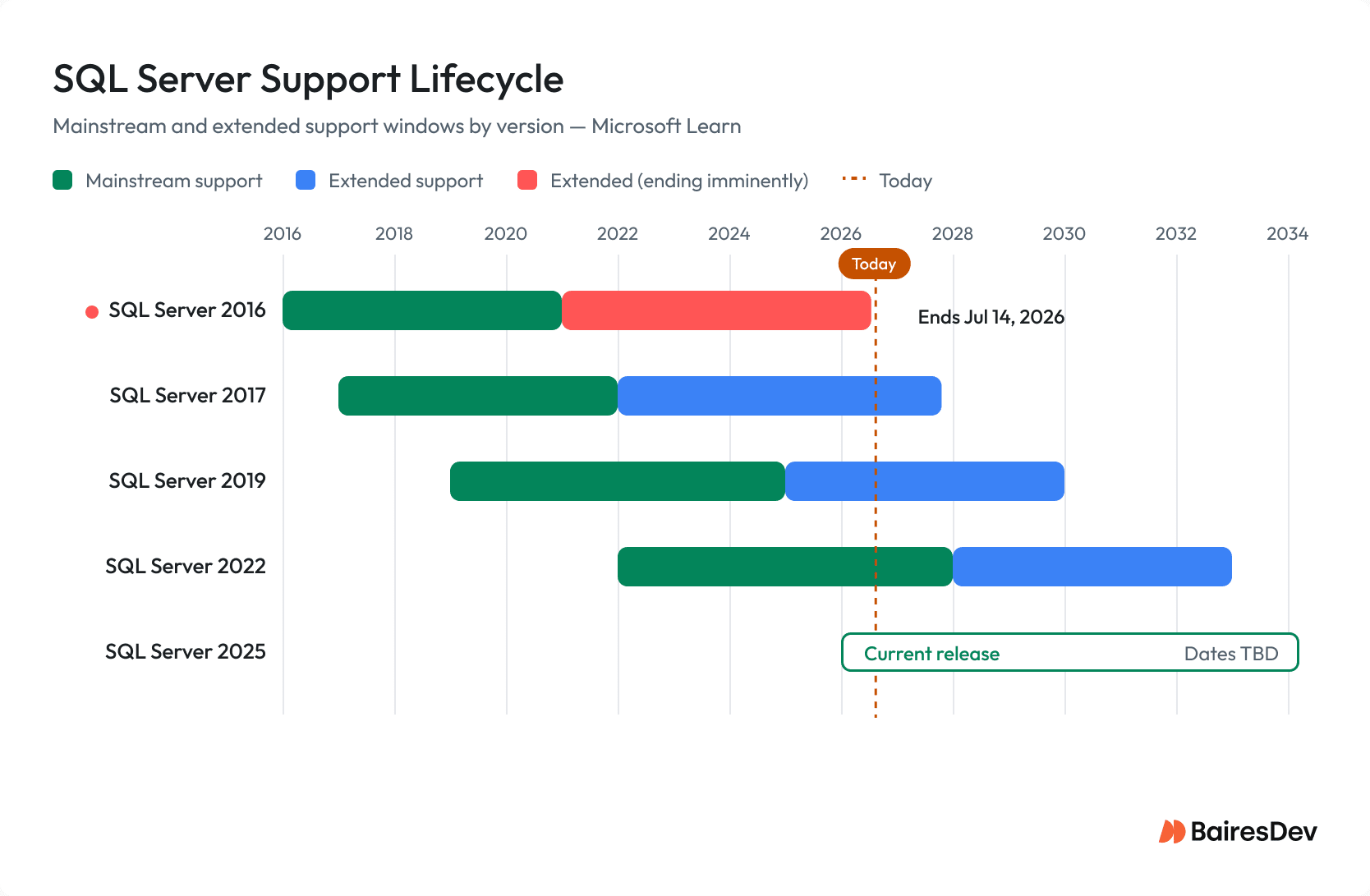
- SQL Server 2016 extended support ended July 14, 2026. Big Data Clusters were retired in February 2025.
Databases power most of the applications we use every day. From web and mobile apps to enterprise platforms, it is next to impossible to build a full-featured application or service without one. Of all the databases in use, the relational database still dominates the landscape. Most server-side applications, including WordPress, Nextcloud, Joomla, and Drupal, depend on relational databases to store and retrieve their data.
When you think about relational databases at scale, the main competitors are MySQL, MariaDB, PostgreSQL, and SQL Server. For many businesses, SQL Server is a natural first choice, particularly those already running on the Microsoft stack. It integrates directly with Windows Server, Active Directory, and other Microsoft services, which lowers the setup cost for teams already familiar with that environment.
That means the chances are strong your business will, at some point, employ SQL Server.
What Is SQL Server and How Does It Work?
SQL Server is Microsoft’s relational database management system, designed to store, retrieve, and manage structured data for applications ranging from small business tools to large enterprise platforms. It uses Transact-SQL (T-SQL), Microsoft’s proprietary extension of SQL, to handle queries and database management operations.
SQL Server follows a client-server model: a client application sends SQL statements to a SQL Server instance, which executes the query, then retrieves data from disk or memory and returns the results.
The system manages multiple users concurrently, enforces ACID transactions, and coordinates security, backup, and recovery through an integrated set of engine components. SQL Server runs on Windows, Linux, and containers, including Kubernetes deployments.
SQL Server is not open-source software. While Microsoft contributes to open-source projects and has released some tooling publicly, SQL Server itself remains proprietary software with commercial licensing requirements for production use.
SQL Server’s Core Components
SQL Server can be broken down into the following pieces:
- External Protocols govern how client applications connect to the server; options include Shared Memory, Named Pipes, and TCP/IP.
- Database Engine is the core query processing layer, handling T-SQL parsing, stored procedures, and managed code via SQLCLR.
- Storage Engine manages physical reads and writes, ACID compliance via the transaction log, and concurrent access through Lock Manager.
- Query Processor takes a parsed query, generates execution plans, and coordinates retrieval through the Query Executor.
- SQLOS API is the OS abstraction layer that provides thread scheduling, memory management, and synchronization across Windows and Linux.
SQL Server also maintains a set of system databases. The master database records all instance-level configuration, logins, and the location of every SQL Server database on the instance.
SQL Server Editions and Pricing
SQL Server comes in five editions, ranging from a free option for small applications to a full enterprise tier for large-scale deployments.
Express and Developer editions are free, which makes them good starting points for teams learning the platform or prototyping new applications before committing to a commercial license.
| Edition | Target Use | Cost | Storage Limit | Notable Constraints |
| Express | Small apps, learning, testing | Free | 10 GB per database | No SQL Server Agent; limited memory and CPU use |
| Developer | Development and testing only | Free | No limit | Full Enterprise features; not licensed for production use |
| Web | Web-facing workloads for hosting providers | Lower cost | No limit | Sold through hosting partners only |
| Standard | Departmental databases, small and mid-size organizations | Commercial | No limit | Subset of Enterprise features |
| Enterprise | Large-scale, high-availability workloads | Commercial | No limit | Unlimited virtualization, full BI suite |
SQL Server Support Lifecycles and End-of-Life Dates
Microsoft provides each SQL Server version with a mainstream support phase followed by an extended support phase. After extended support ends, the version no longer receives security patches, which may create some operational risk for any organization still running it.
What Changed in SQL Server 2025?
SQL Server 2025, generally available since November 18, 2025, is the most significant release in years. Its defining additions are AI-ready capabilities built directly into the database engine, reducing the need to bolt on external vector databases or middleware layers.
The new features include:
- Native VECTOR data type: Stores vector embeddings directly inside SQL Server tables without requiring a separate vector database.
- DiskANN vector indexing: Enables approximate nearest-neighbor (ANN) search using the CREATE VECTOR INDEX command, bringing high-performance vector search into T-SQL.
- AI embedding functions in T-SQL: Allows database-level calls to AI embedding models, so applications can generate and store embeddings from within SQL Server rather than in application code.
- Native JSON data type: Provides a dedicated JSON storage type for documents alongside relational data.
- External REST API support: Lets T-SQL queries call external REST endpoints directly, reducing the need for middleware in AI and integration workflows.
SQL Server’s Key Capabilities
The SQL Server capabilities that matter most to engineering teams include:
- High performance and scalability, with particular strength on Windows Server
- High availability through Always On Availability Groups
- Intelligent query processing with automatic plan correction
- Accelerated Database Recovery for faster transaction rollback
- AlwaysEncrypted with secure enclaves for protecting sensitive column data
- Memory-optimized tables for in-memory OLTP workloads
- Resumable online index builds and index creates
- Seamless Active Directory and Windows service integration
- Native AI capabilities in SQL Server 2025, including vector storage, DiskANN search, and in-database embedding calls
Why Use Microsoft SQL Server?
Many organizations running Windows Server already have DBAs who know T-SQL and the Microsoft toolchain. SQL Server adoption, in that context, does not come with a retraining cost.
SQL Server also ships with a set of additional services:
- SQL Server Integration Services (SSIS) handles ETL pipelines for moving and transforming data.
- SQL Server Reporting Services (SSRS) covers report generation and distribution.
- SQL Server Analysis Services (SSAS) supports multidimensional and tabular models for business intelligence and data mining.
- SQL Server Data Tools (SSDT) is the development environment for building and deploying database projects.
- Master Data Services (MDS) and Data Quality Services (DQS) address reference data governance and data integrity.
- Machine Learning Services brings R and Python execution into the engine for in-database analytics.
- Microsoft Power BI sits on top for dashboards and visualization.
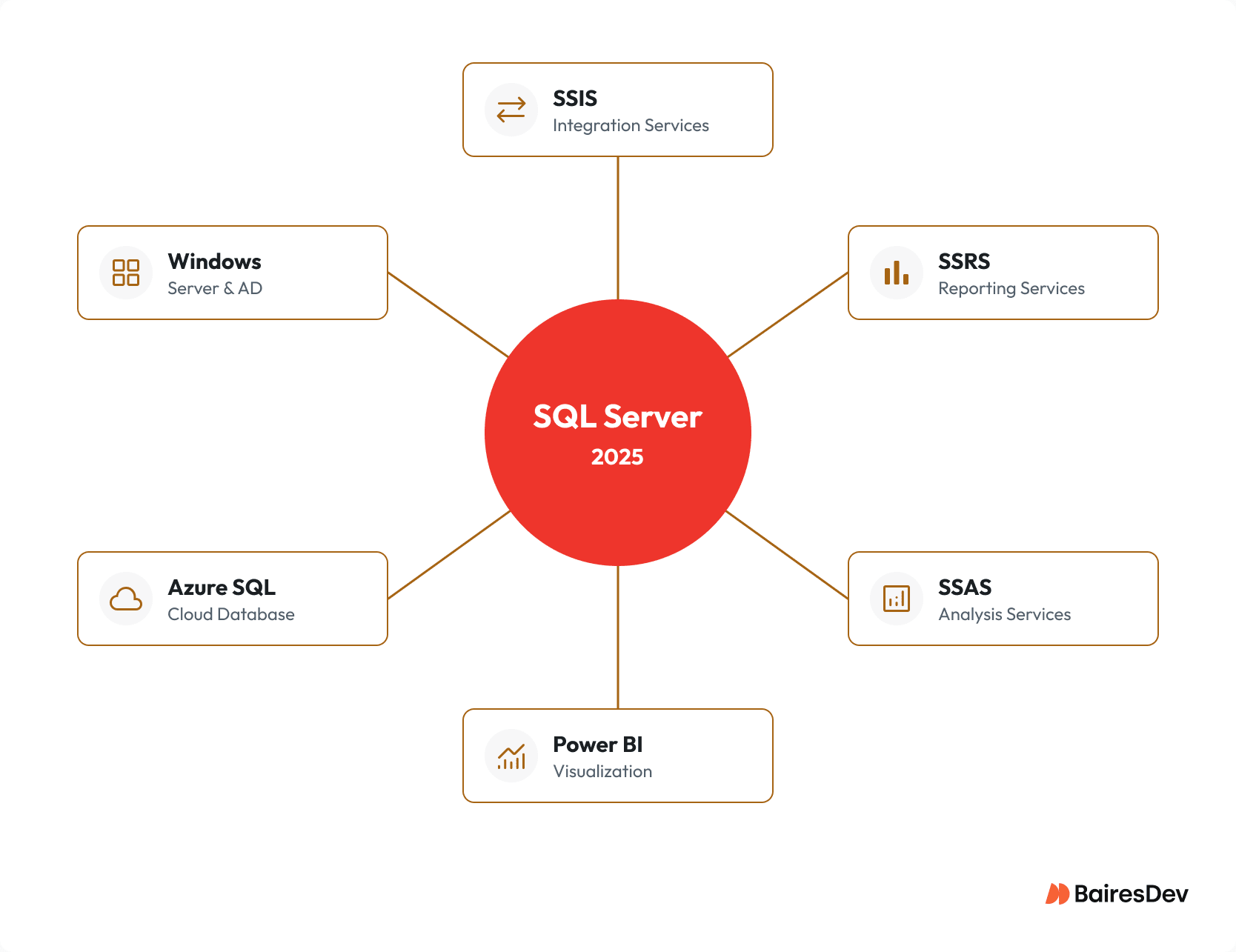
The advantage here is that it keeps the data pipeline inside one vendor rather than spread across several.
When Should You Choose SQL Server Over MySQL or PostgreSQL?
SQL Server, MySQL, and PostgreSQL each suit different situations. The table below compares the three on the criteria that matter most to engineering and infrastructure teams.
| Criteria | SQL Server | MySQL | PostgreSQL |
| License | Commercial (Express and Developer are free) | Open-source (GPL) | Open-source (PostgreSQL License) |
| Primary Platform | Windows-native; Linux supported | Cross-platform | Cross-platform |
| SQL Dialect | Transact-SQL (T-SQL) | MySQL SQL | PL/pgSQL |
| AI and Vector Support | Native VECTOR type and DiskANN (SQL Server 2025) | Limited, via extensions | pgvector extension |
| Windows and AD Integration | Seamless (Active Directory, SSRS, SSIS) | Manual configuration | Manual configuration |
| JSON Support | Native JSON type (SQL Server 2025) | JSON columns | Native JSONB (binary) |
| Licensing Cost | Standard or Enterprise required at production scale | Free for most uses | Free for all uses |
| Managed Cloud Option | Azure SQL | Amazon RDS, Google Cloud SQL | Amazon RDS, Google Cloud SQL, Neon |
| Best Fit | Microsoft-centric environments, AI workloads, Windows shops | Web apps, high-read workloads, cost-sensitive projects | Complex queries, extensibility, open-source preference |
SQL Server is the strongest choice when your organization already uses Windows Server and Active Directory, when your team is familiar with the Microsoft ecosystem, or when SQL Server 2025’s native AI capabilities match your application requirements.
MySQL and PostgreSQL are more practical when minimizing licensing cost is a top priority or when the workload does not depend on Microsoft-specific integrations.
How to Get the Most Out of Your Relational Database Management System?
To get the most out of SQL Server, you’ll need to first understand how relational databases work. And using a database on this level is well beyond that of MS Access.
DBAs and developers working with SQL Server should be comfortable with:
- T-SQL and the SQL query language, including stored procedures, views, and basic SQL statements
- Creating and modifying schemas, tables, indexes, and database objects
- Writing queries to retrieve, insert, update, and delete data
- SQL Server Management Studio (SSMS) or Azure Data Studio for administration and schema deployment
- Backup, restore, and high availability configurations across multiple servers
- Reading execution plans to diagnose database performance problems
- For SQL Server 2025 deployments: vector data types, DiskANN indexing, and AI embedding patterns
The best way for your admins to learn SQL Server is to download and install the free developer edition. Once installed, they’ll want to learn how to create and modify databases and eventually learn more complex tasks.
But deploying SQL Server is only the first step. Designing efficient schemas, optimizing query plans, managing high availability, and planning version upgrades require deep platform expertise. Organizations working with engineers who build and tune Microsoft data platforms in production are better positioned to maximize SQL Server’s performance while taking advantage of new AI capabilities introduced in SQL Server 2025.
Facundo Molina, BairesDev:
“The teams I see getting the most out of SQL Server in 2026 treat the 2025 release as a database and an AI substrate at once, because a native vector type plus DiskANN search means you can keep embeddings next to your transactional data instead of bolting on a separate vector store. My practical advice is to audit your version first: if you are still on 2016 with a July 2026 cutoff, plan the migration now rather than discovering it during an incident.”
Key Takeaways
- SQL Server 2025 is the current release. It introduces a native VECTOR data type, DiskANN vector indexing, in-database embedding functions, native JSON support, and REST API integration.
- SQL Server is Microsoft’s proprietary RDBMS. It is not open-source software.
- Version selection has direct lifecycle implications. SQL Server 2016 reached end of extended support on July 14, 2026. Organizations still on that version should plan an upgrade or migration to Azure SQL.
- Big Data Clusters were retired on February 28, 2025, and should not appear in new architecture planning.