Richie Modad is a Solutions Architect at BairesDev, specializing in technical architecture and data engineering. He brings experience from software development and digital marketing and previously worked at Hubbard Decision Research.


Custom software is expensive, which is why custom CRM software development makes sense only when a valuable, complete workflow fails a realistic platform test and the business can fund the people and work needed to own it over time. If configuration or a limited extension meets that need, use it. For business and engineering leaders choosing between CRM solutions, that decision carries through launch and the full customer lifecycle. The work comes down to testing workflow fit, comparing ownership costs, and deciding what deserves custom CRM development.
Key Points
- Walk a business owner through a real exception case on the proposed platform before your team approves any custom build.
- A license total compared against initial development costs will mislead your decision; use actual quotes over the same ownership horizon.
- Your CRM system must name which system owns each customer attribute so agents know where to send a correction.
- A workflow gap does not justify a custom build if no one inside your organization is funded to own it after launch.
What Does CRM Software Development Mean for Customer Relationship Management?
Customer relationship management software helps sales, service and marketing teams manage customer interactions and customer data, covering day-to-day operational CRM needs and longer-term strategic CRM objectives. Salesforce describes the job as keeping contact information, sales opportunities, service issues and marketing campaigns in one central location available across the company. Getting a system that does that job for your business is where CRM software development comes in. That can mean configuring an existing platform, extending it with code, or building an application your organization owns. The choice changes how much software your team has to run and maintain.
Whichever path you take, I’d start defining requirements outside the CRM screen. CRM is rarely a standalone consideration; it’s part of the larger enterprise solution. A useful requirement spells out what someone must accomplish across that solution, including when another system can’t do its part. Customer relationship management depends on those handoffs, because complete records alone don’t meet customer needs.
When Do Customer Interactions Require Custom CRM Solutions?
Imagine a hypothetical industrial distributor handling a paid service request. The agent needs to identify the account and installed equipment, confirm entitlement, check payment and authorize service. If a billing payment update never reached CRM, the agent could refuse service already paid for. That’s the enterprise-level user story to test, because it’s where the customer experience actually breaks.
I’d ask the business owner to walk through that story on the proposed platform, including exceptions and system handoffs. When it fails, name what’s getting in the way. If custom CRM solutions kept surfacing as the answer before the test, check whether that conclusion held up. Can the CRM system represent the relationship, or has the implementation failed to connect available customer data? Those findings need different fixes.
To make that test concrete, take one platform as an example. Microsoft Dataverse supports custom tables and coded business logic. An unusual relationship between accounts, equipment, and service requests doesn’t prove that CRM platforms can’t support it. Therefore, test the difficult relationship on the platform before adding a custom CRM to the business case.
A workflow gap may justify custom development. Frustration with configuration does not, and neither does a feature wish list. Compare acceptable platform designs and scoped extensions, including custom CRM solutions, before approving custom CRM development.
What Uber’s Support Workflow Shows
The distributor’s problem is hypothetical, but there’s a real example of the need to connect customer requests with what’s happening in the business. In Uber’s November 2017 engineering account, free-form support requests made it harder to organize staff by issue type and route users to the right agent. Uber built web and in-app intake and an internal agent platform connected to existing systems to provide relevant trip information.
Uber also described later frameworks for agent context and self-service workflows, showing that the engineering work continued. The account doesn’t show that Uber replaced sales CRM software, rejected commercial CRM solutions or saved money. For me, the useful lesson is to tie the proposed build to a problem in day-to-day work clearly enough that you can explain why the continuing engineering work deserves funding.
How Do Custom CRM Software and Other CRM Solutions Compare?
Compare the same workflow across CRM platforms and a custom CRM system. Include heavy customization, since it keeps the platform while adding custom development your team has to maintain.
| Dimension | Custom CRM development | Off-the-shelf CRM software | Heavily customized CRM |
| Initial investment | Application build, integration, migration | Licensing, configuration, integration and migration | Platform, extension engineering, integration and migration |
| Implementation time | Application development and operational readiness | Configuration, data readiness, rollout | Extension development and platform regression testing |
| Workflow flexibility | Designed within engineering capacity | Available configuration | Supported extensions and owned code |
| Integration control | Owned application interfaces and recovery; external constraints remain | Supported platform interfaces | Owned adapters within platform limits |
| Scalability | Capacity engineered and tested for workload | Service limits and workload fit | Platform limits and extension behavior |
| Maintenance ownership | Application, infrastructure, support | Vendor service; customer configuration and integrations | Vendor service; customer extensions and integrations |
| Vendor dependency | Infrastructure, libraries, external APIs | Platform contracts, interfaces, roadmap | Platform dependencies and code compatibility |
| Ideal use cases | Proven workflow gap and funded ownership | Requirements fit available configuration | Broad platform fit with bounded coding needs |
I’d reject a cost comparison that puts license fees on one side and initial development on the other. Use actual quotes and staffing rates, including data security, infrastructure, support, upgrades, and work engineers must set aside. Test how that estimate holds up against business growth and changing business processes.
The distributor may still need to own a billing adapter with purchased CRM software. Building its own CRM system leaves the billing provider’s interface outside the team’s control. Price that remaining work when comparing software solutions. You still own configuration, integrations, and business change on vendor platforms.
What Does the CRM Software Development Process Look Like?
I’d follow the distributor’s service request through delivery before adding more features. A complete workflow gives the business something meaningful to try and accept. Even then, migration rehearsals and failure tests can send the CRM development plan back for another pass.
- Validate requirements and buy versus build. Spell out what it means for service to be fully authorized. Test CRM tools against that story and record the important gap a custom component would close.
- Design architecture and data ownership. Map how accounts, equipment and service relate. Decide which system owns each attribute so the CRM system respects that business ownership.
- Plan integrations. Define identifiers, interface versions, data freshness, retry and duplicate handling and recovery ownership. A successful connection doesn’t prove you can recover when it fails.
- Develop one complete workflow. Build the agent’s path from account lookup to service action, including what happens when customer information is incomplete or unavailable. Before expanding CRM software, let users test whether it improves the customer experience and customer satisfaction or just shifts the work elsewhere.
- Rehearse migration. Map fields and relationships, import representative customer data, and verify expected links and counts. Define how you’ll capture changes during cutover and roll back if needed.
- Test behavior and failure. Test permissions, out-of-date payment information, repeated messages, outages and representative volume. Show what the agent can safely do next.
- Deploy to a bounded group. Name a technical support owner and check that operations can reconcile failed updates before expanding the CRM implementation. Monitor the workflow in real time so you spot bottlenecks and failed handoffs before customers report them.
- Fund ongoing evolution. Set aside capacity for security, interface changes, upgrades and regression tests. Revisit custom CRM development as business needs change.
Test Lead Management Before Expanding Marketing Campaigns
For sales teams, apply the same operational CRM test to lead management. Follow potential customers through sales pipelines and ask who owns the next action. Operational CRM records in sales tracking should give users enough information to explain that progress. Before adding marketing automation, decide how responses from targeted marketing campaigns, become owned leads in that pipeline. Test those customer interactions before widening the CRM development scope.
Design the User Interface Around Routine Tasks
Follow contact management from data entry through the next business action. When CRM tools automate tasks, check what triggers them, who receives them and how to recover if customer data is missing. Operational CRM capabilities like workflow automation for follow-ups, sales automation in the pipeline and alerts for sales teams all need that same test. Judge operational efficiency by whether users finish without fixing avoidable data entry problems. If the distributor’s technicians work in the field, test the same workflow on the mobile devices they actually carry, because a screen that only works at a desk fails the story.
If your team needs capacity to deliver those workflows, external software development services can add it. I’d include runbooks, interface documentation, acceptance by operations and a maintenance handoff in the engagement so the internal owner can accept more than screens that work.
How Should CRM Integration Connect Existing Systems?
Return to the distributor’s service request that looks unpaid. These are boundary problems, and replacing the CRM won’t by itself settle who should correct a missing billing update. The CRM system needs to make that responsibility visible.
Give Each Customer Attribute an Owner
For this example, suppose ERP, among the distributor’s supply chain systems, owns legal account details, billing owns payment status and CRM owns service interactions while displaying entitlement. Those assignments won’t fit every business. Sharing customer and business data doesn’t give the CRM system authority over every fact.
I’d keep that shared view read-mostly and send changes to the system that owns the data. Do the same when connecting marketing platforms, support, identity and analytics. Email, calendars and accounting software raise the same ownership questions as ERP and billing. Teams may analyze customer data together for customer segmentation or to examine customer behavior patterns without giving every application permission to rewrite it.
Keep identifiers intact across systems, using whatever key mechanism your platform offers. In Dataverse, our example platform, alternate keys can link a row to an external business identifier, as long as you define what makes it unique. That mapping doesn’t prove the records describe the same customer. Review uncertain matches before merging them into the CRM system.
Design the Handoff Through Failure
When ERP and CRM software use different meanings for “customer,” a translation boundary between them can mediate that communication. The anti-corruption layer pattern provides such a boundary. The guidance for this pattern allows a component inside an application or a separate service, though it adds delay and maintenance work. Use it where the translation is worth that cost.
Base the payment interaction on what the agent needs. If confirmation must be immediate, define what happens while the agent waits, when it fails, or when it needs escalation. If delay is acceptable, show a pending state and who owns recovery in the CRM system.
Where your team controls the payment transaction, the transactional outbox pattern can save the business change and an event record together. Messages can arrive more than once, so plan for the systems receiving them to avoid repeating the business effect, and decide who reconciles an update that never lands. When a provider manages billing, check which notifications and recovery options are available.
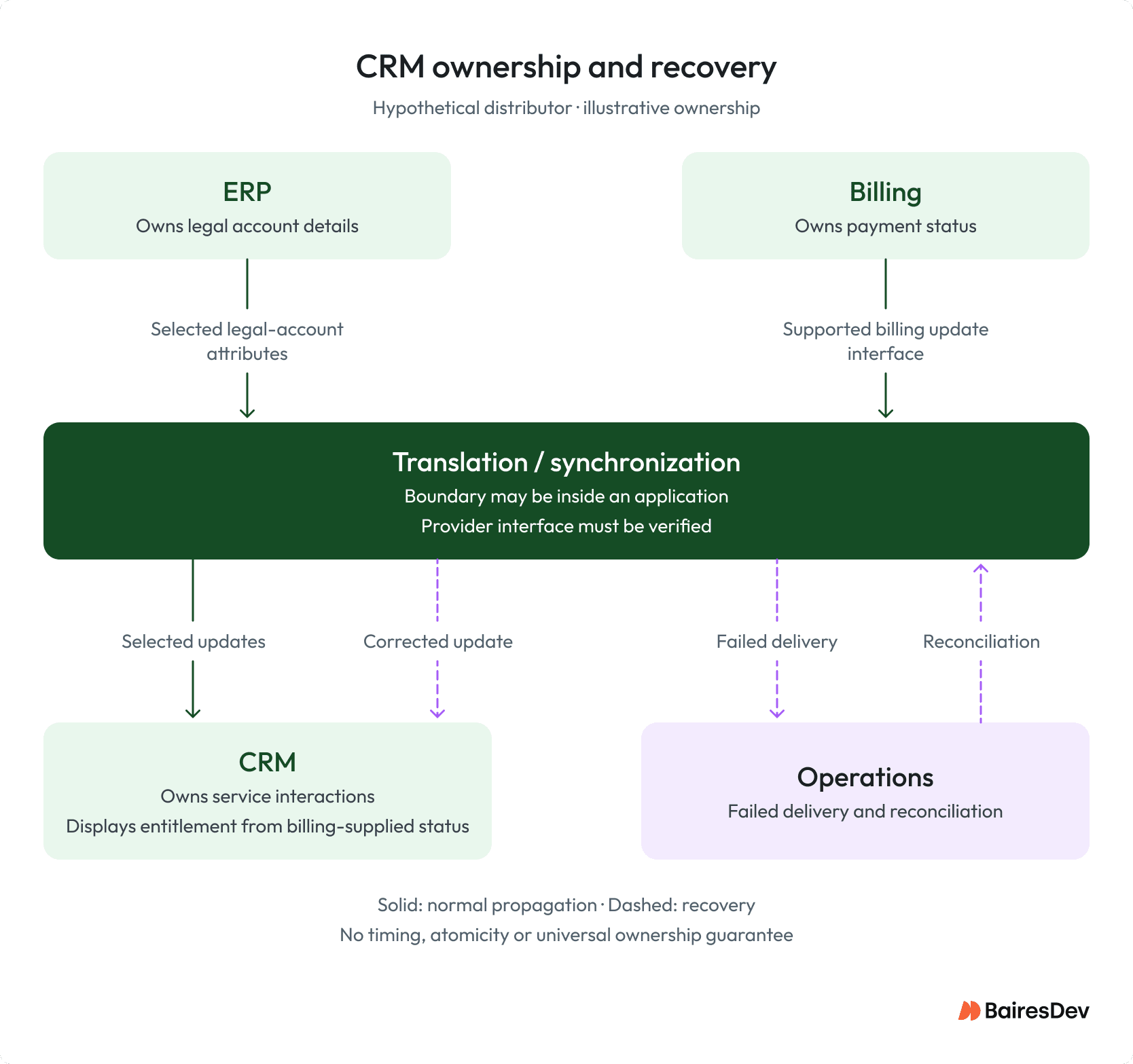
Recovery also has to respect each platform’s limits. Dataverse, for instance, includes a Retry-After duration in Web API 429 responses. A client that loads data or makes bulk updates must handle those limits so recovery follows the actual interface contract.
When Is Custom CRM Development the Wrong Choice?
Choose configuration when it completes the enterprise story within acceptable limits. If CRM platforms broadly fit, price an extension with a limited scope before replacing the application. In the distributor’s case, that might mean custom payment reconciliation without custom contact management. Build custom CRM solutions only when solving the remaining limitation is worth the work of owning the application over time.
I would reject a custom build that has no funded owner after launch. Even important workflow gaps don’t justify an unsupported application. Approve the smallest scope that solves the limitation you’ve shown, with someone responsible for the customer outcome and enough engineering capacity to keep it working.
How Do Data Security and Maintenance Affect CRM Software?
A signed-in salesperson who can change the wrong account can expose customer data or disrupt service authorization. If responsibility for access stops at the CRM system, fixing one screen may leave another route open.
Test combined access against intended permissions before justifying custom CRM development on access grounds. On the example platform, Dataverse privileges are additive, so the broadest access wins. A narrower grant won’t cancel a broader one.
I’d assign owners to make access decisions, audit important changes, handle retention and respond to incidents across bought and built components, including any analytical CRM layer that reads customer data. You’ll need to assess the specific legal obligations; custom CRM software doesn’t settle them.
Owners matter most when something changes. Ongoing maintenance has to preserve the service outcome as business processes change. Version boundary contracts and keep regression tests so a breaking ERP or billing change is more likely to show up as a failed test before it disrupts customer relationships.
Temporary fixes need the same attention, because workarounds can become permanent dependencies. Give each migration adapter an owner. I’d decide whether and when to retire each one and give the product owner capacity to retire it, replace an owned component or keep investing when the workflow’s value justifies it.
Key Takeaways
- Test CRM solutions against a complete enterprise story before approving custom CRM development.
- Compare software solutions over the same ownership horizon using actual quotes and staffing assumptions.
- Give the CRM system clear attribute ownership, integration contracts and recovery paths.
- Build a custom CRM when a valuable workflow fails the platform test and the organization can fund continued ownership.
Frequently Asked Questions
How much does custom CRM software development cost?
Estimate the actual workflow instead of borrowing a generic price range. Compare custom CRM development with CRM platforms over the same planning horizon. Alongside licensing, include application design and development, migration, integrations, data security, infrastructure, support, upgrades and the other work engineers would have to set aside. Then test how growth or changing business needs affect each option. A license total alone can’t show which software solutions cost less to own.
How long does custom CRM development take?
Your schedule depends on scope, integration contracts, data readiness, access requirements and how prepared your team is to run the system. Estimate a complete workflow all the way through migration, testing and rollout. A demo doesn’t resolve any of those dependencies so it can’t stand in for a real production estimate.
Can we extend an existing platform instead of building a CRM?
Yes, when the platform handles the broader workflow and supported extensions close a specific gap without expanding scope too far. Test those tools against real data, actual permissions, expected volume and recovery scenarios. When you compare that option against a custom build, include the maintenance and compatibility work your team will own. Having a vendor run the platform doesn’t remove your responsibility for the code you write on top of it.
Should CRM integration use synchronous APIs or events?
Base the choice on what your user needs to know before they can continue. If confirmation has to be immediate, your design needs to define clearly what happens while the agent waits and what happens when the call fails. An async update can tolerate delay, but your CRM system still needs a visible pending state, duplicate handling, monitoring and a reconciliation path. Either way, someone on your team owns the handoff when it breaks.
How should we handle duplicate customer records during data migration?
Agree on identifiers and which system owns each attribute before you import anything. Review uncertain matches manually rather than merging them automatically. During migration rehearsal, reconcile relationships as well as row counts. A contact linked to the wrong account will break your agent’s workflow even if every individual record transferred cleanly.
Who should own a custom CRM after launch?
Name a business product owner who can decide which workflows matter most for goals such as customer retention and customer experience, accept changes, and get funding for maintenance. Assign clear responsibilities for engineering, operations, security and data to support that owner. An external CRM development team can add capacity, but someone inside the organization must decide whether the customer outcome is acceptable and what happens when it isn’t.
Which CRM features should come first?
Choose key features around the customer relationships the business needs to manage. For lead management, test how a lead moves through sales pipelines and who takes the next action; for service, test whether the agent has enough context to respond to customer needs. Add marketing automation and reporting when those workflows are dependable enough to support marketing campaigns and let teams analyze customer data and customer behavior meaningfully. CRM software should support managing customer interactions before the feature list expands.
Richie Modad is a Solutions Architect at BairesDev, specializing in technical architecture and data engineering. He brings experience from software development and digital marketing and previously worked at Hubbard Decision Research.