



Executive Summary
Custom software development can be a good investment for a small business when existing products do not adequately support the business. If significant workarounds are required to complete a workflow, custom software is worth considering.
But custom software is not always the best option. It has a larger initial investment and requires ongoing maintenance and support. Commercial software can have a lower initial investment, but there might be hidden costs, such as vendor dependence. Neither option should be evaluated just on the initial estimated cost.
The decision should be based on what the business will get from the investment. If custom software can improve processes, those benefits may justify the additional costs. If the existing software already handles the process well, there is little reason to build something new.
For many small businesses, the most practical software solutions will be a combination of both approaches. Off-the-shelf software can address generic processes while custom software can address processes where the business has specific requirements.
Key Points
- If your team relies on workarounds to complete core workflows, that inefficiency cost often justifies custom development.
- Your accounting or payroll needs are almost always better served by commercial software than anything you’d build.
- The International Software Benchmarking Standards Group (ISBSG) estimates that post-launch maintenance alone accounts for 65% to 85% of your custom software’s total lifetime cost.
- Vendor lock-in, migration fees and licensing changes mean your off-the-shelf costs will likely exceed the subscription price.
- Your true cost of existing software includes every hour employees spend on manual workarounds outside the system.
- If your processes aren’t settled yet, building custom software risks locking your team into workflows that won’t fit.
- Your most practical path is often commercial software for generic functions and custom software only where your workflow is genuinely differentiated.
Does Custom Software for Small Business Make Sense?
Yes, custom software for small business does make sense. But with a large caveat. The software must solve a problem that is important enough to justify the investment. That means there should be a clear return.
Bespoke software is most valuable when a company’s requirements are not met by the existing available products. Business processes often evolve in a unique context, whereas software is often built to fit as many contexts as possible. This can lead to an imperfect workflow for a specific purpose. The software might even be missing a key aspect of the workflow that then requires a separate tool, which can make workflow cumbersome. In these situations, custom software can allow a business to build solutions that fit their processes instead of adapting to the limitations of off-the-shelf products.
On the other hand, building a custom application simply because an existing product is imperfect can create unnecessary cost and risk. Custom software can have a large upfront cost and ongoing maintenance costs. If a subscription service adequately meets the business’s needs, there may be little justification for the additional cost and responsibility of owning the software.
Whether custom software for small business will provide enough value to justify the cost is the relevant question. This is an important consideration because the investment does not end when the software is launched. The business also has to account for maintenance, updates, security and the people needed to manage the software over time.
That can make custom software development a difficult investment for small businesses. The Organisation for Economic Co-operation and Development (OECD) found that the three biggest barriers for small businesses are maintenance costs, lack of time for training and hardware costs. These challenges become more significant as the technology becomes more sophisticated.
Custom Software vs. Off-the-Shelf Software
| Factor | Custom Software | Off-the-Shelf Software |
| Cost | Higher initial investment; costs include planning, development, infrastructure, security, and ongoing maintenance | Usually lower initial cost; expenses are typically tied to subscriptions, implementation, integrations, and upgrades |
| Implementation Time | Usually longer because the system must be designed, built, tested and deployed | Typically faster because the core product already exists |
| Scalability | Can be designed around expected business and technical requirements | Depends on the vendor’s architecture, pricing model, limits, and roadmap |
| Flexibility | High control over workflows, interfaces, integrations, and features | Constrained by available configuration, APIs, extensions and vendor roadmap |
| Maintenance | The business owns responsibility for maintenance, security, upgrades and technical debt | Vendor handles most product maintenance, although integrations and configuration still require management |
| Ownership | The business can control the software and its roadmap, subject to the development agreement and technology stack | The vendor owns the product; the customer typically receives a license or subscription |
| Long-term ROI | Potentially high when the system creates measurable operational or competitive value | Often stronger for standardized business functions where customization provides little additional value |
Neither model is inherently cheaper over the long term. A meaningful comparison requires lifecycle costing regardless of which approach is chosen. The U.S. Government Accountability Office (GAO) guidance on cost estimation emphasizes the importance of considering the whole lifecycle of the product rather than the initial cost alone.
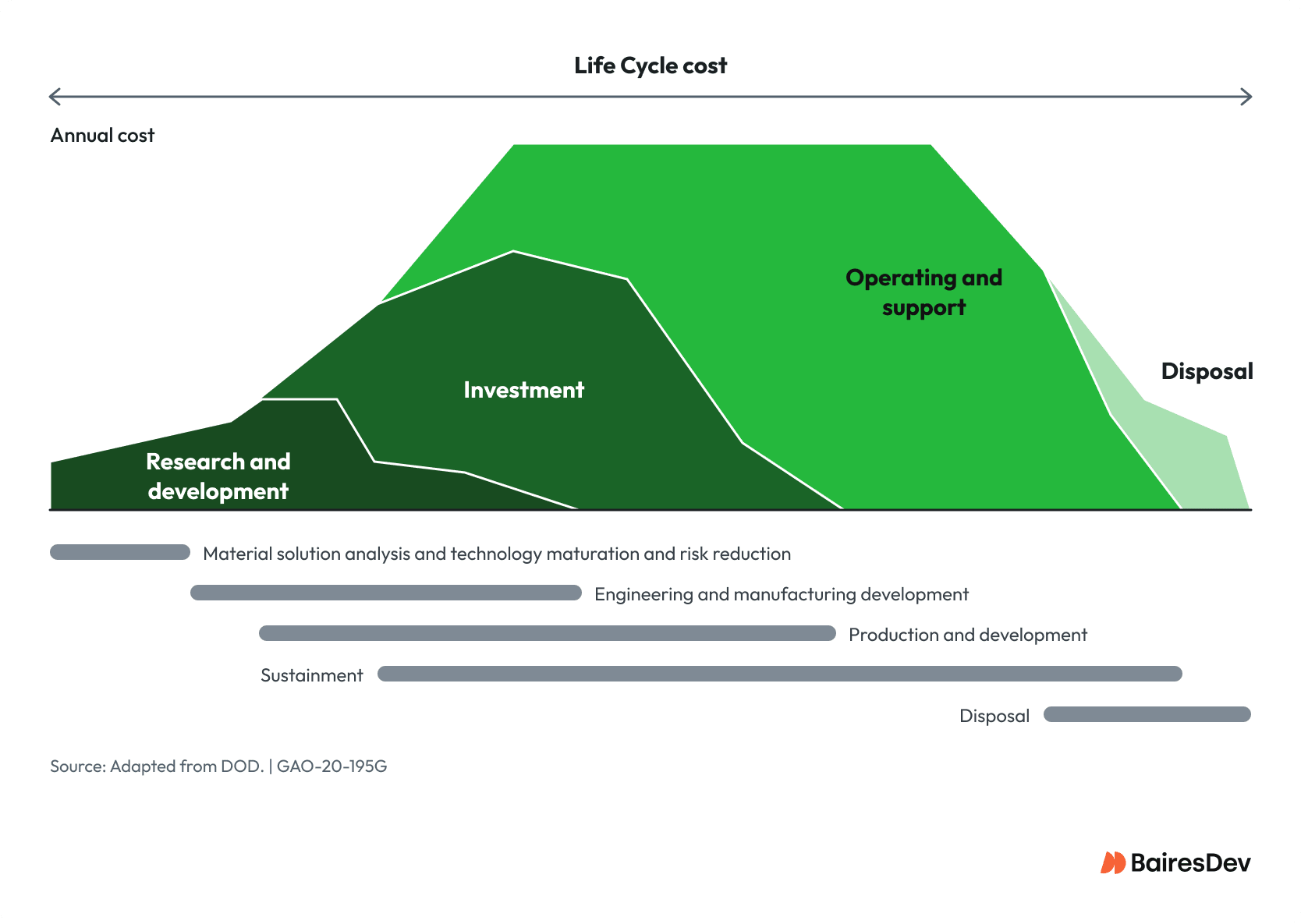
The above diagram focuses on custom software, but the costs are analogous for off-the-shelf software. Research and development would focus on reviewing potential products and gathering feedback from employees. Investment would include not just the implementation and migration to the new system, but also staff training for the new software and processes. Operating and support may have lower costs as code maintenance is the responsibility of the service provider.
For custom software, the initial development is represented in the “investment” section. As you can see, the operating and support is the bulk of the investment. ISBSG estimates that this maintenance phase can account for 65% to 85% of an application’s total cost.
But there could be additional costs to off-the-shelf products that are less obvious. Licensing changes, additional infrastructure requirements, migration fees and vendor lock-in can affect the cost of implementation.
When Custom Software is the Right Investment
1. The Business Has a Differentiated Workflow
Custom software can make sense if a business has developed a workflow that gives it a competitive advantage.
Consider, for example, a manufacturer that specializes in highly customized orders. A generic quoting system may not handle the company’s pricing rules, material requirements, production constraints and delivery schedules. Employees may have to move information between systems or complete some aspects manually. A custom application could bring these processes together to better reflect the workflow.
In this example, the business need is not just a quoting system, it is a system to support the whole employee workflow. If such a system can better support staff and customers, resulting in measurable improved outcomes, the investment may be justified.
2. Existing Products Require Too Many Workarounds
Off-the-shelf software is designed for diverse companies and is therefore by necessity generic. This allows it to be easy to deploy, but most organizations have to adapt to the software to some degree.
Workarounds can become an issue for an organization when employees start depending on additional external systems to complete their workflow, especially if employees begin to develop different ways to deal with the same workaround.
The entire workflow process, in and out of the software, must be considered. Workarounds, if not managed, can build inefficiency into workflows. That cost needs to be factored into the cost of the off-the-shelf service.
A custom application does not necessarily need to replace the existing products. Custom software could focus on managing the workarounds in a way that integrates with the off-the-shelf services to support workflow.
3. The Software Directly Affects Customer Experience
Customer service is often a company’s competitive advantage. So, if customers interact directly with the system, custom software might make more sense. Standard SaaS products may provide the basic functionality, but they might offer a generic user experience that does not reflect the organization’s customer-focused values.
Custom software can also connect the customer experience to the way the business actually operates, reducing the need for employees to manually handle information or move it between systems. This can make the process easier for both the customer and the customer support team.
4. Integration is Becoming a Core Business Requirement
As organizations grow, they tend to accumulate specialized systems. An organization could have different software for accounting, inventory, CRM, scheduling and so on. Each system might work well, but moving between systems may be difficult.
Custom software could be designed to automatically pass information from one system to another. This can reduce duplicate tasks and potentially reduce entry errors. Each transfer could also be bound to the organization’s business rules. For example, an order could trigger an inventory update and then initiate the billing process without an employee manually performing each step.
A custom system could also bring information from several systems into a common interface. This could streamline analytics, logging and governance.
5. The Business Has Requirements That Cannot Be Standardized
Custom software is a good option when an organization needs control over their data. It can allow organizations to define exactly who can access data and what level of access they have. Workflows can be designed for specific operational or regulatory requirements instead of adapting to generic processes. This can make it easier to record elements that require auditing and retain the logging required to demonstrate compliance.
When Custom Software is Not the Right Choice
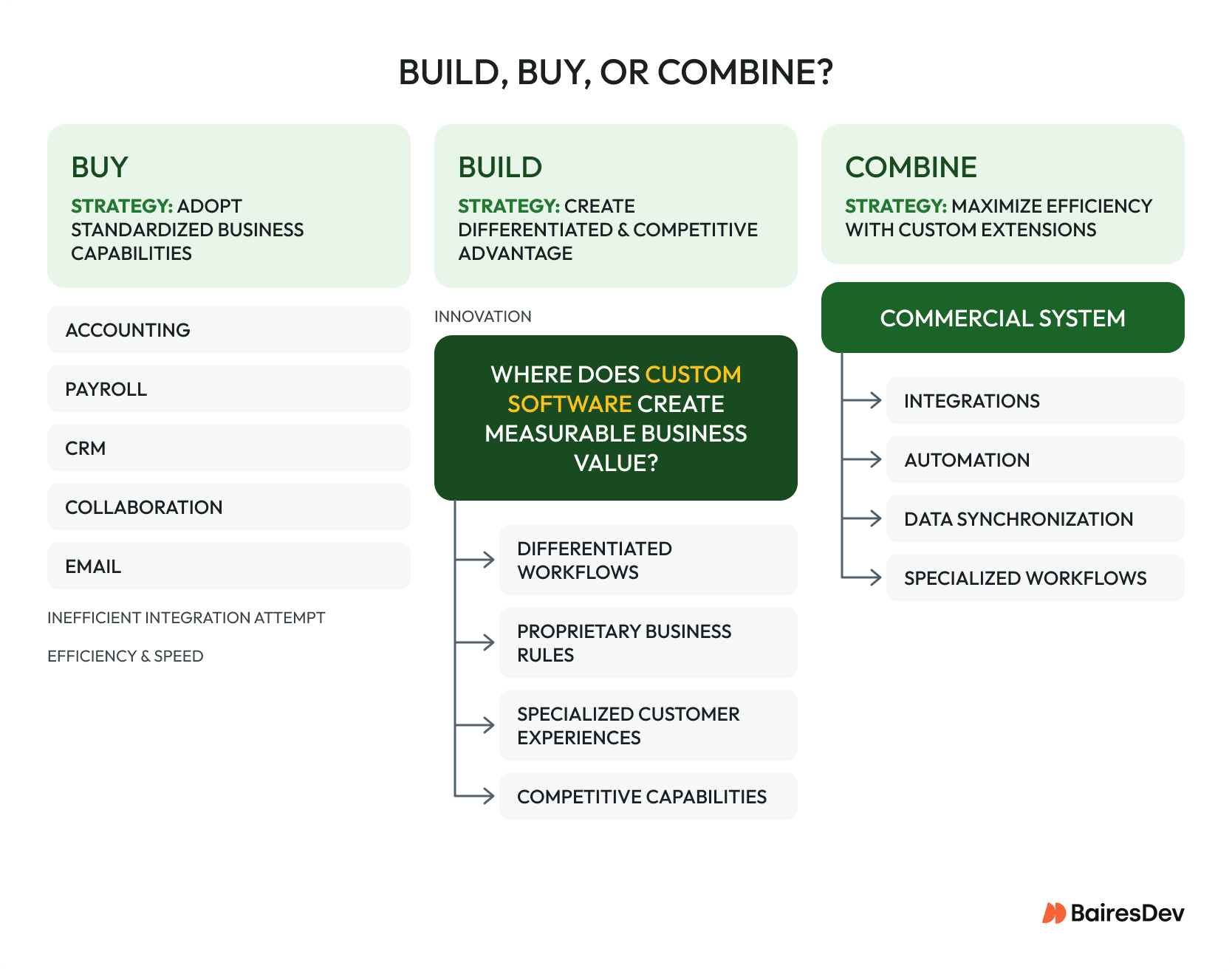
Common business functions are usually better served by commercial software because there are already mature products designed for them. Accounting and payroll systems, for example, have to keep up with changing regulations and requirements. Email and collaboration tools require ongoing development and infrastructure that can be difficult for a small business to justify investing in. Commercial products have had years to develop features, integrations, security, and support.
An organization should generally not create custom software to replace a mature product when their needs are generic.
Custom software can also be a poor choice when requirements are uncertain.
If a business is still figuring out their business processes, building a large system around their current assumptions is a risk. It can lock them into workflows or processes that do not fit, or they might design for incorrect assumptions. This can lead to costly refactoring late in the development process.
A configurable SaaS product may be a better approach. It can allow the organization to validate processes before committing to an architecture. And the cost of changing is much lower. Re-configuring software can be painful, but a much smaller investment than refactoring a code base.
Technical debt also needs to be treated as a real business cost. A custom system that is poorly documented or dependent on one developer can become an operational liability rather than an asset.
How to Evaluate the Investment
Both options should be estimated before deciding on a path.
Start with the current state. How much time do employees spend on manual processes? How often do errors occur? What revenue opportunities are limited by the existing systems? What does it cost to maintain spreadsheets, integrations, duplicate data entry and manual approvals?
Next, estimate the full cost of the custom development option over its lifecycle. This should include the work required to define the requirements and the software development effort, as well as infrastructure, security, implementation and training. The estimate should also account for ongoing maintenance and future changes to the systems.
The same approach should be used for commercial software. The estimate should include licensing, implementation, integrations, administration, training and data migration. It should also account for costs that could arise if the business needs to change products or move away from the vendor later.
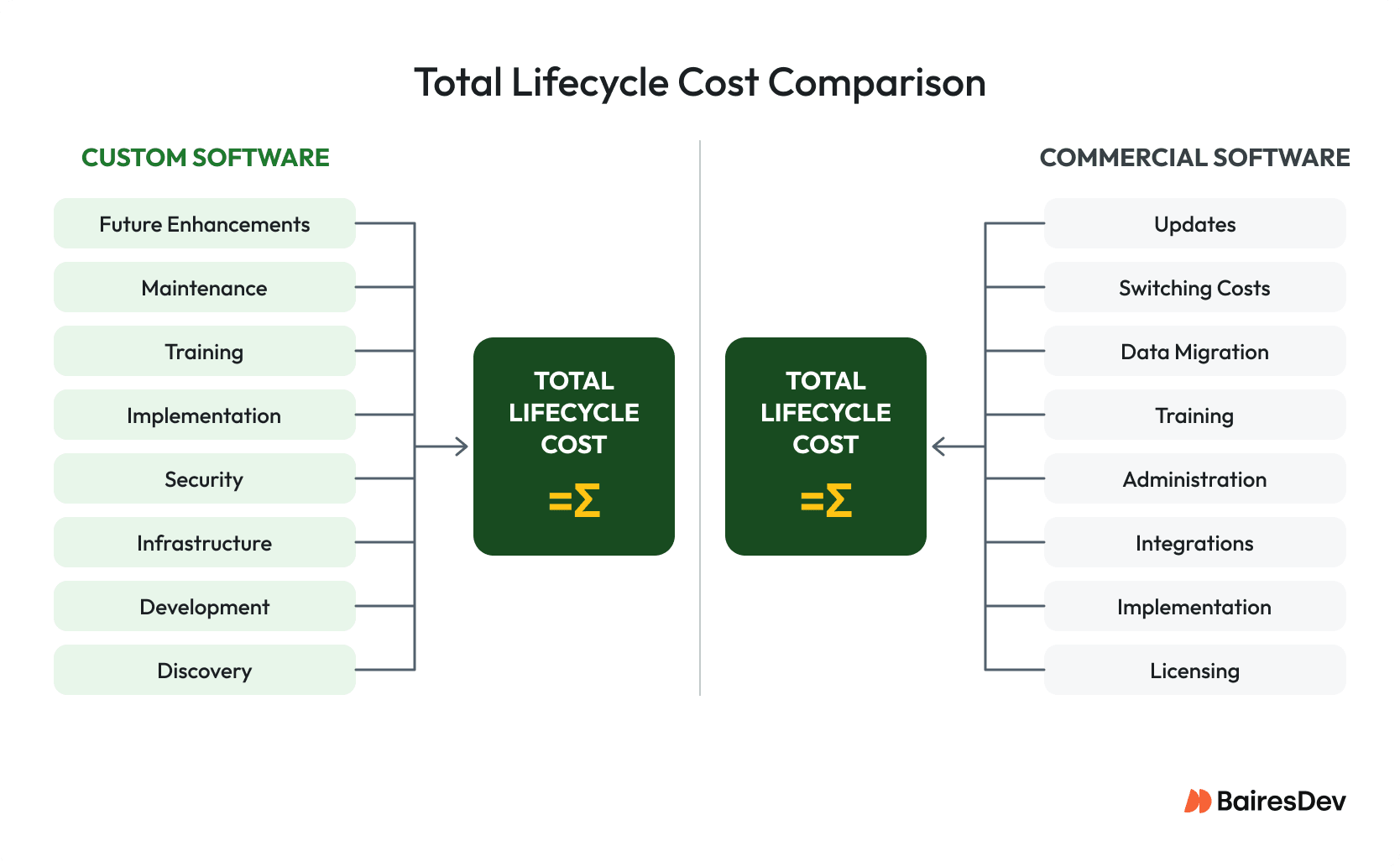
Then compare those costs against measurable outcomes. These may include reduced labor, increased capacity, fewer errors, increased conversion, improved retention or new revenue.
Not every benefit needs to be quantified initially. But there should be an understanding of how it will be known whether there was a return on investment. For example, a business might build custom scheduling software to reduce administrative work. Initially, the best way to measure that improvement may not be known. After implementation, useful metrics, such as scheduling time or errors, can be identified.
Employee efficiency is a particularly important outcome. A system can be technically successful while still failing operationally if it does not improve employee workflow.
It is also important to consider the cost of failing. If the custom project fails, can the organization continue to operate? Can data be exported? Could a new development team understand the architecture and find a way to move the project forward? Are critical dependencies documented?
For organizations without enough internal development capacity, working with an experienced external team on custom software development can reduce the burden of recruiting and maintaining a full specialist team, especially when an organization would otherwise need to build an entire engineering team from scratch for one application.
Working with an external team can reduce development overhead, but will not eliminate ownership responsibilities. Whether working with a software development company or building in-house, the organization still needs a clear product owner, defined success criteria, appropriate security controls and an agreement about who owns the resulting code, infrastructure, documentation and intellectual property.
Hybrid Models are Often More Practical
The build-versus-buy decision seems binary, but businesses rarely choose one approach for everything.
A small business can use commercial software for capabilities that are well understood and served by existing software. In tandem, they could invest in custom development for processes that are more specific to the business. The goal is to decide which capabilities are worth owning.
For example, a service company might use commercial software for accounting, CRM, and payments while building a custom application for scheduling and dispatch. A manufacturer might use a commercial ERP system but build its own quoting and production workflow. A professional services company might use an established CRM while building a custom client portal.
This approach allows the business to invest in custom development where it can create value. As the company grows, that boundary can change. An aspect that is well served by off-the-shelf software today, may become a better fit for custom software later as that aspect becomes central to the business.
Build-vs-Buy Decision Framework
| Question | Favors Custom Software | Favors Off-the-shelf |
| Is the workflow strategically important? | The workflow differentiates the company | The workflow is common across businesses |
| Does the software affect revenue or customer experience? | Directly | Only indirectly |
| Can existing software meet most requirements? | No, or with costly workarounds | Yes |
| Are integrations a major source of friction? | Yes | No |
| Are requirements stable? | Clear and well understood | Still changing |
| Can the company support the product long term? | Yes, internally or through a reliable partner | Limited technical capacity |
| Is the cost of manual work significant? | Yes | No |
| Would owning the software create strategic flexibility? | Yes | No |
| Is rapid deployment the priority? | No | Yes |
The decision does not have to be permanent. A business can begin with commercial software, learn where the constraints are and then consider replacing the parts that demonstrate a business need.
What Should Small Businesses Do?
There is no simple answer. The right software for small businesses depends on what the business needs it to do and whether those needs are being met by existing products.
A business should first explore where existing software works well and where it creates pain points. If an off-the-shelf product is adequate, it is hard to justify investing in custom software. If an important business process is not supported by existing software, investing in custom software is worth considering.
Both options can be expensive. Evaluating software for small businesses properly means considering the cost of the whole lifecycle, not just the initial investment. A custom application requires ongoing maintenance and support. Commercial software has its own costs, including licensing and vendor dependence. Neither is guaranteed to be less costly.
For many small businesses, the answer will be a combination of the two, using software solutions that address both standardized and specific needs. Commercial software can handle common business functions while custom software can integrate and address the areas where the business has more specific needs.
The goal is to invest in solving problems.