


Most iOS app development trends and broader mobile app development trend lists recycle the same talking points: AI, AR, cross‑platform tooling, SwiftUI, and vague claims about rising user expectations. That framing—great for selling excitement—is useless to a leader running a mobile engineering organization and deciding where engineering time goes over the next four quarters.
The trends that matter in 2026 are the ones that change shipment risk, incident rates, compliance exposure, maintenance drag, and how users interact with your product across Apple surfaces. Apple’s deadlines matter. Swift’s stricter correctness model matters. So does the widening gap between thoughtful modernization and programs framed as modernization.
A few user-facing shifts belong in roadmap discussions. Most don’t. For enterprise teams, iOS development remains less about chasing the latest trends and more about building reliable apps inside a disciplined delivery pipeline.
If you filter iOS app development trends through a delivery lens, a pattern emerges: the trends that matter cluster around release integrity, reliability engineering, and governance. The rest fall into selective modernization or watch‑item territory.
Toolchain and SDK Baselines Are Now on the Critical Path
Why Toolchain Drift Becomes a Shipment Problem
This is the least glamorous trend and the most predictable source of release friction.
Apple’s submission requirements now force teams to adopt new Xcode and iOS SDK versions on Apple’s schedule, not their own. When the requirement flips—as it will again—toolchain drift becomes a shipment blocker, not a maintenance chore. That pressure is amplified by rapid OS adoption: 66% of active iPhones were already running iOS 26 within five months of release, compressing the window where legacy assumptions remain safe.
In mature organizations, the first failures after an Xcode upgrade are rarely in product code. It’s signing. Or a vendor xcframework built against an older SDK. Or a stale privacy manifest buried inside a third‑party dependency. Or a brittle build script that still assumes a toolchain path from two releases ago. Locally everything looks fine; CI collapses; the release window slips.
This isn’t theoretical. Two recent Apple-driven changes show the pattern at scale:
- When Xcode 15 shipped a new default linker in 2023, apps depending on older compiled frameworks or C++ binaries broke at link time with zero changes on the app team’s side. Teams either delayed their release or reverted to the previous linker while waiting on vendor SDKs to catch up.
- Apple’s privacy manifest enforcement, effective May 1, 2024, meant any app using an SDK on Apple’s “commonly used” list — Firebase, the Facebook SDK, AppsFlyer, and others — faced rejection at submission if the manifest didn’t match the SDK’s actual data behavior. Teams that hadn’t been tracking dependency versions found out at the App Store gate, not before.
Both incidents share a root cause: a vendor or platform change the app team didn’t initiate, surfacing as a release blocker on a timeline they didn’t set.
The Operating Model That Works
Larger mobile orgs have converged on a predictable pattern:
- Run Xcode N and N‑1 in parallel.
- Let non‑critical branches fail first.
- Make platform own runner images and dependency matrices.
- Treat Apple’s submission deadlines as capacity planning, not cleanup.
- Monitor Apple’s beta and release-candidate announcements as a continuous signal, not a once-a-year scramble, and run trial builds against new toolchain versions automatically as they appear — weeks before they’re mandatory.
Small teams can sometimes wait for the deadline. Enterprises running multi-app portfolios with regulated flows and dense vendor dependency matrices rarely can afford to. Toolchain upgrades behave like any other hard external dependency—predictable, noisy, and safer when planned for in advance.
By running automated beta toolchain gates that surface linker and SDK compatibility issues before they reach the critical path, the upgrade stops being a periodic scramble and becomes a scheduled, routine part of the release calendar.
Swift 6 Concurrency: Reliability Work, Not Refactor Theater
Where Swift 6 Surfaces Hidden Failure Modes
Many teams still treat Swift 6 adoption as a modernization milestone—something to schedule once there’s spare capacity. For enterprise teams, it’s more useful to think of it as reliability work. Apple’s recent direction has been consistent: strengthen compile-time concurrency safety while making adoption more incremental through features like Approachable Concurrency. Teams that continue postponing the migration won’t lose functionality overnight, but they will accumulate more migration overhead and compatibility work as newer frameworks and APIs increasingly assume modern concurrency patterns.
Stricter concurrency checks expose the parts of a codebase that have been running on convention and luck: mutable models crossing async boundaries, shared caches updated from multiple tasks, delegate wrappers that quietly assume single‑threaded behavior. These patterns are common in long‑lived iOS apps.
Swift’s migration guide outlines a phased path that lets teams enable stricter checking before switching language modes.
Phased Adoption Beats Big‑Bang Migration
A practical path looks like this:
- Start by replacing legacy GCD and callback-based patterns in shared networking, caching, and persistence modules with async/await. Then enable stricter concurrency checks.
- Enable stricter concurrency checking while remaining in Swift 5 mode.
- Make Sendable and actor isolation part of your team’s enforced engineering standards, not optional guidance.
- Train developers on real failure patterns, not just syntax.
- Track unresolved warnings by module owner, and require new code to meet stricter concurrency standards than legacy modules.
Starting with shared infrastructure and enforcing consistent concurrency standards early gives every downstream feature a cleaner foundation and avoids repeating migration work across apps and teams.
Success isn’t checking off a “Swift 6 migrated” milestone. It’s building a codebase where concurrency rules are enforced consistently, defects are caught earlier in the delivery pipeline, and new platform capabilities can be adopted without another large-scale migration effort. UIKit-heavy codebases will encounter more friction than newer architectures, but delaying the work only increases the cost of every future platform upgrade.
Among the trends shaping iOS development in 2026, strict concurrency stands out because it changes engineering economics rather than user-facing features. By moving more correctness checks from code review and testing into the compiler, teams reduce operational risk while making the codebase easier to evolve over time.
Where SwiftUI Fits
Where SwiftUI Actually Pays Off
SwiftUI’s declarative architecture gives Apple more flexibility to evolve platform behavior, which is one reason new UI capabilities increasingly appear there before UIKit. For most new user interfaces, SwiftUI should be the default framework, especially where teams expect ongoing iteration or want early access to Apple’s newest platform capabilities:
- Onboarding variants
- Settings and configuration panels
- Account insights
- Widgets and App Clips
- Lightweight flows tied to in‑app purchases
The declarative model and preview tooling reduce boilerplate and accelerate iteration. Just as importantly, Apple continues introducing many new platform capabilities in SwiftUI first. Organizations that continue investing exclusively in UIKit should expect the long-term cost of standing still to rise over time.
Where SwiftUI Doesn’t Pay Off
Rewrite programs framed as “modernization” often underestimate:
- Navigation behavior differences
- Accessibility regressions
- Analytics drift
- Layout inconsistencies across devices
- Binary size changes
High‑risk flows—checkout, financial transfers, identity verification—rarely benefit from a rewrite. UIKit’s stability wins.
The smarter pattern is additive modernization: build new experiences in SwiftUI by default while migrating existing UIKit flows only where the long-term maintenance benefits outweigh the cost and delivery risk of a rewrite. That keeps teams aligned with Apple’s direction without sacrificing stable, business-critical journeys simply for architectural consistency.
System‑Level Integrations Matter More Than In‑App Features
Where System‑Level Integrations Actually Help
One of the most meaningful shifts isn’t about adding more features inside the app. It’s about letting users complete tasks without opening it.
Across the Apple ecosystem, Apple continues expanding the ways users interact with apps outside the traditional full-screen experience. For the right workflows, this reduces friction dramatically. iOS 26 reached 74% adoption on newer devices within 150 days.
A delivery status that updates on the lock screen removes dozens of low-value app opens. A banking widget that exposes a tightly scoped action improves time‑to‑task—assuming authentication and auditability are handled correctly.
The same thinking applies to newer Apple surfaces. Dynamic Island, for example, lets navigation, fitness, logistics, media, and similar apps surface live status without requiring users to reopen the app. The most effective implementations treat every interaction as a continuation of the task, using deep links that take users directly to the relevant screen rather than the app’s home page.
Freshness Is the Product
A stale Live Activity is worse than none. A widget that shows outdated data creates support tickets. Backend timing, push reliability, privacy boundaries, and observability determine whether these integrations feel magical or flimsy.
The same principle increasingly applies to intelligent experiences built with Core ML and HealthKit. Applications that process motion, biometric, or sensor data locally can deliver low-latency insights while keeping sensitive data on the device. Whether the goal is recovery scoring, gait analysis, workout feedback, or wellness recommendations, local inference becomes valuable only when the underlying data stays timely and trustworthy.
System surfaces demo beautifully on pristine devices. The real test comes days later, when notifications are throttled, a push arrives late, or a widget falls out of sync. That same expectation extends to CarPlay, Focus Filters, SharePlay, and other system integrations. Modern iOS apps no longer live in isolation—they become reliable extensions of the operating system itself.
Testing and Release Governance Protect Velocity
How Signal Collapses in Growing Teams
Automated testing isn’t new, but in 2026 the emphasis has shifted from increasing test coverage to building layered delivery pipelines that combine unit tests, integration tests, snapshot testing, UI automation, static analysis, and compiler-enforced correctness. Every unreliable signal slows developers down, making weak governance as much a delivery problem as a quality problem.
As teams scale, informal quality rituals collapse. Flaky CI becomes normal. Engineers rerun pipelines until they go green. Eventually, red builds lose meaning—and incident rates rise because the signal channel was already corrupted. The downstream cost isn’t just more defects. Engineers lose confidence in the pipeline, spend more time rerunning builds, and become slower to ship even routine changes.
Release confidence increasingly depends on automation that goes beyond functional testing. As iOS continues introducing major visual changes—including the Liquid Glass design language in iOS 26—manual UI verification becomes harder to scale across devices, Dynamic Type sizes, Dark Mode, and accessibility settings. Many teams now treat automated visual regression testing as another release gate rather than a nice-to-have.
This isn’t bureaucracy. It’s velocity insurance. Increasingly, those governance controls live inside the same CI/CD platforms that power the rest of the engineering organization rather than in mobile-specific tooling alone. Many teams now run iOS pipelines alongside backend and web services in platforms such as GitHub Actions, using Fastlane to automate signing, provisioning, and App Store delivery. Centralizing pipelines can reduce operational overhead and make release policies, security controls, and quality gates consistent across the software development organization, although it also shifts more responsibility for maintaining Apple-specific build infrastructure onto the engineering team.
The same principle applies to UI quality. As Apple continues evolving its interface frameworks and design system, automated visual regression testing helps catch rendering and layout issues before they reach manual QA. Faster, trustworthy feedback reduces release friction without adding more review gates.
Governance That Maintains Trust
Effective release governance includes:
- Every pull request automatically triggers CI checks—including unit, integration, linting, and snapshot tests—and red builds block merges into the main branch.
- Platform teams continuously optimize build infrastructure by maintaining dependency caching, build artifacts, and runner performance so feedback stays fast as projects grow.
- Deployment pipelines automate TestFlight distribution, phased App Store rollouts, and release gates based on crash rates and other health metrics rather than manual judgment alone.
- Named owners are accountable for dashboards, quality gates, and release health so failures are investigated instead of normalized.
In larger engineering organizations, these controls are typically implemented through GitHub Actions or other enterprise CI/CD platforms, often using tools such as Fastlane to automate signing, deployment, and App Store releases. The specific platform matters less than ensuring release policies are enforced consistently by automation rather than relying on manual checklists or tribal knowledge.
Developers should be able to trust the pipeline: fast feedback, deterministic builds, and automated quality gates that make releases predictable. The goal is a delivery pipeline developers trust—one that provides fast, reliable feedback and confidence that changes are safe to ship.
Make Visual Regression Testing Part of CI
Functional tests verify behavior. Snapshot tests verify presentation. Together they catch regressions that neither approach reliably finds on its own.
Enterprise iOS teams commonly use Point-Free’s open-source swift-snapshot-testing library to automatically compare rendered views against approved baselines. SwiftUI views can be embedded in UIKit using UIHostingController, while UIKit view controllers can be hosted in SwiftUI using UIViewControllerRepresentable. That makes it practical to apply a consistent snapshot-testing strategy across mixed UIKit and SwiftUI codebases during long migration efforts.
Snapshot testing also makes it practical to verify rendering across multiple iPhone and iPad screen sizes, Light and Dark Mode, Dynamic Type accessibility sizes, localization, and different trait collections. When integrated into CI, visual regressions become build failures instead of bugs discovered during manual QA or after release.
Snapshot tests catch visual regressions, but they shouldn’t carry the entire quality burden. Mature iOS teams layer automated testing across the delivery pipeline: unit tests for business logic, integration tests to validate networking, persistence, and module boundaries, snapshot tests to detect unintended UI changes, and a focused set of end-to-end acceptance tests for critical user journeys such as sign-in, onboarding, and checkout. Apple’s XCUITest framework is well suited to those high-value workflows, where a small number of reliable tests provides far more confidence than a large suite of brittle UI automation.
Release planning doesn’t end when the build turns green. For consumer-facing products in particular, App Store review timelines become another delivery dependency. Apple continues reviewing submissions throughout the year, but review capacity and submission volume can fluctuate around major platform releases and the year-end holiday period. Teams planning seasonal launches should leave additional buffer for review cycles and avoid assuming that a rejected build can be corrected and approved within a day.
As release pipelines mature, many organizations automate App Store packaging, TestFlight distribution, metadata management, and staged rollouts with tools such as Fastlane. Others use managed mobile delivery platforms, including Appcircle or Runway, to coordinate approvals, releases, and cross-functional workflows. The objective isn’t adopting a particular tool—it’s removing manual release steps that introduce avoidable delays during high-pressure shipping windows.
Privacy manifests and Required Reason APIs should be validated automatically during dependency upgrades. Teams increasingly use privacy scanning platforms such as Privado.ai alongside CI to detect undeclared data collection or policy mismatches before release.
Privacy Posture Now Lives Inside the Delivery Pipeline
Why Privacy Became a Release‑Blocking Concern
Privacy used to be adjacent work. Apple has moved it directly into the release path. iOS 26 jumped to 29% adoption in its first three weeks. In regulated environments, this directly affects audit readiness and procurement timelines.
Privacy manifests and required-reason API declarations now determine release eligibility, but Apple’s review process is only one part of a broader compliance landscape. Enterprise mobile applications increasingly operate under regulations such as GDPR, CCPA/CPRA, HIPAA, PCI DSS, and industry-specific privacy requirements. A third-party SDK update, a new analytics event, or an undocumented data flow can create both App Store review issues and compliance exposure if consent, disclosures, and internal data governance fall out of sync.
Operationalizing Compliance
Enterprise teams should establish:
- Documented inventories of SDKs, collected data, and business purpose.
- Compliance reviews for dependency upgrades and release cycles.
- Automated dependency, vulnerability, and PrivacyInfo.xcprivacy validation in CI.
- Engineering metrics for ATT opt-in rates, unintended PII exposure, and response times for user data requests.
- Clear ownership across engineering, security, and legal for high-risk dependency changes and data flows.
Many larger organizations now support these processes with privacy management platforms such as OneTrust, Securiti.ai, or Ketch to coordinate consent management, data inventories, and regulatory reporting across applications. The specific platform matters less than ensuring governance is integrated into engineering workflows instead of becoming a last-minute legal review.
Privacy posture is now part of core engineering, not a compliance afterthought. High-performing teams enforce those requirements in CI, failing builds when dependency updates introduce missing privacy manifests, undeclared Required Reason APIs, or unauthorized data collection. Compliance checks are embedded into build pipelines, dependency management, and release automation so issues surface during development instead of during App Store review or an external audit.
Teams should also monitor privacy metrics such as App Tracking Transparency opt-in rates, automated detection of unintended PII exposure, and response times for user data requests (such as GDPR Subject Access Requests).
On-Device AI: Smaller, Clearer Bets
Where Local Model Execution Actually Helps
Generative AI dominates trend lists, but the more practical question for iOS teams is narrower:
Does on‑device processing materially improve latency, privacy, or offline behavior?
When the answer is yes, the wins are real:
- Speech recognition in low-connectivity environments
- Computer vision and pose estimation
- Predictive analytics in bounded workflows
- Semantic search across local history
- Biometric and sensor-based inference for health and fitness apps
These benefit from low latency, stronger privacy, and predictable performance on resource-constrained devices. By early 2026, iOS 26 accounted for over 75% of tracked iOS usage clusters.
It’s also worth distinguishing generative AI from the broader machine learning landscape. While chat interfaces attract most of the attention, many of the highest-value mobile use cases rely on specialized models performing tasks such as computer vision, pose estimation, speech recognition, biometric analysis, sensor fusion, and predictive analytics. These models typically run entirely on-device, delivering low latency, reduced power consumption, and stronger privacy without requiring conversational interfaces.
Where generative AI is a product requirement, teams generally deploy compact models designed for edge devices rather than attempting to run large foundation models locally. Options such as Apple’s OpenELM, Microsoft’s Phi-3 Mini, and Google’s Gemma are designed for resource-constrained hardware. In practice, teams typically deploy quantized versions of these models to reduce memory consumption enough for practical mobile inference.
The Tradeoff: Observability
Because local inference runs independently on every device, debugging becomes an exercise in managing environmental variability rather than reproducing failures in a central environment. Performance and stability can differ based on available memory, battery state, thermal throttling, operating system activity, and hardware generation, making issues far less deterministic than server-side AI workloads. Teams need strong telemetry, crash reporting, and fallback strategies to understand how models behave across real-world devices. If a team can’t describe the fallback path in one paragraph, the feature isn’t ready—whether it runs locally or in the cloud.
While immersive AR/VR experiences remain watch items for most enterprise apps outside gaming and specialized visualization, system assistant integration has become part of the mainstream iOS platform. Exposing high-value user actions through App Intents makes those actions available across Siri and other system experiences while also positioning apps for newer Apple platforms built on the same architecture, including visionOS. For many teams, that’s a practical modernization step rather than a separate product initiative.
Trend Prioritization
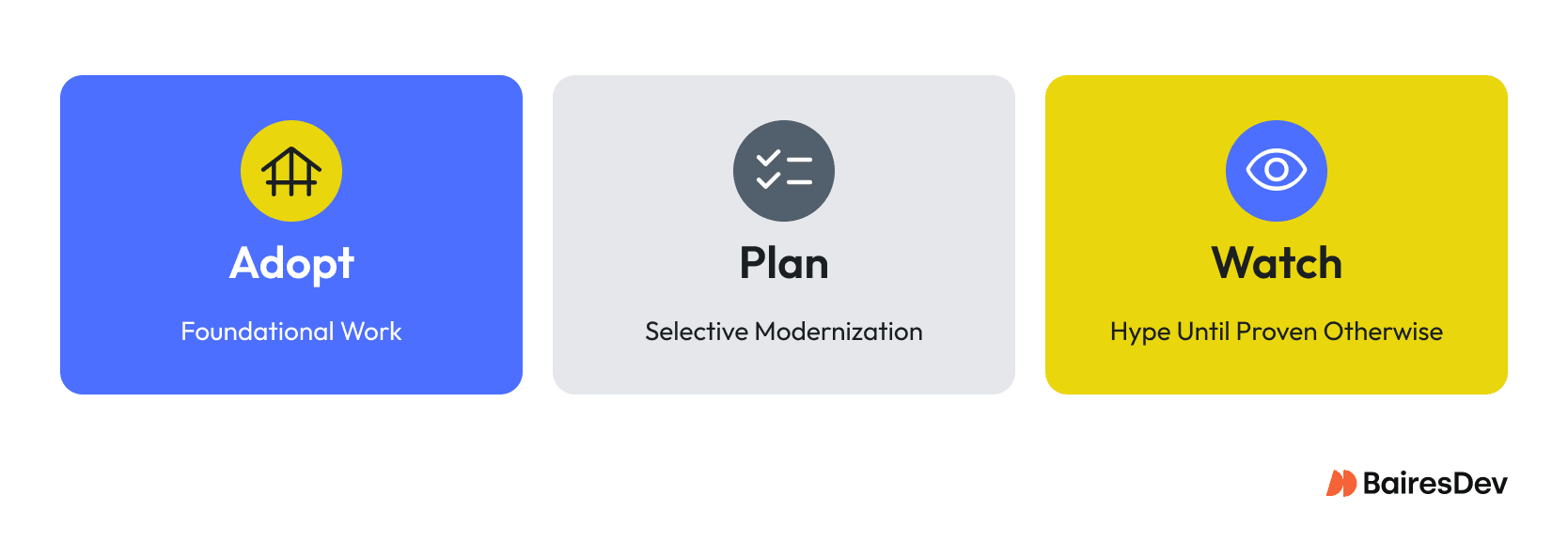
Most iOS trend lists flatten everything into equal weight. They aren’t. When you filter 2026 trends through a delivery‑risk lens, a clear hierarchy emerges: some are foundational, some deserve planned investment, and some are best treated as targeted pilots until the economics justify broader adoption. The matrix below reflects that split.
| Trend | Posture | Primary Impact | Owner | Effort |
| Toolchain & SDK Baselines | Adopt | Release predictability | Mobile platform | Medium, recurring |
| Swift 6 Concurrency | Adopt | Reliability & crash prevention | Platform + app leads | Medium-high, phased |
| Testing & CI Governance | Adopt | Delivery quality & release confidence | Engineering leadership + app leads | Medium |
| Privacy & Compliance Automation | Adopt | Compliance & release readiness | Platform + security | Medium |
| App Intents & Assistant Integration | Adopt | OS discoverability & task completion | Product + mobile leads | Medium |
| SwiftUI Modernization | Plan | Maintainability & platform alignment | Mobile + design systems | Medium |
| System-Level Integrations | Plan | User engagement & task completion | Product + backend | Medium |
| Local ML & On-Device Models | Pilot | Privacy, latency & specialized experiences | Product + platform | High |
Most delivery risk in 2026 lives in the “Adopt” column, not the “Watch” column. Teams that consistently execute the foundational work will usually outperform those chasing every new capability Apple announces.
Shipping Well in 2026
The teams that succeed in iOS development in 2026 won’t be the ones chasing every new surface Apple ships. They’ll be the ones that:
- Automate toolchain validation so new Xcode and SDK releases are tested before they become release blockers.
- Adopt Swift 6’s strict concurrency model and replace legacy GCD and callback-based concurrency where it creates delivery risk.
- Modernize continuously with SwiftUI, using it as the default for new interfaces while migrating legacy surfaces where it reduces long-term maintenance risk.
- Protect release quality with automated testing, including unit, integration, snapshot, and targeted XCUITest coverage for critical user journeys.
- Build privacy into the delivery pipeline through automated dependency scanning, privacy manifest validation, and PII detection.
- Prioritize App Intents for system integration, and adopt specialized local ML models only where they deliver measurable user value within device constraints.
The differentiator isn’t novelty. It’s delivery integrity.
Teams that consistently automate toolchain upgrades, enforce compiler checks, validate privacy requirements, and invest in reliable release automation will ship faster with fewer surprises. In 2026, the biggest competitive advantage isn’t another framework—it’s an engineering system that makes high-quality releases routine.
The boring work remains the leverage point.