

At a mid-sized healthcare SaaS company, a recent acquisition made its aging Java microservice architecture even more complex. Attempts to integrate with legacy services created more problems than they solved. When usage scaled up the system randomly crashed, IaaS and external SaaS fees escalated, and clients threatened to quit over instability.
Tech leads promised a reliable microservices environment that would enable faster development cycles. But instead of building new features at high velocity, teams are bogged down in fire drills and reactive mitigations.
This pattern isn’t unique — it’s a common symptom of microservices sprawl. Your job as a leader is to transform this architectural style so that it becomes the reliable workhorse it was intended to be.
This guide presents three leadership playbooks to achieve this goal:
- Diagnose to find the signs of microservices sprawl
- Stabilize with strategies and standards to increase uptime
- Right-size to a consolidated architecture that supports the enterprise
Each playbook keeps your teams focused on the work needed to reach the next milestone. The playbooks dovetail because some teams will move their services through the phases more quickly than others.
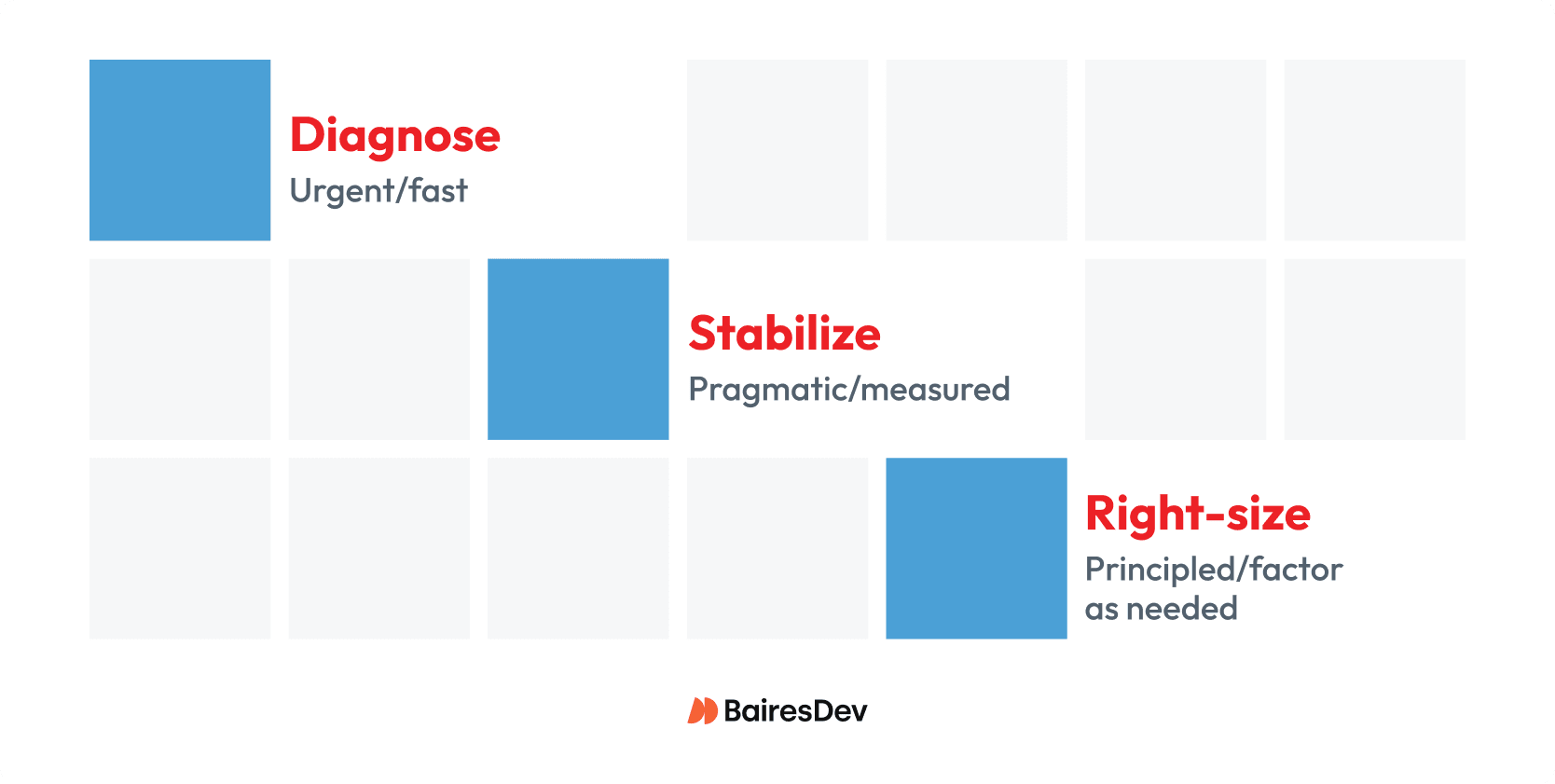
Figure 1: Diagnose and stabilize in practical steps that lead to right-sized architecture.
These playbooks apply governance and discipline that lead to a Java microservices architecture capable of steady maintenance and feature growth. And, they enable you to avoid big-bang rewrites that are the first aspiring developers reach for.
Prepare Your Teams for Action
Outages are never fun, but microservices are distributed systems, and partial failures are expected. Development teams are on the front lines, but the whole organization feels the pain. Prepare the organization for change as follows:
- Temporarily assign your best tech resources to a stabilization pod.
- Position your architects as the brain trust of the stabilization pod.
Communicate the phases that all teams will move through:
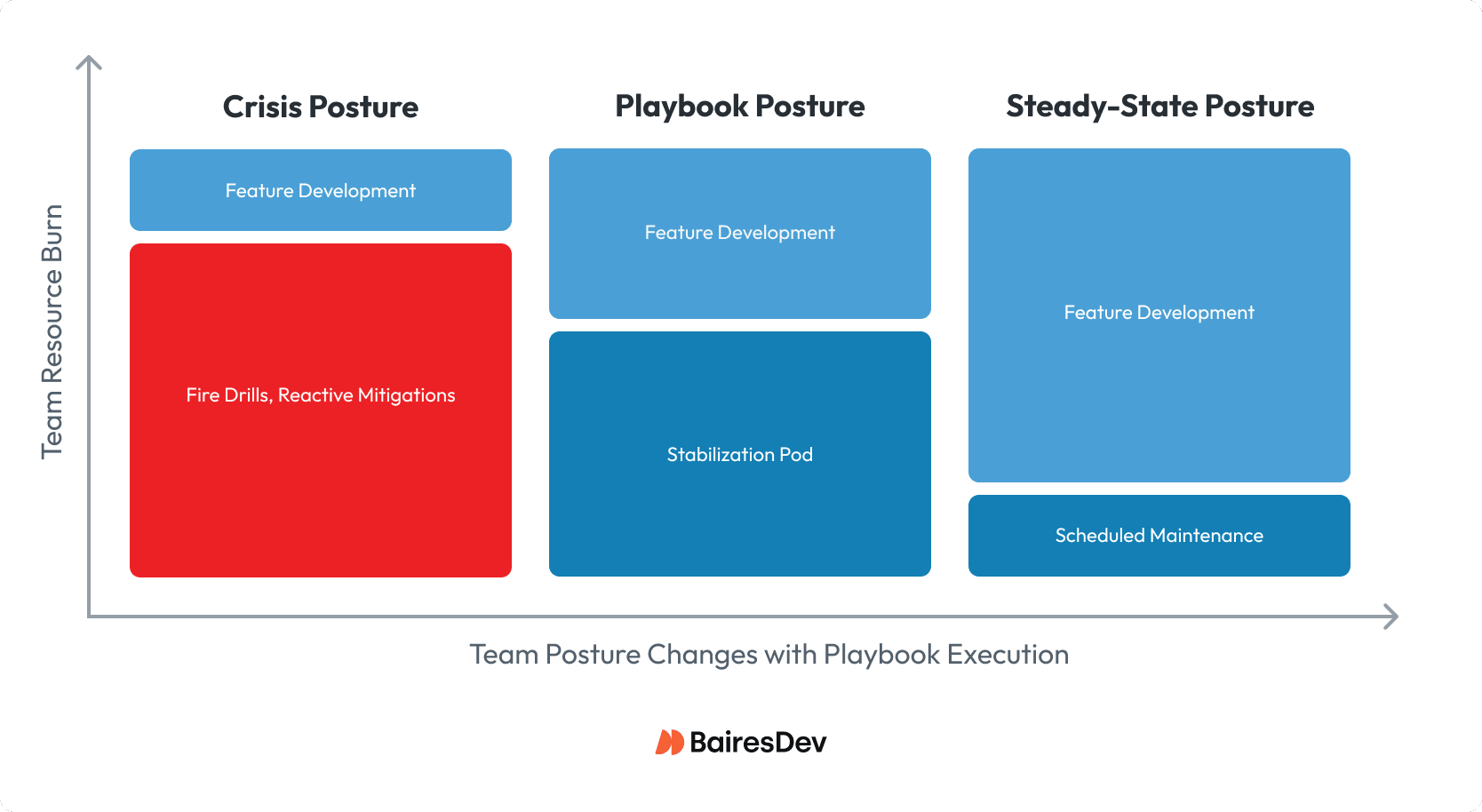
Figure 2: Move the organization from crisis to steady-state by applying the playbooks.
Stabilization Pod as the Means Forward
A system in crisis prevents efficient feature development. Teams react rather than plan. To break out of crisis posture, you must first move key personnel into a stabilization pod.
The stabilization pod team works alongside development teams to triage issues within each playbook. This playbook posture relieves enough pressure so that critical feature development can move forward and will help streamline development once you reach a steady state.
Dissolve the pod upon reaching steady-state posture. Teams will build new features efficiently using the guidance and discipline they learned during the playbooks.
Request the Topology Diagram
Ask your architects to produce a system topology diagram. This is a test:
- If they provide it fast, it proves they have visibility into the system.
- If they cannot, you’ve put them on notice to gain that visibility.
You don’t have to understand the topology in detail. Just use it as an executive-friendly map to show how the system transforms as the playbooks have their effect.
In this article we’ll work through a simple topology that has issues typical of microservices sprawl. You’ll see how the topology changes with each playbook.
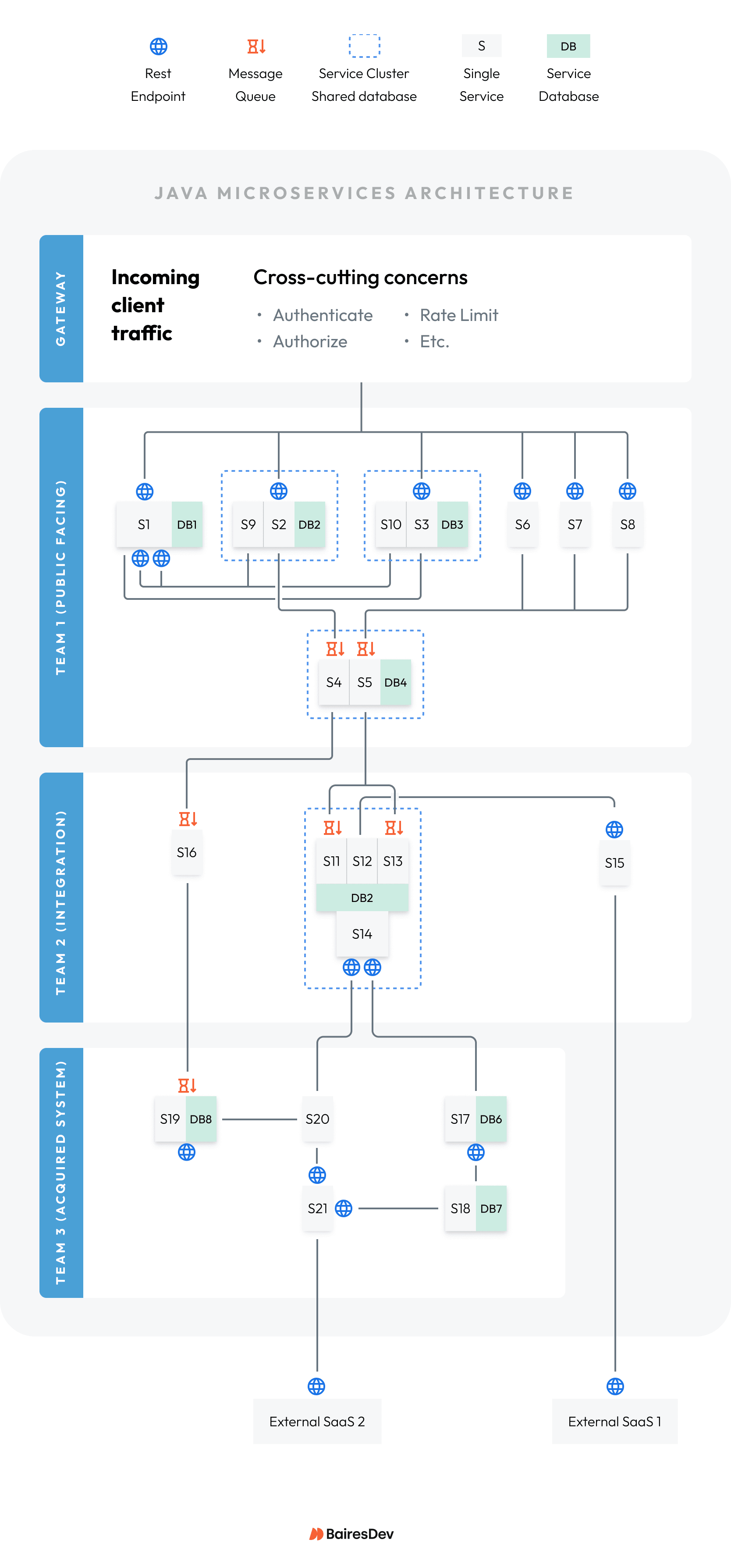
Figure 3: Example topology that has one of every typical microservices sprawl problem.
Your system’s topology will have many times the complexity. You’ll apply the playbooks in divide-and-conquer fashion for each subsystem.
Diagnose to Find the Signs of Microservices Sprawl
Diagnosis transforms pain to actionable data. It’s an art form enabled by no- and low-code moves.
Diagnose Playbook Scope and Goals
The diagnosis playbook’s goals are as follows:
- Risk: Find hotspot services and their blast radius.
- Reliability: Find the saturation points that slow transaction volume.
- Version Skew: Find the biggest risks in the Software Bill of Material (SBOM).
- Cost: Scrutinize role versus cost for each service.
Only three types of low-risk code changes should happen during diagnosis:
- Add internal metrics: Your Observability and Monitoring Platform (OMP) provides a lot of useful signals. Supplement with count and timing metrics for internal operations beyond the OMP’s reach. Together these will lead to root causes.
- Add useful logging: Invest in small code changes to add or improve log clarity. Metrics tell you what happened. Good logs tell you why.
- Fix narrow-scope bugs: These are rarely root cause problems. But fixing them provides quick wins that reduce noise and make deeper problems easier to find.
Inform everyone that the diagnosis playbook is not the time to be the redesign hero or to randomly fix version skew. Doing so could introduce new problems that cloud root causes.
Constrain the teams to only document design flaws and version skew. This will inform the downstream playbooks.
Risk: Find Hotspot Microservices and their Blast Radius
Your first step toward risk reduction requires finding hotspot services. Do this with two sources of truth:
- Dashboards
- Deployment problems
Dashboards
Ask your teams for dashboards that show when services fail:
- If they have good dashboards, then you have a faster path to find problems.
- If they do not, then you’ve put them on notice to build good dashboards.
Dashboards should feature these metrics:
- Error counts: Errors show where the fire is. If your OMP does not provide this out of the box, a quick no-code win is to create them with log-based metrics. To save cost, logs typically go to cold storage after a short window. Log-based metrics generate cheap, long-lived signals that are crucial for root cause analysis.
- Latency: Slowdowns show where the smoke is. Your OMP will show durations for common events like REST calls. Include p95 latency for RESTful web services. Add durations to critical internal events to supplement.
- Saturation: Saturation happens when slowdowns cascade. This shows up as exponential growth of queues, CPU, memory, and thread resources.
- Health check failures: Health check failures indicate services under duress. Enable Spring Boot’s built-in health checks. Track per service instance readiness and health. Task DevOps to create alarms for them.
- Traffic: Transaction volume stresses a system’s weak points. Correlate with the above to look for patterns.
Use dashboards and your OMP’s trace facility to find the blast radius of each failing service.
In our example: Teams used dashboards and logs to find these problems (marked red):
- Service 14: Repeat crasher, blast radius include Services 17 and 20. S14’s CPU pegs, health checks fail, service restarts. S17 and S20 to throw 404 errors while S14 is down.
- Services 2 and 3: Hotspot services with high error counts. Root cause analysis shows Services 2 and 3 are throwing errors related to database state.
Deployment Problems
You can find more signs of microservices sprawl when things go wrong during software releases. Here are some examples:
- Do gateway updates require extended system downtime?
- Do individual services deployments break connections with other services?
These are deeper symptoms of microservice sprawl.
In our example: Discussion dug deeper to these findings (marked orange):
- Gateway: Has business logic that applies rules to all customer-facing services (1, 2, 3, 6, 7, 8). Downtime increases because services must be stopped during gateway updates.
- Services 17, 18, 20, 21: Need configuration tweaks to “re-find” each other on the network, because the newly-acquired services do not use service discovery.
Reliability: Transaction Volume and Services Under Duress
From the customer’s perspective, slow services are just as bad as crashed services. Key symptoms point these out:
- Resource use spikes: High CPU/memory use, connections grow
- Transaction Slowdown: Duration metrics grow by huge factors
- Queue growth: Message queues get bigger exponentially and don’t recover
Slowdowns don’t make noise like errors, but they are every bit as important to find.
In our example: Teams discovered the following saturation points (marked yellow):
- Service 1: Saturated by REST calls from Services 9 and 10.
- Service 5: Queue backed up by message traffic from Services 6, 7, and 8.
Version Skew: Identify the Biggest Security Risks
Triage the most important version skew problems by running a security scan on the SBOM. Make note of top-priority security threats that it finds.
In our example: The security scan found two services with major security risks (marked purple):
- Services 15: Early REST library version when it calls external SaaS.
- Service 19: Deprecated parser library that can execute malicious code.
Cost: Find Consolidation Targets
Microservice sprawl can happen when teams “save time” by deploying new separate services (or by building microservices) instead of adding features to existing services. A cost-for-value review identifies services that should be consolidated:
- Role: How many functions does it serve?
- Compute cost: How big is the machine it uses?
- Pipeline efficiency: Does it have its own, or bundled with others?
- Release pain: Do you forget to redeploy it when other services change?
In our example: Teams conclude Services 6, 7, and 8 cost the team too much (marked blue). Each service costs the enterprise in these ways:
- Has its own build/deploy pipeline but serves a narrow purpose
- Nearly identical business logic
- Must be released as a group when any one of them changes
Diagnosis Playbook Outputs
The chart below provides a summary of diagnosis findings. These match the marked colors coded onto the example topology diagram just below the chart.
| # | Problem | Diagnosis Summary | Action Taken |
| 1 | Crashes/errors (red) | S14 CPU heats up, restarts, causes S17, S20 to throw errors while restarting.
S2, S3 throw data-related errors. |
Added metrics and dashboards to identify root cause |
| 2 | Deployment problems (orange) | Gateway should not have business logic.
Acquired services lack discovery. |
Deferred to stabilization |
| 3 | Slowdowns (yellow) | S1 saturated by S9, S10 REST calls.
S5 has queue backup. |
Deferred to stabilization |
| 4 | Priority version skew (purple) | S15, S19 use libraries with severe security exploits. | Deferred to stabilization |
| 5 | Cost of ownership (blue) | S6, S7, S8 require team resources despite small size | Deferred to stabilization |
Here is what the topology diagram looks like after finding the problems:
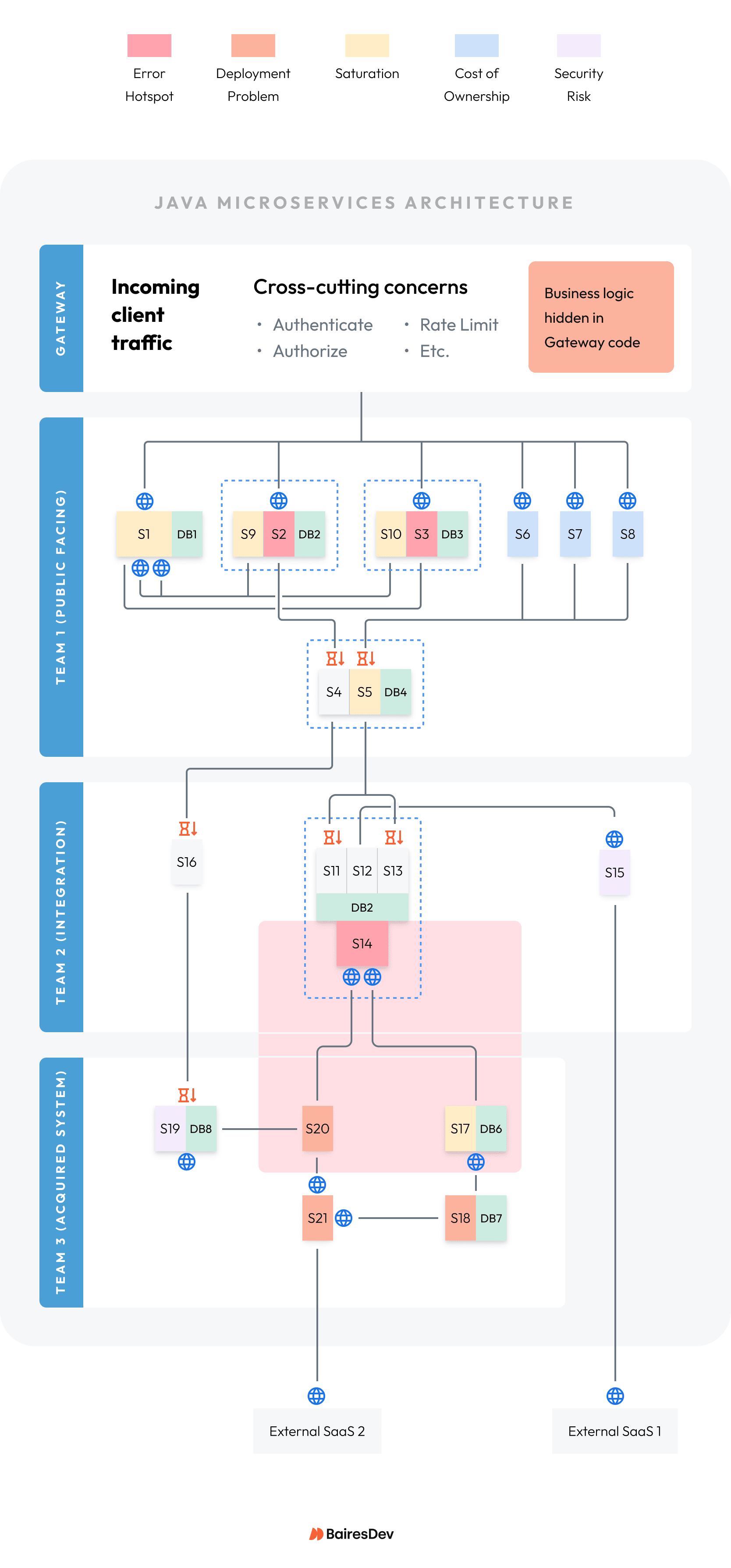
Figure 4: Highlight problems on the topology diagram for all teams to see.
These metrics, dashboards, and logging inform what to do next in the stabilization playbook.
Stabilize with Standards and Strategies to Increase Uptime
In the stabilize playbook, you’ll make pragmatic changes to keep the system from crashing. This buys time to figure out the optimal architecture in the final playbook.
Stabilize Playbook Scope and Goals
The stabilize playbook’s goals are as follows:
- Root cause analysis: Diagnosis got the problem analysis started, but it often takes more work to get to the true root cause.
- Best triage per problem: Determine what steps to take that avoid downtime and reduce risk until right-sizing can happen.
- High priority version alignment: Fix version skew only where it lowers risk and/or enhances stability.
Keep the changes pragmatic and measured. Do only what’s needed to increase uptime:
- Mitigate security risks: Mitigate top-priority security exploits by updating the indicated libraries. This will protect against expensive hacks.
- Add resilience: Apply resilience standards, so that all services have similar timeout, retry, and circuit-breaker policies. This the start of opinionated standards across all teams.
- Fix medium-scope bugs: Problems within a service, or between several services, can be addressed if they enhance stability without scope creep.
Inform everyone now is still not the time to be the redesign hero. A redesign now could add the fog of war to your stabilization efforts. Keep documenting design flaws and version skew to inform the plans for a right-sized Java microservices architecture.
Let’s work through the marked errors on the topology diagram and see what can be done to stabilize them.
Plug Security Holes
Highly-exploitable components in the SBOM must be upgraded ASAP. This is non-negotiable:
- Research: Find and apply the proper replacement.
- Expand JUnit coverage: Review unit and integration tests for the affected code.
- Expand QA coverage: Review and update functional and automated tests as needed.
Most library swaps are modest in scope. Plan for soak testing to make sure it works out.
In our example: The stabilization pod researched and recommended the following.
Legacy and newly acquired services have different libraries and versions:
- Update legacy S15 to use the same REST library as the acquired services it talks to.
- Update all services to a higher version that eliminates the exploit.
- Add REST unit test coverage that all services lacked to test changes.
Fix Parser Exploit:
- Update acquired S19 to a later version of a JSON parser to patch an exploit.
- Stabilization pod found no JUnit tests, provided a test harness for Team 2 to complete.
Analyze Ecosystem’s Adoption of Service Discovery
A production release can totally change a system’s topology. But when the lights come back on, service transaction partners still need to find each other.
Some dynamic changes that make service discovery a necessary discipline:
- Service-level: Upgrades, retirements, new players.
- Topology: Move services behind a load balancer, enforce health-aware load balancing.
- Geographic: Move services to a different availability zone.
- Horizontal scaling: Spinning up more instances to deal with increased loads.
- Restarts: Due to health checks, deployments, or hotspot recovery.
Given these challenges, every architecture must support a standard for service discovery.
In our example: The stabilization pod discovered the following.
- Legacy services use discovery: Services refer to each other by unchanging symbolic node names. Pipelines inject the names of a service’s transaction partners. Therefore, service discovery is a DevOps-level activity, as it should be.
- Acquired services do not use discovery: Services hard-code node names in application configuration files. Therefore, if DevOps changes node names without telling anyone, then deployments fail because services cannot find their transaction partners.
Stabilize Failing and Slowing Services
Diagnosis identified what was failing. But to stabilize you must understand why. If the diagnosis playbook’s metrics, dashboards, and logging have not pinpointed this, then add more until you can identify the root cause.
Then, you have the following no-code or low-code mitigations to stabilize services under duress:
- Vertical or horizontal scaling: Give the machine more horsepower (CPU, memory, GPU, disk) or keep the horsepower but create more instances.
- Retry/timeout/circuit-breaker: Failures happen for reasons beyond the system’s control. Retry, timeout, or circuit-break measures can let it succeed “later”.
- Focused bug fixes: Failures can happen because of internal system behaviors. In this case, it may be possible to patch the code to mitigate internal problems.
Any of these mitigations give you the breathing room to fight another day. Any new insights carry forward into the right-size playbook.
In our example: The stabilization pod mitigated these problems in priority order.
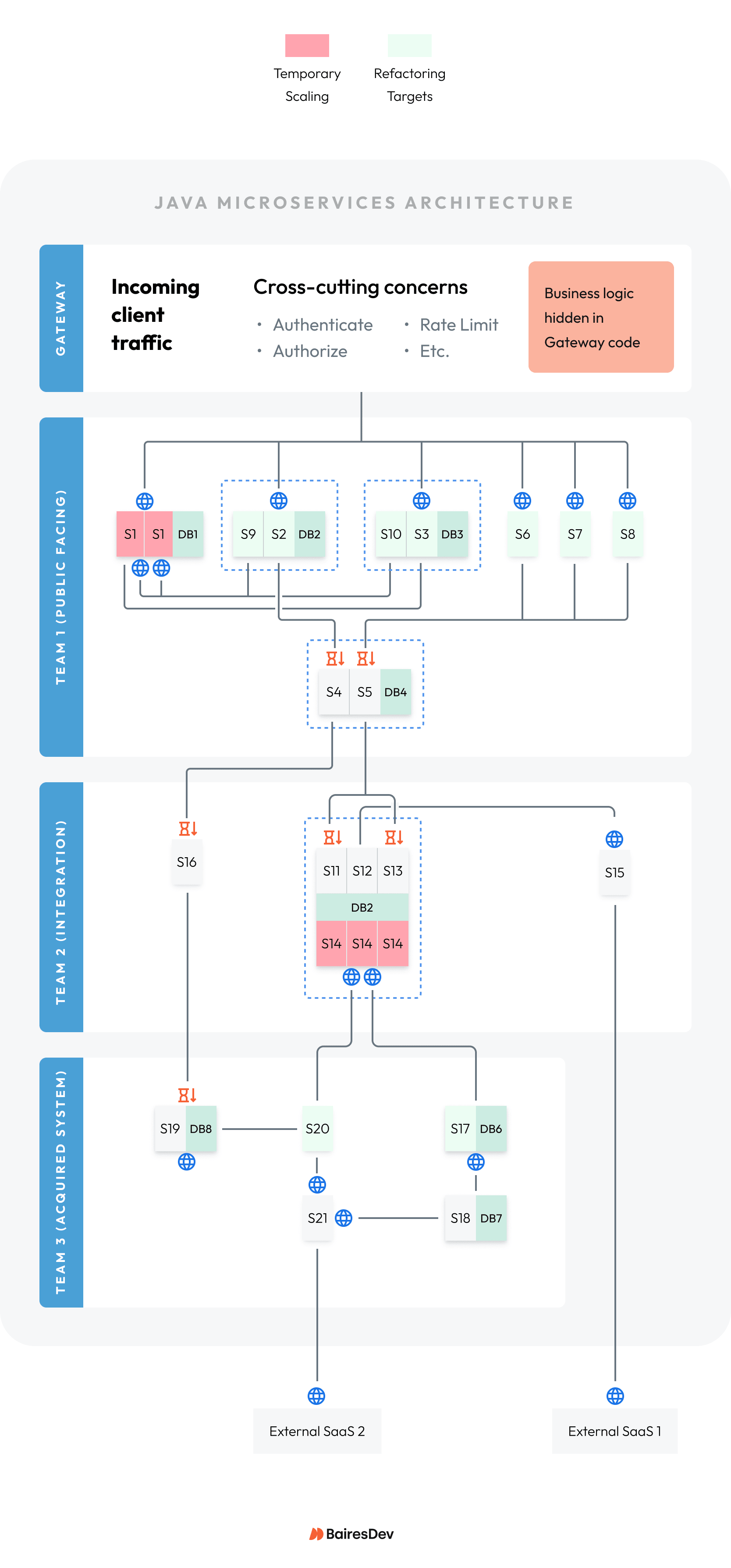
Priority 1: Blast radius around S14:
- S20 pumped huge data volume from External SaaS 2 into S14 during peak hours. The high volume also heated up S17.
- Vertical scaling S14 tolerated more volume, but failures still happened at peak volume.
- Horizontal scaling S14 due to high CPU use stopped failures, but was more expensive.
Team members agreed to keep the expensive horizontal scaling option. However, they also recommended a right-size change to replace fragile synchronous REST linkages in favor of an asynchronous message queue to more gracefully deal with data volume variations.
Priority 2: Error hot spots in S2 and S3:
- History showed S9 and S10 were added to keep S2’s and S3’s databases synchronized with S1’s database, so that new features could be added more quickly to S2 and S3.
- Further analysis proved that the data-related errors were random, but root cause could not be determined conclusively.
Team members agreed to table devising a solution until Priority 3 was analyzed. Sometimes, putting several problems together leads to a superior overall solution.
Priority 3: Saturation involving S1, S9, and S10:
- Digging deeper into logs and traces, the teams found that S1 was saturated by S9 and S10 pestering it with REST call volume to get data updates.
- The responses from S1 were delayed due to saturation, so S2 and S3 data state fell behind, leading to the random errors.
- This led to a root cause of S1 “doing too much” with REST and message-sending responsibilities.
- An attempt to horizontally scale S1 to more instances succeeded in reducing its saturation and reduced the incidence of data inconsistency errors.
Team members agreed to keep S1’s horizontal scaling, even though it temporarily increased cloud expenses. However, they recommended a right-size solution to combine the five services into a healthier relationship that costs less.
Priority 4: Message queue backup:
- S3 processes messages from a queue that backs up during peak hours.
- Log analysis shows S6, S7, and S8 sent duplicate messages during peak hours.
- Root cause was assigned to the duplicate messages.
The stabilization pod recommended a temporary fix to detect and filter out duplicate messages, allowing S3 to keep up with the load even during peak hours.
The architects recommended a right-size solution to combine S6, S7, and S8 into a single service to consolidate processing. This will allow them to share common logic and eliminate the duplicate messages at the source.
Remove Business Logic from Gateway
Gateways have a protective purpose within a microservices architecture. They are meant to police incoming requests and deal with common concerns shared by all microservices.
Here are some examples:
- Authentication, authorization: Make sure the incoming actor is allowed to run requests, and deny actors lacking the proper credentials and privileges.
- Route to service: Examine the incoming request to figure out the best service within the ecosystem to handle it.
- Rate limiting: Guard against overloading the ecosystem’s microservices.
- Request shaping: Enhance the incoming requests to make them more digestible to the handling services.
- Response shaping: Enhance the outgoing response to match the client device form factor (mobile phone, tablet, laptop).
The gateway’s purpose is to free each internal microservice from having to deal with these common, cross-cutting concerns. This allows the services to be focused, lean, and efficient.
However, gateways are like any other service in that they have code to support their features. And where there’s code, there’s temptation to add logic that doesn’t belong in the gateway. Such logic can lead to extended system downtime and fragile system behaviors.
When that happens, it’s time for a conversation that starts with, “Umm… how did we get here?”
In our example: The stabilization pod discovered the following.
- Team 1 often requested that during the gateway update, customer-facing services (S1 through S8) must be shut down.
- It turned out Team 1 chose to put business rules into the gateway that determine which customer-facing service to call for certain requests. All instances of the gateway needed to be updated to prevent incorrect call routing.
- Team 1 put the rules into the gateway because they lacked a better place to do it.
After some research, the architects recommended a right-sizing change to add a domain orchestration service that would hold the business rules. The gateway would route to the domain orchestration service, and the domain orchestration service would route to Team 1’s services.
Stabilize Playbook Outputs
The chart below provides a summary of stabilization findings and actions. The topology diagram shows the results of the improvements so far.
| # | Problem | Stabilization Summary | Action Taken |
| 1 | Crashes/errors | S14 CPU heats up, restarts, causes S17, S20 to throw errors while restarting.
S2, S3 throw data-related errors. |
Horizontal scale-out, plan for right-size
(both problems) |
| 2 | Deployment problems | Gateway should not have business logic.
Acquired services lack discovery. |
Coordinate through DevOps and plan for right-size
(both problems) |
| 3 | Slowdowns | S1 saturated by S9, S10 REST calls.
S5 has queue backup. |
Horizontal scale-out, plan for right-size
Duplicate message filter |
| 4 | Priority version skew | S15, S19 uses libraries with severe exploits. | Mitigated |
| 5 | Cost of ownership | S6, S7, S8 send duplicate messages at peak system volume. | Plan for right-size |
Right-Size to get a Consolidated Architecture
The third pathway implements the stabilization playbook’s recommendations. This will right-size the topology in ways that mitigate the problems for good.
Right-Size Playbook Scope and Goals
The stabilize playbook’s goals are as follows:
- Technology refactoring: Decide technology changes to increase service resilience and scalability.
- Right-size microservice: Decide appropriate topology changes to correct the relationship between problematic services.
- Technology introduction: Bring new technologies into the topology that solve problems that cannot be mitigated in any other way.
You can permit more ambitious code changes for the right-size playbook. But temper planning to keep them within the scope of this playbook.
Note: The discussion presented in this right-size playbook looks “short” in comparison to the diagnosis and stabilization playbooks. But keep in mind that right-sizing takes a lot of planning and time to accomplish. This will be the longest playbook on the calendar.
Technology Refactoring
The stabilization playbook’s findings show where technologies need to be replaced. Here are some typical examples to choose from:
- Database type: The initial choice was relational, but actual usage is document-centric.
- Database cluster type: Divert traffic from a read/write node to a read-only node.
- Introduce caching: Make often-used data available with a first-class cache layer.
- Move to asynchronous processing: Alleviate brittle REST calls with message queues.
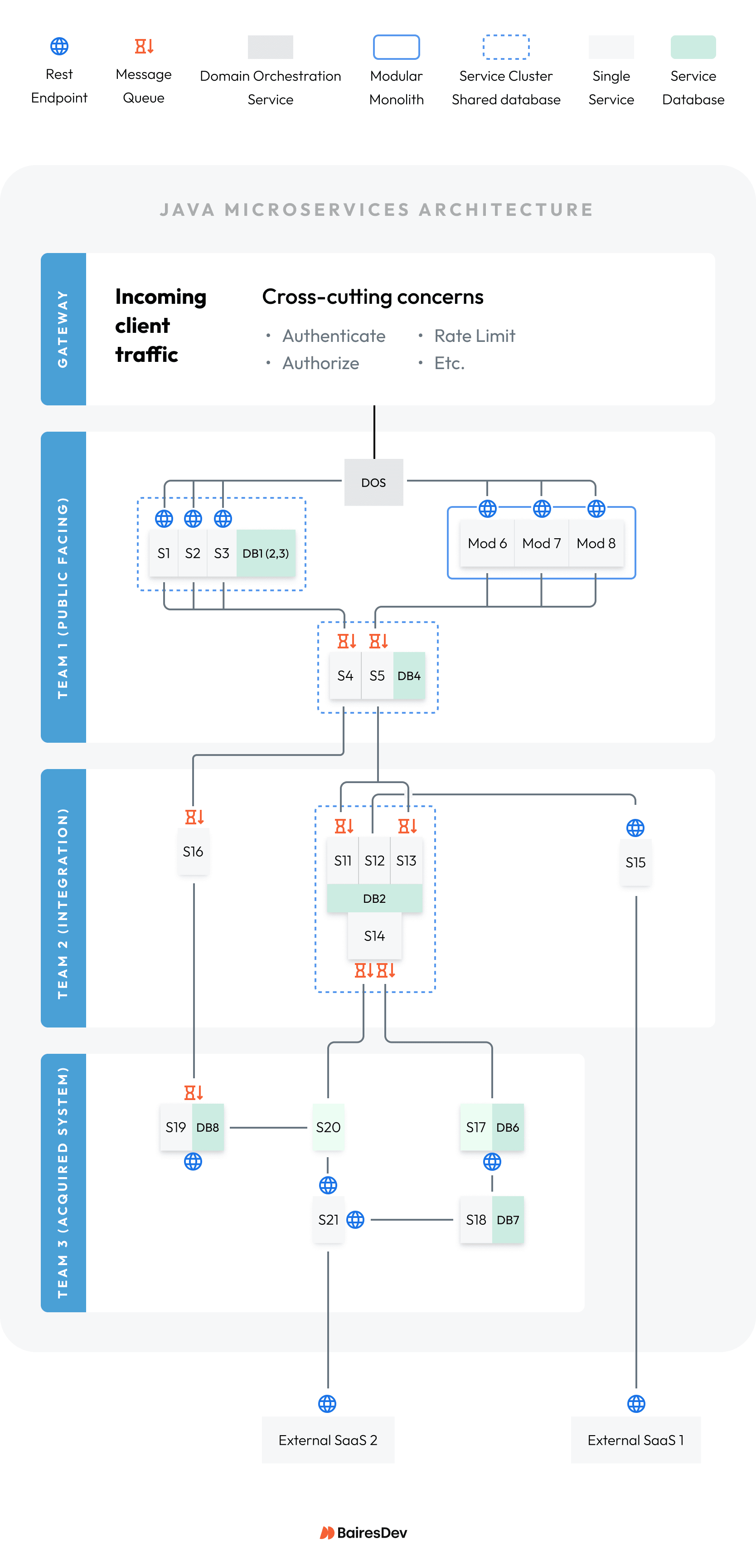
In our example: The team implemented the stabilization finding to replace the synchronous REST linkages between S17/S20 into S14 with a robust asynchronous message queue:
- S14 no longer needed horizontal scaling, saving cost.
- S14 stayed up by plugging away at message processing, adding stability.
- S17/S20 ran without errors due to sending messages instead of making REST calls.
Right-Size Closely-Related Microservices into Clusters
When pressed for time, development teams may opt to deploy a new service rather than modify an existing service. However, the small/new services can have hidden dependencies to legacy services like these:
- API coupling: REST calls or messages sent for a one-off purpose because “it works for now”.
- Behavioral coupling: Assumptions by one service about how another service operates that break when behaviors change.
- Operational or deployment coupling: Services that need to restart in a certain order because one has something that the other needs.
These transaction partners benefit from getting refactored into a closer, contract-driven relationship.
In our example: The teams determined that S1, S2, and S3 should live in a cluster:
- The cluster has a single database that combines their data.
- S9 and S10 were no longer needed with the shared database.
- S1 was no longer bogged down with all the data sync REST calls and ran normally.
Right-Size Poor Cost Performers into Modular Monoliths
It’s easier than ever to create new services fast. Developers may opt to create new services just because they can, contributing to microservice sprawl:
- Microservice Platforms: Spring Boot enables developers to build a new service quickly.
- Microservice templates: Templates enable developers to clone a new service with a set of common features.
- Generative AI: Generative AI takes templates a step further by generating the entire scaffold for a new service, to order, with custom features each time.
Services that are very similar benefit from being deployed together in a single service called a modular monolith.
In our example: Separate teams each built and deployed one of S6, S7, and S8:
- Used a new AI-based service to generate their microservices.
- Did not compare code and realize duplicate messages would be sent.
- The stabilization pod decided to move their code into a modular monolith and clarify the common logic that eliminated duplicate messages.
Technology Introduction
It can become necessary to introduce new technologies into a system as it evolves. Examples include:
- Message streaming: High-volume message streams need a heavy-duty platform to handle the load.
- Analytical model management: Data-rich environments need a data science and machine language (DS/ML) platform to manage the training and deployment of models.
- Business rules engine: Organizations that have a lot of business rules need tools to manage and apply the rules.
Adopting a new technology requires organization buy-in.
In our example: Team 1 put business rules into the gateway for lack of a better place to house them:
- Architects first needed to understand the problem.
- They recommended a domain orchestration service (DOS) to house the business rules.
- The DOS simplified the relationship between the gateway and the customer-facing services and allowed the business rules to be removed from the gateway.
Right-Size Playbook Outputs
The chart below summarizes the final adjustments to a right-sized system.
| # | Problem | Right-Size Summary | Action Taken |
| 1 | Crashes/errors | S17/S20 message S14 instead of REST calls, handling traffic surges gracefully. | Technology refactoring |
| 2 | Data errors | S1, S2, S3 combined into a cluster with a shared database, eliminating saturation. | Topology adjustment to shared cluster |
| 3 | Message errors | S6, S7, S8 combined into a single service to fix logic. | Topology adjustment to modular monolith |
| 4 | Domain orchestration service | Business rules removed from Gateway, moved into domain orchestration service, and calls routed accordingly. | Topology adjustment to use DOS between gateway and services |
Wrapping Up
The playbooks help your teams transform a system into a stable ecosystem that can grow and evolve. Each playbook accomplished goals that enabled the next playbook’s success. Once finished, you can establish steady-state behaviors to keep the system healthy
Team Development Habits to Transform
The saying “haste makes waste” is one of the main reasons why microservices sprawl happens. You’ve seen a few causes in this article:
- Rushing new services into production creates hidden dependencies.
- AI-generated scaffolding fails to receive oversight before deployment.
- Deferring SBOM updates to save time now.
- Integrating acquired, complex systems into a legacy architecture.
A Java microservices architecture needs constant investment to keep it tuned and agile:
- Establish a gradual upgrade schedule for the SBOM inventory.
- Set goals for major upgrades like Spring Boot and Java.
- Maintain security scans that inform the SBOM upgrade cycle.
- Encourage architecture oversight for all new features.