
Carlos is a senior software engineer with 10+ years of experience specializing in Java and Python. At Pinterest, he engineers the backend for the Shopify App, powering automatic product syncing and Pin creation for thousands of merchants.
Expertise



Flaky tests are one of the more persistent drains on engineering organizations running automated regression suites at scale. Before getting into causes and fixes, here’s what engineering leaders need to know:
Key Points
- Flaky tests are automated test cases that were once reliable and have become unreliable. They’re a common problem in mature test automation running at scale, and like any persistent problem, they need a persistent response rather than a one-time fix.
- Flaky tests create technical debt on both sides of the pipeline: they can hide real product defects from developers and force testers into extra failure analysis, reruns, and repair work.
- Flakiness has surface-level causes, like poor test case isolation, environmental differences, and timing issues, plus deeper organizational causes. Teams need to address both to reduce test flakiness for good.
- Leaders can fix flaky tests with tools and processes for analyzing test history, rerunning failed tests, and flagging tests for repair, and can prevent new ones through code review, shift-left testing, and parallel or randomized test execution.
A flaky test is an automated test case that has passed reliably before but now fails some of the time and passes some of the time when it runs against the same product under the same conditions. It’s a common problem in mature automated regression test libraries running at scale, and it tends to get worse rather than better without deliberate intervention.
The cost adds up faster than many teams expect. A 2025 study found that an earlier industrial case study reported developers spending up to 1.28% of their time repairing flaky tests, at a monthly cost of about $2,250. The same 2025 study found that flaky tests often fail in clusters that share underlying causes, suggesting that addressing a common root cause can resolve multiple flaky tests at once.
That makes flaky tests more than a test-automation nuisance. They consume engineering capacity and can weaken the quality signal leaders rely on when deciding whether a release is ready.
This article covers what makes tests flaky, high-level strategies for fixing and preventing flakiness, and how engineering leaders can tell whether those strategies are actually working.
What Makes a Test Flaky
A flaky test behaves as though it passes or fails at random: it can produce different outcomes without a corresponding change to the test or the application under test. A practical detection rule is that the two most recent results for the same test case include both a pass and a fail. But that’s a detection rule, not a complete definition of flakiness.
Flaky tests aren’t actually random. Each one has a cause, and most fall into a short list of causes, sometimes in combination. Research and industry practice commonly identify test order dependency, concurrency, asynchronous behavior, environmental differences, network dependencies, and other external dependencies among the causes of flaky tests.
A Simple Process for Identifying Flaky Tests
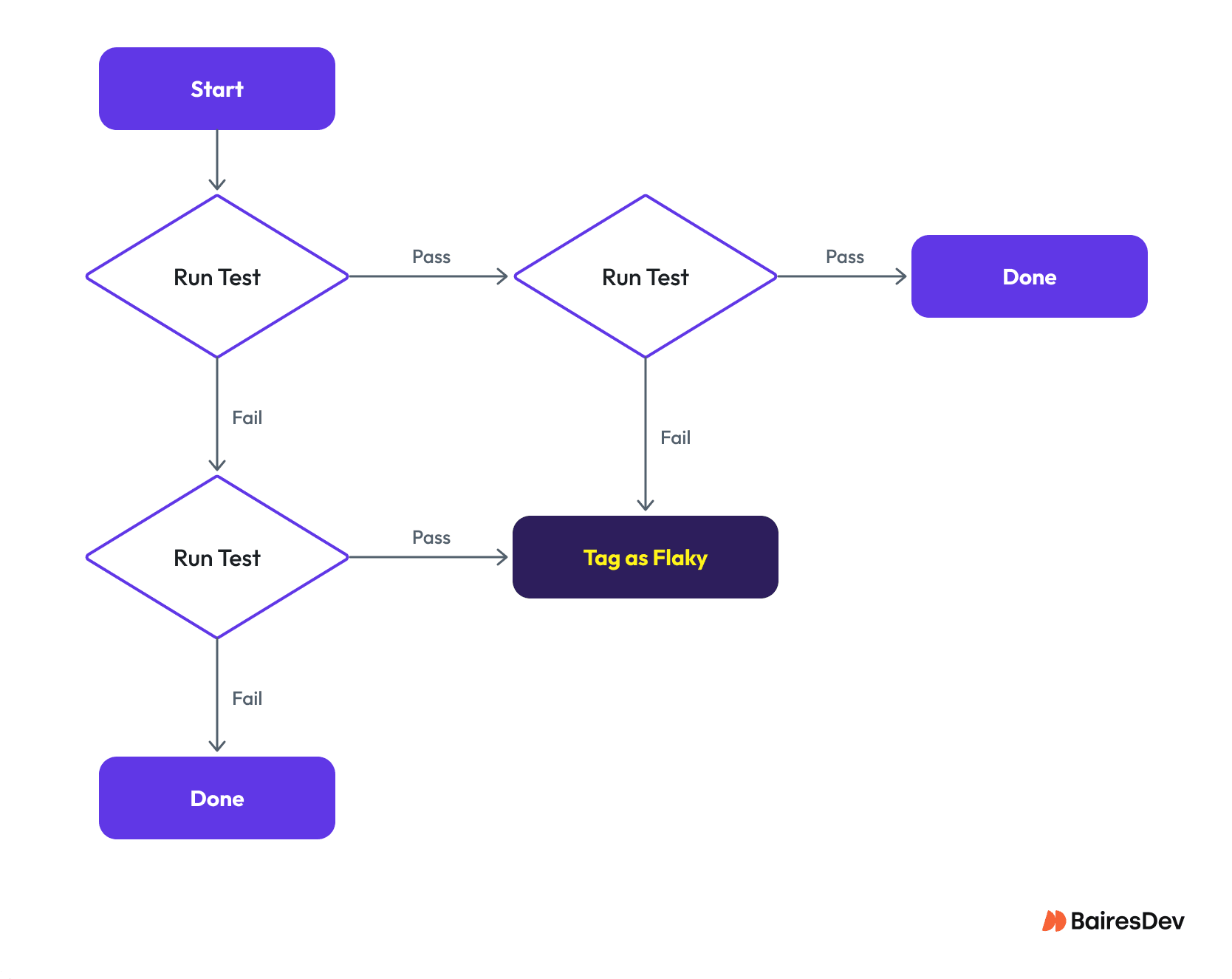
The table below shows the most common immediate causes of test flakiness, what teams should look for, and what they need to fix each one.
| Immediate Cause | What Teams Should Look For | What Teams Need To Fix It |
| Lack of test case isolation | Passes on its own but fails when it runs after other tests. That usually means an earlier test left behind a state or postcondition the failing test doesn’t expect, a classic example of test order dependency. | Rerun the affected tests in the same order, reverse order, and random order. Use targeted subsets to isolate which test is creating the dependency, then refactor so neither test relies on the other’s state. |
| Environmental differences | Passes locally but fails in CI/CD, or the reverse. | Compare pipeline and local commands, software versions, configuration, and execution environments to isolate the difference. |
| Bad verification conditions | Sometimes passes and sometimes fails, but always at the same verification check. | Review the assertion, test output, logs, automation code, and product requirements to confirm whether a more reliable condition exists to check. |
| Timing issues | Intermittent timeout or failure because the expected condition doesn’t appear when the test checks for it. | Synchronize with the application’s actual state instead of relying on a fixed wait. Adjust polling frequency and timeout to match the condition. Check an ephemeral toast notification frequently over a short window, and a persistent condition less often with a longer timeout. |
| Concurrency issues | Passes sequentially but fails when tests run in parallel, a special case of lack of isolation. | Reproduce the failure under parallel execution and look for shared state or race conditions between tests running at the same time. |
| Resource contention | Failures cluster at particular times of day or under particular workloads. | Check for competing pipelines, scheduled jobs, or other teams pulling on the same disk space, compute, or network resources during the test run. |
| Sequence dependencies | Fails unless a specific test runs first, another special case of lack of isolation. | Identify the shared setup or state and refactor dependent tests so each one is self-sufficient. |
| Brittle web UI locators | Fails while locating an element, especially after a UI change or when identifiers are dynamic. | Use stable locators and verify the behavior that matters instead of fragile implementation details. |
| Inappropriate test code reuse | Starts failing differently after shared test code gets reused or refactored, as if the test’s own behavior changed. | Trace shared methods and test steps to confirm whether a refactor unintentionally changed their behavior. |
Google’s 2024 testing guidance makes a related point about brittle tests: a test is brittle when it fails because of an innocuous change rather than because something important has gone wrong. Google recommends more expressive test APIs and narrower assertions that focus on the behavior that actually matters.
These are some of the immediate, mostly technical causes of flaky tests. Next, here’s a look at the deeper, organizational causes that tend to produce them.
The Organizational Roots Behind Flaky Tests
Flaky tests have more than immediate causes. They also have deep causes that are mostly organizational rather than technical, and a single deep cause can feed several immediate causes at once. Teams can usually fix immediate causes on their own, but deep causes typically need leadership involvement to address and prevent.
| Deep Cause | Immediate Causes It Feeds | What To Look For | How Leaders Can Fix It |
| Limited experience among engineering staff | Lack of test case isolation, bad verification conditions, timing issues, sequence dependencies, brittle web UI locators, inappropriate test code reuse | Engineering staff repeat the same mistakes or lean on known anti-patterns again and again. | Have senior engineers mentor less-experienced staff, share best practices in brown-bag sessions, and make sure teams have time allocated to repair flaky tests rather than working around them. |
| Organizational silos | Environmental differences, resource contention, inappropriate test code reuse | Poor communication or unclear ownership for issues that require development, test, build, and IT teams to work together. | Make sure development and test teams get timely cooperation from other teams when investigating environment differences or resource contention. |
| Lack of infrastructure automation | Environmental differences | Persistent differences in test results between development and CI/CD pipeline environments. | Adopt infrastructure automation, and have development and build teams work from the same scripts or playbooks to configure machines where practical. |
| Lack of test result analysis tools | Lack of test case isolation, sequence dependencies, concurrency issues | Teams take a long time to analyze or fix flaky tests. | Fund tools, or the time to build them, for rerunning tests, running tests in random order, and running tests in parallel. Faster tooling speeds up discovery, analysis, and fixes. |
| Overuse of system and acceptance tests | Most immediate causes except concurrency issues | Regression suites take hours to run, and more than 5% of tests are flaky at any given time. | Sponsor a shift-left effort to move appropriate coverage from system and acceptance tests toward unit and integration tests, which generally have fewer dependencies and can be easier to keep reliable. |
| Inadequate test case reviews | Most immediate causes except resource contention | Flaky tests keep catching teams by surprise. | Require automated test cases to go through review early in the development lifecycle, including an explicit flakiness risk check. |
Google’s testing guidance identifies reliability as a core property of a good test suite and notes that as systems and their tests grow, non-determinism and flakiness can creep in. It also points out that the maintenance cost of larger systems and their tests can grow with dependency churn and changing requirements.
The 2025 study of systemic flakiness adds another reason to look beyond individual test cases. Across 10,000 test suite runs from 24 Java projects, the researchers found that 75% of flaky tests failed as part of a cluster, with multiple flaky tests sharing underlying causes. That suggests teams can sometimes reduce more flakiness by addressing a shared dependency or environmental problem than by fixing each failing test independently.
Reading the Trend Line: How to Tell the Fixes Are Working
Leaders can tell whether efforts to manage flaky tests are working by watching whether the percentage of flaky tests trends down over time. There will always be spikes in failed and flaky tests tied to breaking changes, environment outages, and other one-off causes, but the underlying trend, with those events understood and accounted for, should point downward.
The acceptable level of flakiness depends on test level and business risk. Unit tests should provide a highly reliable signal, and a flaky unit test should be treated as a defect rather than accepted as normal background noise. Integration tests and system tests have more dependencies and can therefore be harder to keep deterministic.
The original framework’s 1% integration-test and 5% system-test thresholds can be useful as internal warning levels, but they shouldn’t be treated as universal industry standards. Teams should establish their own baseline, track the trend, and define thresholds that trigger investigation.
The most useful metrics include:
- Flaky test rate: What percentage of the test suite produces inconsistent results?
- New flaky tests: How many newly introduced tests become flaky?
- Time to repair: How long do flaky tests remain unresolved?
- Repeat flaky failures: How often do known flaky tests continue to fail?
- Flakiness by environment: Do failures cluster around particular CI agents, environments, or infrastructure conditions?
- Flakiness by test level: Is the problem concentrated in UI and system tests, or does it extend into lower-level tests?
This measurement approach matters because the goal isn’t simply to make the test report look cleaner. The goal is to make test results trustworthy again.
Google’s 2024 guidance puts the principle clearly: reliable tests should fail when an actual problem has been discovered, while flaky failures consume developer time and resources.
Frequently Asked Questions
What causes flaky tests?
Immediate causes of flaky tests include poor test case isolation, environmental differences, timing issues, incorrect verification conditions, concurrency issues, resource contention, test order dependency, brittle UI locators, and inappropriate test code reuse. Deep, organizational causes include limited engineering experience, silos between teams, a lack of infrastructure automation, insufficient supporting tools, and inadequate test case reviews.
How do teams detect flaky tests?
Flaky tests can be detected by comparing historical test results from comparable test runs, typically in CI/CD pipelines. A practical detection rule is to flag a test when its recent results include both a pass and a fail. Teams can then investigate the test history, execution order, environment, concurrency, and related failures to determine whether the inconsistent result is actually caused by flakiness.
What should happen once a test case becomes flaky?
A test case that doesn’t pass consistently, whether flaky or outright failing, should get a defect logged for analysis and, where appropriate, a fix, unless a defect already exists for it. If the test stops being flaky before the defect gets worked, the team should still understand why its behavior changed before closing the issue.
Should automated reruns count in the regression test results?
No. Automated reruns can help investigate a failure, but they shouldn’t change the original test result for reporting purposes, and only original results should factor into release-gating decisions.
A test that fails in the latest run and passes on rerun still failed in the original run. Counting the rerun as a pass can inflate the apparent pass rate and hide a flaky test. Google similarly recommends that test failures be actionable from the original test result rather than requiring another run simply to understand what happened.
Should teams quarantine flaky tests?
Quarantine can be useful as a temporary containment measure when a known flaky test would otherwise block critical delivery, but it shouldn’t become the permanent solution.
A quarantined test should remain visible, have an owner, and have a defined path to repair or retirement. Removing a flaky test from normal reporting indefinitely creates a different problem: the organization loses visibility into a weakness in its test suite. The better objective is to investigate flaky tests promptly, fix them when appropriate, and keep their status visible while they’re being addressed.
Carlos is a senior software engineer with 10+ years of experience specializing in Java and Python. At Pinterest, he engineers the backend for the Shopify App, powering automatic product syncing and Pin creation for thousands of merchants.
Expertise