



Key Points
- In-place pod resize reached General Availability in Kubernetes v1.35 (December 2025), allowing CPU and memory to be resized without restarting pods.
- Start with OpenCost for cost attribution, rightsize with VPA, and adopt spot and reserved pricing only after utilization has stabilized for 60 to 90 days.
- GPU utilization averages just 5% across production clusters, making it one of the highest-impact areas for cost reduction.
Your Kubernetes clusters are almost certainly overprovisioned.
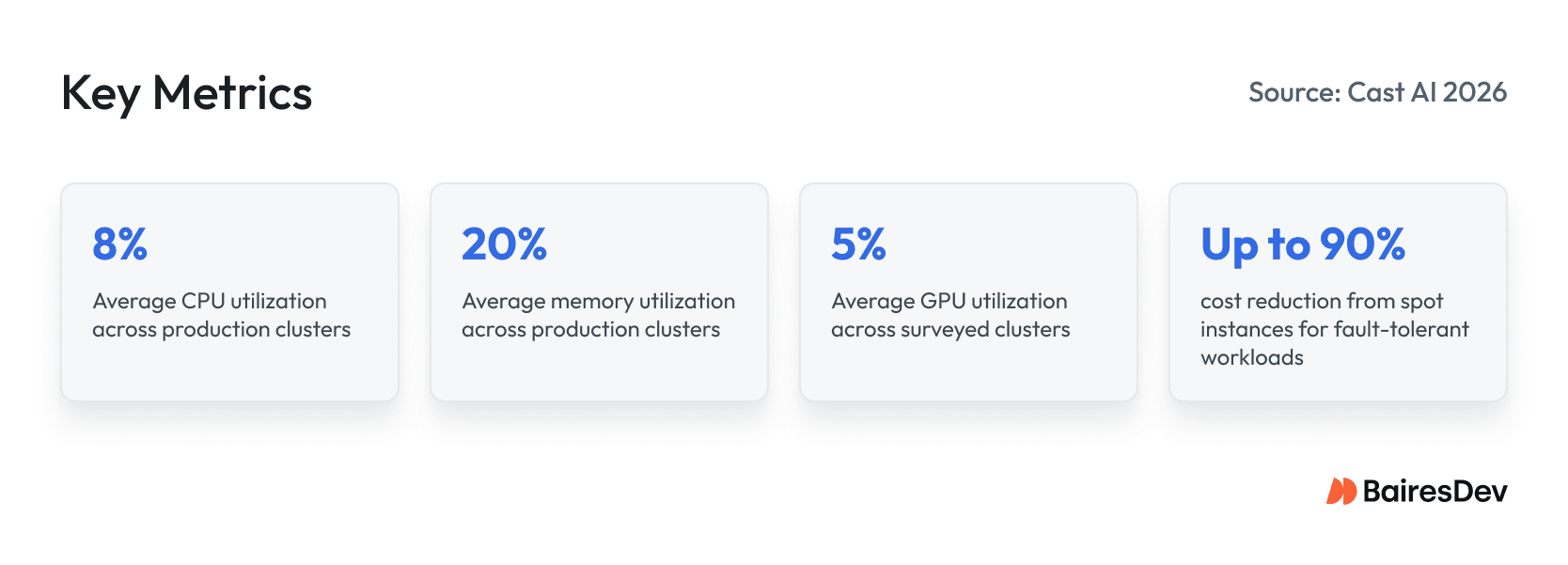
According to Cast AI’s 2026 State of Kubernetes Resource Optimization, which analyzed tens of thousands of production clusters, average CPU utilization has fallen to 8% and memory to 20%. GPU utilization sits at 5%. CPU overprovisioning jumped to 69% year over year, and memory overprovisioning reached 79%.
Kubernetes cost optimization is an operating discipline. It requires visibility, team-level accountability, and guardrails that let you rightsize and autoscale without creating incidents.
Here is how to get visibility into what your clusters actually cost and rightsize safely with the tools available in Kubernetes today.
What Is Kubernetes Cost Optimization?
Kubernetes cost optimization is the practice of reducing the gap between the resources a cluster allocates and the resources its workloads actually consume, without sacrificing reliability or application performance. It combines cost visibility and attribution, rightsizing of requests and limits, autoscaling, and node pricing strategy under a recurring FinOps operating loop.
The goal is spend that is predictable, attributable to the teams that drive it, and tied to decisions the organization actually controls.
Why Kubernetes Cost Is Hard to See on Your Cloud Bill
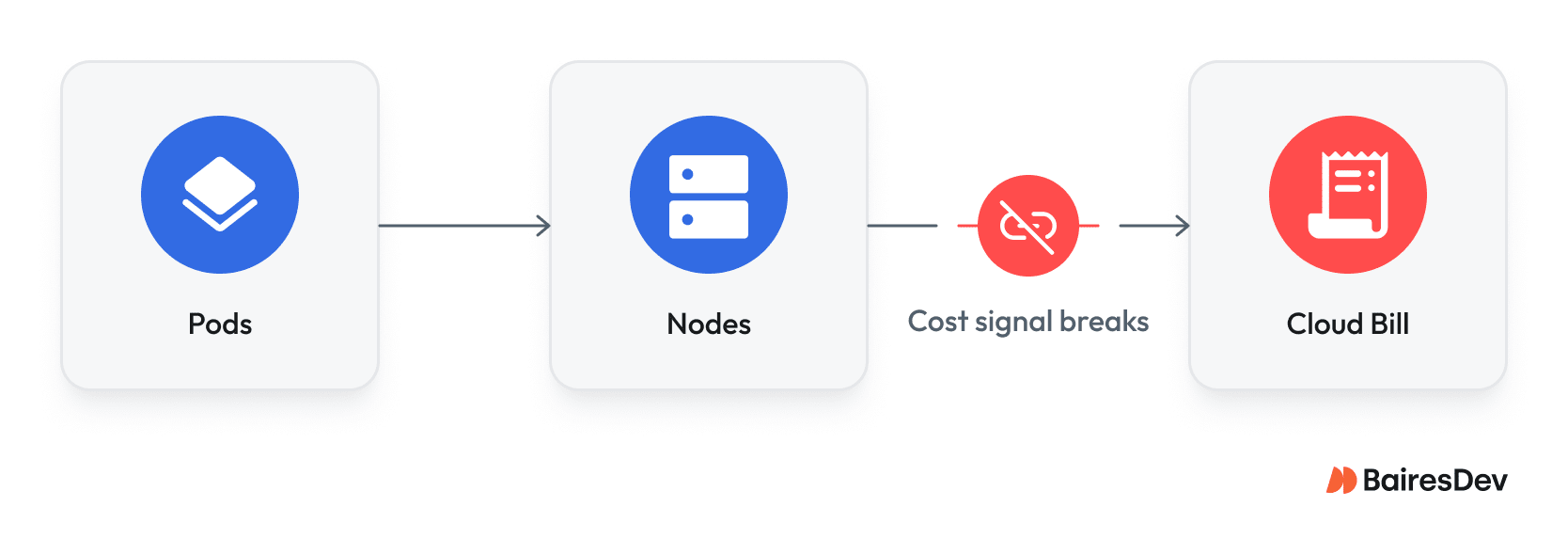
Kubernetes puts layers of abstraction between resource consumption and your cloud cost. Pods consume CPU and memory. Pods run on nodes. Nodes are cloud instances you pay for by the hour. Between scheduling overhead, shared infrastructure, and idle capacity, the link from a container’s real utilization to a line item on your invoice breaks down fast.
The challenge breaks into three parts.
First, even AWS Cost Explorer doesn’t provide pod-level breakdowns by default. Second, clusters share resources across teams and namespaces, making attribution ambiguous. Third, CPU overprovisioning has reached 69% and memory overprovisioning 79%, meaning teams routinely provision resources that workloads never request.
Cost Visibility and Attribution: The Foundation You Cannot Skip
Effective spend governance starts with seeing what you spend and attributing it to who spends it, broken down by team, service, product, and environment.
The OpenCost specification provides a vendor-neutral standard for cost allocation across Kubernetes-native constructs: namespaces, labels, deployments.
OpenCost is a CNCF incubating project, and the open-source data layer most production environments start with. IBM acquired Kubecost in September 2024 and folded it into its FinOps Suite. It extends OpenCost with multi-cluster dashboards, discount handling, and historical data retention.
Most production environments use two or three complementary tools across different layers:
| Category | Representative Tools | What It Does | Applies Changes? |
| Open-source data layer | OpenCost (CNCF) | Standard cost allocation model, single-cluster visibility | No |
| Allocation and chargeback | IBM Kubecost, CloudZero | Multi-cluster cost attribution, showback and chargeback | No |
| FinOps and unit economics | Vantage, Finout, CloudZero | Unit-cost and cross-cloud reporting | No |
| Autonomous optimization | Cast AI, ScaleOps, nOps, Sedai, PerfectScale | Automated rightsizing, bin packing, spot automation | Yes |
Note: StormForge’s ML-based rightsizing is now part of CloudBolt, following CloudBolt’s acquisition of StormForge in March 2025.
The Biggest Waste Patterns in Kubernetes Environments
Before you tune autoscalers or commit to reservations, you have to pinpoint where money is leaking.
| Waste Pattern | Signal | Fix | Owner |
| Overprovisioned nodes | CPU/memory utilization below 20% | Right-size instance types; enable cluster autoscaler | Platform/SRE |
| Idle workloads | Pods running with near-zero consumption | Shut down or schedule for low usage periods | Service owners |
| Cluster sprawl | Multiple clusters with low utilization | Consolidate; use namespaces for isolation | Platform |
| Storage drift | Orphaned PVs, old snapshots, excessive log retention | Optimize storage; reduce storage costs | Platform/SRE |
| Data transfer costs | High cross-AZ or egress on cloud bill | Topology-aware routing; review data transfer charges | Platform/FinOps |
The underlying pattern is always the same: teams over-request because the cost of requesting too little is felt immediately. The cost of requesting too much stays invisible until the quarterly review. That asymmetry drives most cluster spending overruns, and only leadership-level visibility reliably breaks the cycle.
How Do You Rightsize and Autoscale Safely Now That In-Place Resize Is GA?
Resource requests and limits are the control plane for both pod scheduling and infrastructure spend. When teams set requests too high, nodes fill on paper while real utilization stays low. When requests are too low, pods get evicted or throttled. Getting this right is the single highest-leverage optimization in a Kubernetes environment.
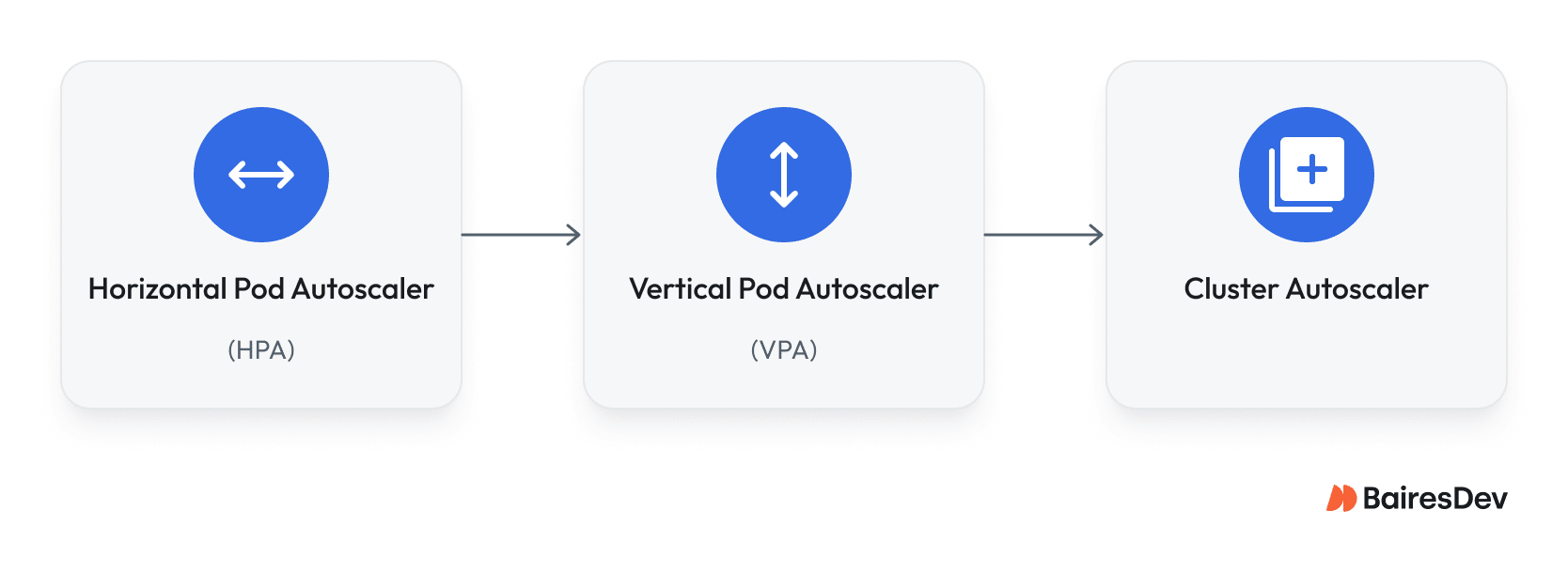
Kubernetes provides three autoscaling tools.
- The Horizontal Pod Autoscaler scales replica count based on CPU, memory, or custom metrics.
- The Vertical Pod Autoscaler adjusts CPU and memory requests per pod based on observed consumption.
- The Cluster Autoscaler adds or removes nodes when pods cannot be scheduled, or nodes sit idle.
On AWS, Karpenter provides faster, more flexible node provisioning with bin packing capabilities that reduce the total number of nodes required.
In-place pod resize reached General Availability in Kubernetes v1.35. Before this feature, changing CPU or memory resources required deleting and recreating the pod. In-place resize allows CPU and memory to be adjusted on running pods without restarting them. VPA’s InPlaceOrRecreate update mode attempts a live resize first and falls back to pod recreation only when necessary.
The critical rule is to never run HPA and VPA on the same metric.
If HPA scales on CPU while VPA adjusts CPU requests, they compete and create autoscaling failures, replicas thrashing with every traffic spike, and VPA-triggered restarts causing latency regressions, to name a few. Configure HPA on application-level metrics such as request rate or queue depth. Let VPA manage resource requests based on observed usage.
Safe Rollout, Step by Step:
- Deploy OpenCost (and IBM Kubecost for multi-cluster environments) to attribute spend by namespace, label, and deployment.
- Enforce namespace labeling standards for team, service, environment, and cost center using admission policies (OPA/Gatekeeper or Kyverno).
- Set resource quotas and limit ranges per namespace so workloads cannot claim unlimited capacity.
- Run VPA in recommendation mode (updateMode: Off) to identify overprovisioned workloads without changing anything.
- Apply rightsizing to non-production environments first, with SLO guardrails. On Kubernetes v1.35, use in-place pod resize to adjust CPU and memory without pod restarts.
- Configure HPA on application metrics (request rate, queue depth) and keep it off the same metric VPA manages.
- Enable Cluster Autoscaler or Karpenter for node-level scaling and consolidation.
- Move fault-tolerant workloads to spot instances with Pod Disruption Budgets and graceful shutdown hooks.
- After utilization is stable for 60 to 90 days, commit to reserved instances or savings plans matching the real baseline.
- Run the operating loop with monthly spend reviews, weekly waste triage, and continuous utilization monitoring.
Admission controllers such as OPA/Gatekeeper and Kyverno enforce resource request standards at deploy time, rejecting pods with missing resource limits, enforcing labeling requirements, and capping maximum resource requests per container.
This is how you prevent oversized requests from shipping in the first place.
Which Node and Pricing Strategy Fits Each Workload Type?
After stabilizing resource allocation through rightsizing, the focus shifts to node-level pricing, where the biggest savings live.
Classify your Kubernetes workloads by interruption tolerance. Stateless, batch, and CI/CD workloads can handle preemption. Latency-sensitive and stateful services cannot. For tolerant workloads, spot instances deliver significant savings, up to 90% versus on-demand pricing, across major cloud services. But spot capacity can be reclaimed on short notice (two minutes on AWS, give or take). Your clusters need proper handling: graceful shutdown hooks, pod disruption budgets, and automatic rescheduling.
For predictable baseline capacity, reserved instances and savings plans lock in lower prices over one-to-three-year terms. The key rule: do not commit to reservations until your utilization is stable. Locking in a commitment on overprovisioned clusters just locks in waste at a discount. Rightsize first, observe real consumption for 60-90 days, then commit.
For most organizations, the hybrid approach delivers the strongest cost and operational efficiency. Run baseline workloads on reserved capacity. Layer spot capacity for burst and fault-tolerant workloads. Use on-demand only as a bridge. This combination can lower costs by 40-60% compared to running everything on-demand. The resulting reduction in compute costs and cluster costs changes the business outcomes conversation with your CFO.
This pricing model applies whether you run Kubernetes in hybrid environments, multi-cloud environments, or a single provider.
Guardrails, Policies, and the Operating Model
Without guardrails, gains from any optimization effort erode within months. Every deployment shipped without resource quotas or required labels adds cost you cannot track, attribute, or control. Sustainable cost effectiveness requires policy enforcement and a recurring review loop, not a one-time cleanup sprint.
Resource quotas and limit ranges at the namespace level are the foundation. Quotas cap total CPU and memory per namespace, enforcing fair resource allocation and preventing any team from consuming unlimited capacity. Limit ranges set defaults and ceilings for individual containers, so pods that ship without explicit requests still get reasonable resource configurations.
Labeling standards are non-negotiable for effective cost management. Every Kubernetes deployment needs labels for team, service, environment, and cost center. Admission policies enforce this at deploy time. If a workload ships without required labels, it does not land. This is what makes cost attribution reliable rather than aspirational, and it is what makes detailed reports actionable rather than approximate.
Sustained Kubernetes savings come from disciplined operational processes rather than one-time cleanup efforts. DevOps engineers who run cost discipline as an operating loop, not a quarterly fire drill, establish the quotas, labeling standards, and autoscaling policies that keep infrastructure costs aligned with business goals while ensuring every optimization is introduced safely.
The operating loop:
- Monthly: Review spend by team and service. Flag trends. Adjust quotas where needed.
- Weekly: Triage waste and anomalies from your dashboard. Feed optimization findings into the backlog.
- Continuously: Monitor utilization against requests. Track data transfer costs, storage costs, and orphaned resources. Tune autoscaling policies as workloads fluctuate and application demands change.
Top 12 Kubernetes Cost Optimizations to Run Safely
Start at the top. Items 1-4 are low-risk foundations you can ship in a sprint. Items 5-10 require measurement and SLO guardrails. Items 11-12 are ongoing cost management discipline.
| # | Optimization | Risk | Validation Metric |
| 1 | Deploy cost visibility tooling (OpenCost, IBM Kubecost) | Low | Cost allocation coverage by team and service |
| 2 | Enforce namespace labeling standards | Low | Percentage of deployments with required labels |
| 3 | Set resource quotas per namespace | Low | Quota utilization rate per team |
| 4 | Add limit ranges with sane defaults | Low | Containers running without explicit requests |
| 5 | Rightsize requests using VPA recommendations | Medium | CPU and memory actual usage vs. requests |
| 6 | Enable Cluster Autoscaler or Karpenter for node scaling | Medium | Node utilization rate; pending pod count |
| 7 | Configure HPA on application-level metrics | Medium | Replica count vs. traffic; latency P99 |
| 8 | Shut down idle workloads and clean orphaned resources | Low | Pods with near-zero resource consumption; orphaned PV count |
| 9 | Consolidate underused Kubernetes clusters | Medium | Per-cluster utilization; operational overhead |
| 10 | Adopt spot instances for fault-tolerant workloads | Medium | Interruption rate; job completion rate |
| 11 | Optimize storage: remove orphaned PVs and enforce storage class policies | Low | Storage costs trend; orphaned volume count |
| 12 | Commit to reserved instances after utilization stabilizes | Low | Reservation coverage vs. actual usage |
Expert Perspective
Kubernetes cost work compounds when you treat it as an operating loop. The teams whose spend tracks with growth instead of outpacing it are the ones who get visibility in place early, assign ownership clearly, and put a few guardrails around resource usage before scaling.
Whether you have 5 clusters or 50, the goal is not to chase the lowest possible bill. It is to make spend predictable, visible, explainable, and tied to decisions the team actually controls.
The inflection point comes when cost stops being a platform problem and becomes something service teams can reason about. That is also where the safety discipline matters most. Tightening requests in production based on a week of clean averages sounds reasonable until a nightly batch peak you had not measured turns it into OOM noise and latency spillover.
It is not dramatic, but it is enough to remind everyone that optimization is still a production change: baseline real peaks, roll out gradually, validate against reliability signals, and keep rollback easy.
Once you operate that way, the work gets calmer. Rightsizing becomes part of normal maintenance rather than a special initiative.
Over time, platform engineering teams keep velocity, finance gets fewer surprises, and cost control stops being something someone has to remember to schedule.
Key Takeaways
- Visibility and attribution come first. You cannot optimize spend that cannot be assigned to a team or service.
- Rightsizing resource requests delivers the highest impact. In-place pod resize in Kubernetes v1.35 makes many adjustments non-disruptive, removing the main barrier to continuous rightsizing in production.
- Guardrails are what prevent savings from eroding after the initial optimization effort.
- The operating model drives long-term cost effectiveness more than any single tool or optimization effort.