

Key Points
- Enterprise WordPress security issues tend to be governance failures: plugin sprawl, slow patching, privilege creep, and infrastructure with unclear ownership.
- Organizations need to treat marketing-owned WordPress sites like a production system with everything that entails.
- WordPress security breaches follow a well-documented and predictable pattern, so serious organizations should be able to manage them once the groundwork is ready.
WordPress Risks Usually Stem From Governance Failures
WordPress remains one of the most widely used platforms behind public-facing websites. That scale makes any WordPress site a persistent target, and new WordPress vulnerabilities surface routinely.
The bigger issue is that WordPress often sits outside the standards applied to other production systems. It’s easy to launch, customize, extend, and it’s owned by non-engineering teams (at least partly). That means public-facing asset WordPress often escape routine engineering discipline.
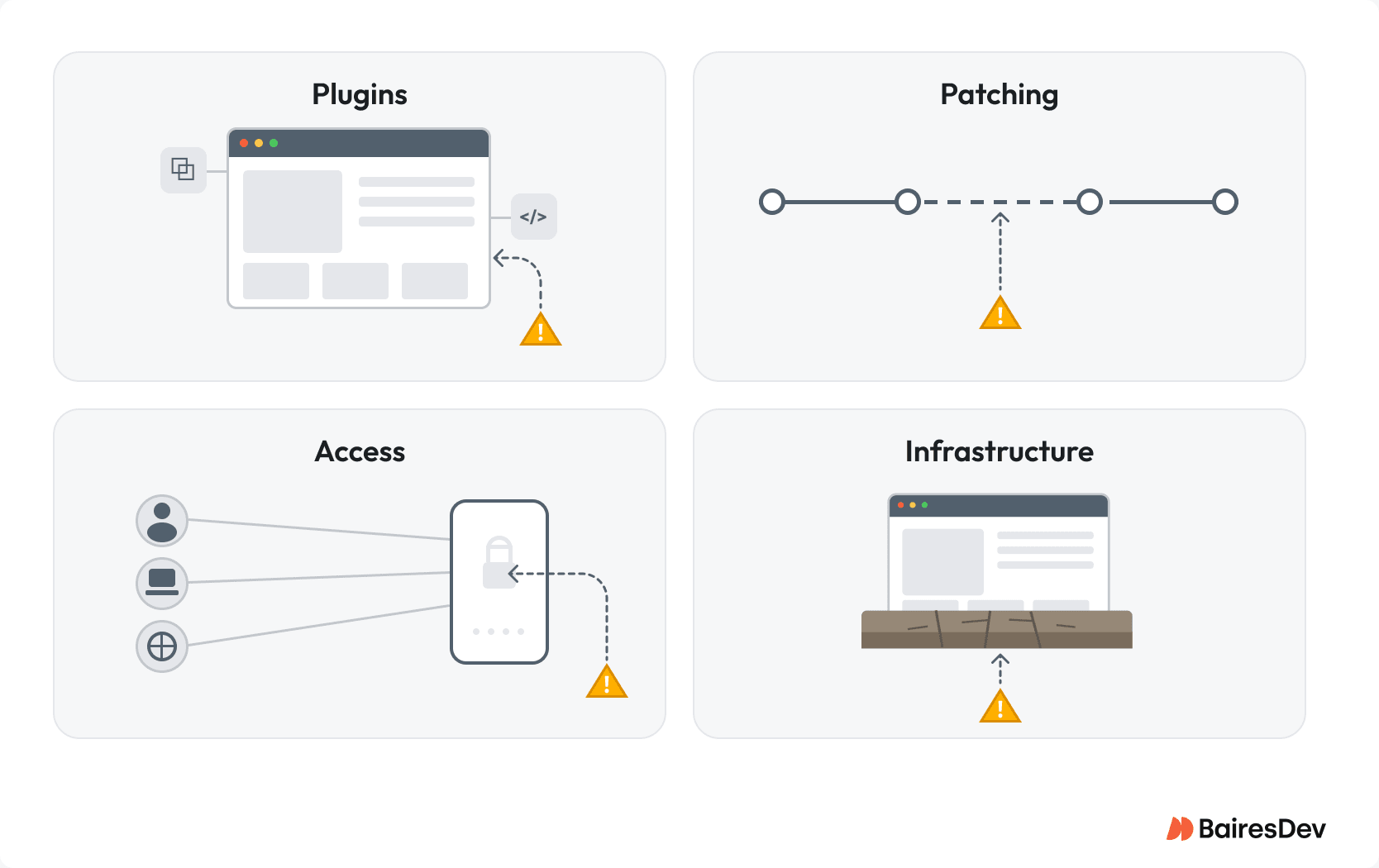
In practice, most exposure comes from four places:
- Plugin and theme sprawl
- Slow or inconsistent patching
- Weak privileged-access control
- Unsupported or poorly governed infrastructure
When a WordPress website is compromised, the impact rarely stays with the website team. It pulls in incident response, engineering capacity, stakeholder communication, and sometimes audit or reputational fallout that can get extremely damaging.
When WordPress Becomes an Expensive Exception
When sprawl is controlled, ownership is clear, and the site follows the same patching and access discipline as the rest of your estate, WordPress is a workable platform. Problems start to emerge when your WordPress site becomes an operational exception.
It can become expensive when several of the following start to compound:
- A large or fast-growing plugin inventory
- Heavy customization that makes safe patching harder
- Agency-led delivery without strong internal ownership
- Marketing autonomy without dependency review
- Privileged-access sprawl across internal and external contributors
- Weak staging or release discipline
- Compliance requirements that exceed the team’s operating maturity
At that point, the organization has to decide whether to govern WordPress like a production system, or accepts it as a disproportionate operational burden to keep a non-core platform safe.
In some scenarios, the better answer might be to migrate off or move to a locked-down headless model. For engineering leaders, that threshold is is usually when the platform starts to consume more attention than its business value justifies.
Themes and Plugins Are the Key Dependency Surface
The biggest WordPress security risks sit in the themes and plugins layer, not the core. The WordPress ecosystem is large, uneven, and relies on third-party services with (very) different standards for patching and security review, i.e., some are maintained by enterprises while others are maintained by a single enthusiast halfway around the globe.
Patchstack’s 2024 vulnerability data found 7,966 WordPress vulnerabilities, with 96% in plugins and 4% in themes. The practical takeaway? Your WordPress plugin inventory is a third-party dependency portfolio. This means plugin decisions are production dependency decisions.
A team should ask five questions before approving a plugin:
- Is the plugin actively maintained?
- Does it have a credible vulnerability and patch history?
- Is it business-critical, or merely convenient?
- Does it introduce elevated privileges or fragile custom workflows?
- Is there a clear owner for lifecycle decisions?
This is where teams often create avoidable risk. A plugin that solves a very narrow marketing problem can also introduce elevated privileges, brittle workflows, or a vendor with no real support path. In these cases, the convenience is offsent by the recurring cost.
The implication is straightforward: marketing should not install plugins without engineering review, approval criteria, and a named owner. Without that policy, plugin sprawl is the default.
Patchstack’s State of WordPress Security in 2025 found that more than half of the vulnerabilities reported to plugin developers in 2024 were still unpatched at the time of public disclosure, and 24% had no patch available at disclosure.
Nulled or pirated themes and plugins deserve separate treatment. They are a supply chain risk, not a licensing edge case. They should be banned by policy and detected at the platform layer.
Patch Delays Turn Known Issues Into Live Exposure
In many WordPress installations, patching is treated as routine maintenance. For high-visibility sites, that framing understates the risk.
The window between disclosure and exploitation is short. In April 2025, Patchstack documented a critical SureTriggers plugin vulnerability being exploited within just four hours of appearing in its database. So, patch availability does not equal risk reduction in all cases. Risk only falls when the team can assess, validate, and deploy quickly enough to matter.
This is where most operating models break, because nobody owns version monitoring, vulnerability triage, staging validation, and deployment end-to-end. When those responsibilities scatter across teams, known risks stay live in production. Updates slip because roadmap work feels more urgent, staging environments are weak, automatic updates are disabled out of caution, or no one wants to be the person who broke production.
Teams that handle this well share three controls for keeping WordPress secure:
- Monitoring of installed versions against known-vulnerability sources such as WPScan
- Staging-based validation for high-impact updates
- Named ownership for patch decisions and escalation
The question is who decides on a critical plugin patch in the first 24 hours, and what process lets that decision execute safely?
The stakes are high. Wordfence’s 2024 Annual Security Report found 35% of disclosed WordPress vulnerabilities from 2024 remained unpatched at the time of publication in early 2025. A fix that exists but is not operationalized is still live exposure.
Access Risk: Login Credentials and Privilege Creep
Access-control failures in WordPress environments are structural. Yes, weak passwords and reused login credentials still appear in incidents, but the larger issue is quietly expanding privilege that no one reviews. Provisioning and deprovisioning drift across WordPress users on internal teams, agencies, and former contributors. Plugins layer their own permission models on top of native roles, often without consistent review.
The result is a larger blast radius for routine attacks: phishing, credential reuse, session theft, endpoint compromise.
Patchstack’s 2024 data showed that broken access control accounted for 14.19% of disclosed WordPress vulnerabilities—one of the most common vulnerability classes in the ecosystem.
Multi-factor authentication (MFA), often deployed as two-factor authentication, helps. It does not solve the underlying governance problem. Shared credentials, unnecessary admin rights, and persistent elevated permissions remain high-risk conditions even with MFA enabled.
The operating model is familiar:
- least privilege
- regular privilege review and regular security audits of admin accounts
- disciplined provisioning and deprovisioning
- restrictions on shared or persistent admin access
- enforced strong passwords and limit login attempts policies for any retained password-based access
Legacy endpoints add another exposure, and xmlrpc.php is the canonical example: its system.multicall capability lets attackers bundle thousands of authentication attempts into a single request, turning brute force attacks into a single-shot operation. The WordPress REST API and any exposed login page deserve the same scrutiny. The leadership question is whether the organization has a policy for legacy access paths and enforces it.
“Just a Website” Is Still a Production System
A well-maintained WordPress website still carries avoidable risk when it runs on unsupported runtimes, a weakly governed hosting environment, exposed administrative surfaces, or poorly handled file permissions and user input. This is platform governance, and the common mistake is treating it as optional because the asset supports marketing or content rather than core product.
At a minimum, platform governance covers:
- Supported runtime versions
- Sane file and configuration permissions
- Blocked access to repository artifacts and sensitive directories
- Restricted legacy endpoints where not required
- Clear separation between infrastructure and application controls
Platform governance also means active monitoring for outdated core software and any unpatched WordPress core stuff that exposes sensitive data through misconfigured permissions.
Runtime support windows end whether teams track them or not. PHP’s official end-of-life schedule shows PHP 7.4 reached end of life in November 2022, PHP 8.0 in November 2023, and PHP 8.1 in December 2025. WordPress’s own PHP usage data shows a meaningful share of sites still running unsupported versions. For enterprise teams, that means more compensating controls, more upgrade friction, and a harder audit story.
Managed WordPress hosting reduces infrastructure risk by isolating, patching, and maintaining baseline operational hygiene. It doesn’t remove the need for plugin governance or access control, but it helps. That said, treating a managed host as a security strategy is one of the more common misreads in this space.
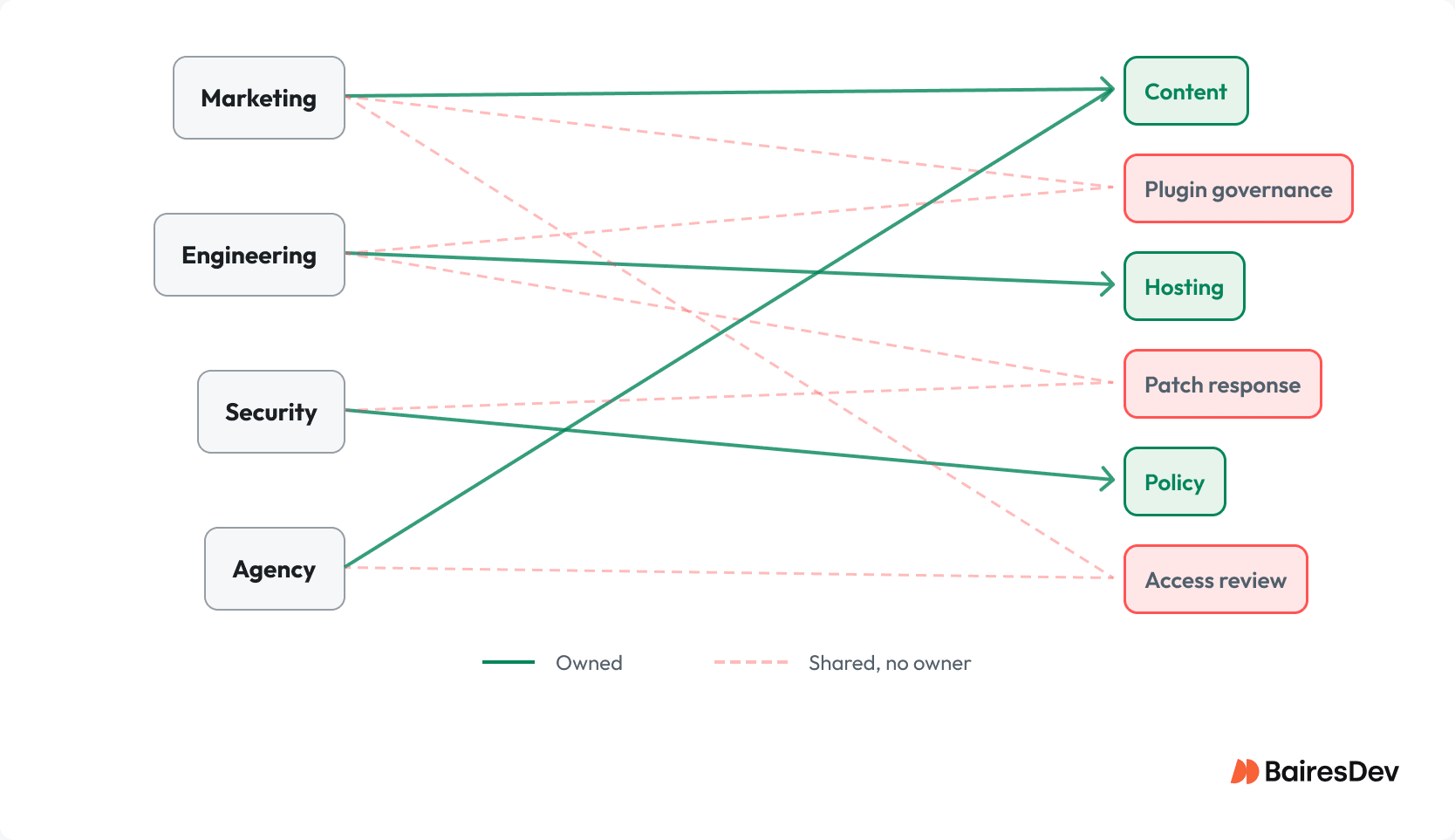
WordPress environments fail at the seams. For example, marketing owns content, engineering owns hosting, security owns policy, and an agency owns implementation. No one owns the full risk surface end-to-end. That gap is where breaches tend to happen.
Controls Should Match Real Attack Paths
Engineering leaders do not need to memorize every WordPress vulnerability class. They do need to know whether their controls align with the failure modes that actually show up in production.
| Attack Vector | Typical Entry Point | Primary Control Category |
| Cross-site scripting (XSS) | Plugin inputs, admin workflows, URL parameters | Secure coding, patching, output handling |
| SQL injection | Plugin or theme database logic | Secure query patterns, review, patching |
| Cross-site request forgery (CSRF) | Forms and admin actions | Request validation, application controls |
| Brute force / credential stuffing | Public login surfaces | Rate limiting, MFA, endpoint restriction |
| Supply-chain compromise | Third-party plugin or theme source | Source verification, vendor governance |
| File injection / backdoors | Themes, plugins, uploads, compromised admin access | Integrity monitoring, least privilege, scanning |
Patchstack’s 2024 data found that 43% of WordPress vulnerabilities required no authentication. Nearly half were XSS, with SQL injection and broken access control filling out the next tier, i.e., the same WordPress security issues that have dominated incident postmortems for years. Wordfence reported blocking more than 9 billion XSS exploit attempts that year alone. Those numbers reinforce the same point: basic patching and control discipline still matter most.
Patching alone doesn’t protect against supply-chain compromise. In 2021, attackers breached AccessPress Themes’ infrastructure and injected a PHP backdoor into dozens of themes and plugins. More than 360,000 sites downloaded the compromised packages before anyone noticed. No amount of patch discipline helps when the vendor’s distribution pipeline is the attack vector.
Recovery Is Where Most WordPress Programs Quietly Fail
Prevention gets most of the attention and most of the budget. Recovery is where compromises become expensive and prolonged. The WordPress-specific failure modes are predictable. Most teams have never tested their ability to recover from them.
Three capabilities matter most.
Step Up Your Monitoring
WordPress environments generate platform-specific security monitoring signals that standard stacks ignore:
- Rogue admin users created during off-hours
- Unexpected scheduled tasks in wp-cron
- Modifications to core files
- New PHP files under wp-content/uploads
If no one is watching for these, you learn about a compromise from a customer, a search engine warning, or a third party.
Where Traffic Filtering Fits In
A web application firewall (WAF) blocks common exploit traffic and malicious traffic patterns, but placement determines value. Edge-layer controls block malicious traffic before it reaches origin systems and provide DDoS protection at scale. Plugin-based WAFs run inside the application they’re meant to protect—useful, but not a substitute for upstream controls.
The leadership question is whether the WAF feeds into a broader detection and response process. The WordPress Security Team coordinates directly with hosting providers and WAF vendors during disclosure. If your filtering sits at the plugin layer, you’re last in line for that protection.
Recovery Readiness is More Than Backups
Backups are necessary but rarely sufficient. WordPress recovery has failure modes that generic backup strategies don’t address:
- compromised admin credentials that survive a restore
- backdoors persisted in wp-content/uploads or theme files
- malicious scheduled tasks that re-establish persistence after cleanup
- plugin auto-updates pulling a clean restore back into a known-vulnerable state
- restoration to a state that still contains the original entry path
A backup that has never been restored under realistic conditions is not a control. It is an assumption.
Recovery readiness means automated backups, offsite storage, version history, restoration testing, and a clean baseline that closes the original entry path before traffic is restored.
What Engineering Leadership Should Actually Own
WordPress security usually degrades when ownership is divided and accountability is vague. Leadership’s job is to define the model that prevents avoidable exposure from accumulating in the first place.
In practice, that means five things.
- Own plugin governance: Define who approves plugins, who reviews inventory, and who removes components that no longer justify their risk
- Define patch-response expectations: Set response windows, escalation paths, validation requirements, and deployment authority for critical vulnerabilities. Name the decision-maker before the incident, not in the middle of it.
- Separate platform controls from application controls: Hosting hygiene, runtime lifecycle management, and edge protections should have explicit owners, preferably outside the application layer.
- Treat privileged access as an operational control: Administrator access should be limited, auditable, and reviewed on a defined cadence, not only after a near-miss.
- Test actual recovery, not just backup creation: Recovery is an operational capability. It needs ownership, realistic testing, and clear criteria for what counts as a clean restoration.
Organizations must either govern WordPress like a production system or explicitly treat it as a managed exception. Either option is defensible. Drift between the two is what creates avoidable incidents.