

AI-assisted coding tools are everywhere now. The output looks good, and the delivery timelines look great. And then the bugs start showing up in places nobody expected.
Key Points
- Higher PR volume doesn’t always mean higher delivery velocity.
- AI-generated code often looks correct while missing system context, team conventions, or failure modes.
- Common mistakes include logic errors, duplicated utilities, weak error handling, and architectural drift.
- Teams need stronger verification habits before scaling AI coding tool usage.
The Code Looked Perfect. It Wasn’t.
Last year, I was working with a very capable development team on a new internal tool. The first version was almost done, but then I noticed developers delivering 80% solutions over and over, with show-stopping bugs showing up during code reviews and internal demos. Everything required a lot of rework, putting the timeline and commitment at risk.
Capable developers were relying on AI-assisted coding tools to generate and debug their code, and it seemed like we were always so very close to delivery. Our project post mortem identified a slew of hard lessons learned.
This pattern repeated itself with other teams I worked with: AI-generated code was fun to generate and seemed to scratch that itch that most developers chase: completing tasks and feeling productive. Unfortunately, that great feeling also leads to quality and security issues unless those same engineers can develop a strong discipline and a new relationship with these AI coding tools. They’re powerful, but they’re not necessarily your friend. Sometimes they listen, and sometimes they get a wild hare and just do something “creative”.
Top all of that with the fact that that feeling of accomplishment also comes with a shallow understanding of the solution developed, unless accompanied by that same discipline I just mentioned. Beware that LLM-generated code carries the DNA from its training data. Not operational experience or your codebase.
The Uncomfortable Truth
- AI-generated code fails in insidious ways. Confident, articulate code that passes muster, written by someone who doesn’t understand production considerations.
- Stack Overflow’s Developer Survey highlights an increasing number of developers who now distrust AI tool accuracy, moving from 31% to 46% in just a year’s time. And amongst the most experienced developers? The “highly trust” rate is 2.6%. That number is both painfully low and surprisingly high.
Automation Bias: Why “Looks Right” Gets Merged
Let’s talk about the new relationship between AI-written code and developers.
Developers see seemingly well-structured code come back from their frontier LLM of choice (e.g., Claude Code), and their gut reaction is that “it looks right.” That’s automation bias, and once you start looking for it, you’ll see it everywhere.
So, how do I know this is the case? The proof is in the numbers. Code churn (lines revised within two weeks of commit) is significantly up, going from 3.1% to 5.7% between 2020 and 2024, an 84% relative increase tracking directly with AI adoption. Code that looked correct got merged, then had to be fixed. Over and over.
I’ve watched this play out on a team that adopted AI tooling without changing its review process. The CodeRabbit State of AI vs. Human Code Generation Report put numbers on it. Across 470 real-world pull requests, AI-generated PRs averaged 10.83 issues versus 6.45 for human-authored code. Roughly a multiple of 1.7 mistakes, and not trivial lint findings: 1.4 times more critical issues, 1.7 times more major ones. Logic errors, architectural violations, security findings, everything.
The thing that’s really got me reaching for the antacids is how the newer models are churning out code that, honestly, doesn’t crash.
We’re talking plausible stuff that sails right through the unit tests, which, let’s be real, the AI probably wrote too. But what about the quiet rot in the codebase? The kind of expensive, fatal security flaw that nobody notices right away? A crash or an obvious failure? Your team jumps on that instantly.
But a subtle mistake in the payment calculation pipeline? That’s a slow burn with a much more painful (and costly) timeline.
Context Loss: The Architecture AI Cannot See
So, I’ll pose a question. What’s the first thing I see when I engage with teams embracing AI-assisted coding?
Context loss.
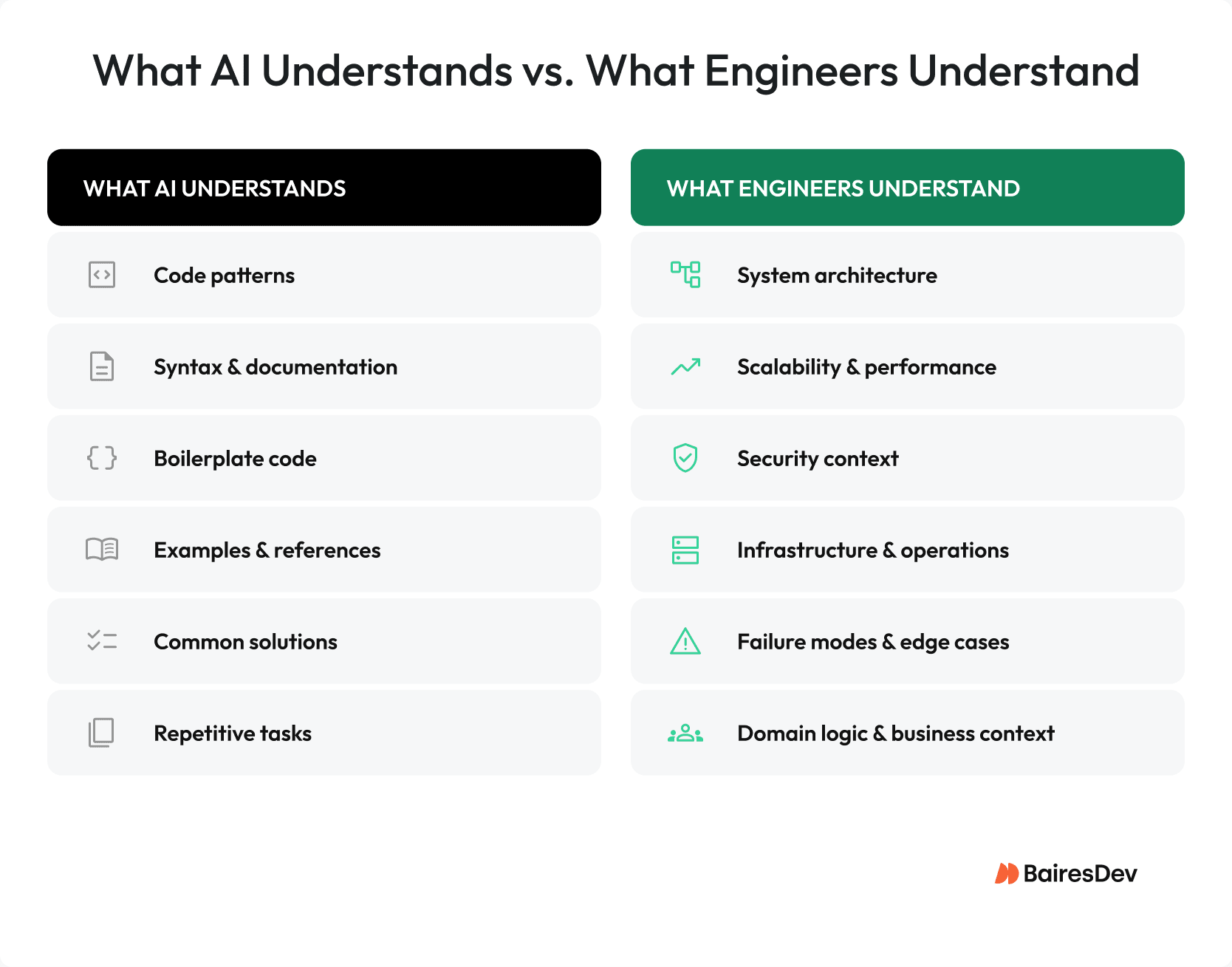
Let’s define that: context loss is when your AI model forgets or ignores important parts of the conversation, or loses track of requirements or details of its own analysis of your codebase within a session. AI tools shine when they’re allowed to be laser-focused, doing surgical analyses and targeted fixes.
Unfortunately, as the size of your codebase increases, AI struggles to hold all of it, and there are parts of your system built up over time in terms of architecture, naming conventions, and team decisions littered throughout the code. These things tend to be underdocumented anyway, and it is too easy to lose sight of the fact that AI doesn’t know about these or that it didn’t realize the why behind certain approaches in the code. And the context window, no matter how large it gets, cannot hold all of that at once.
Duplicated Utilities Everywhere
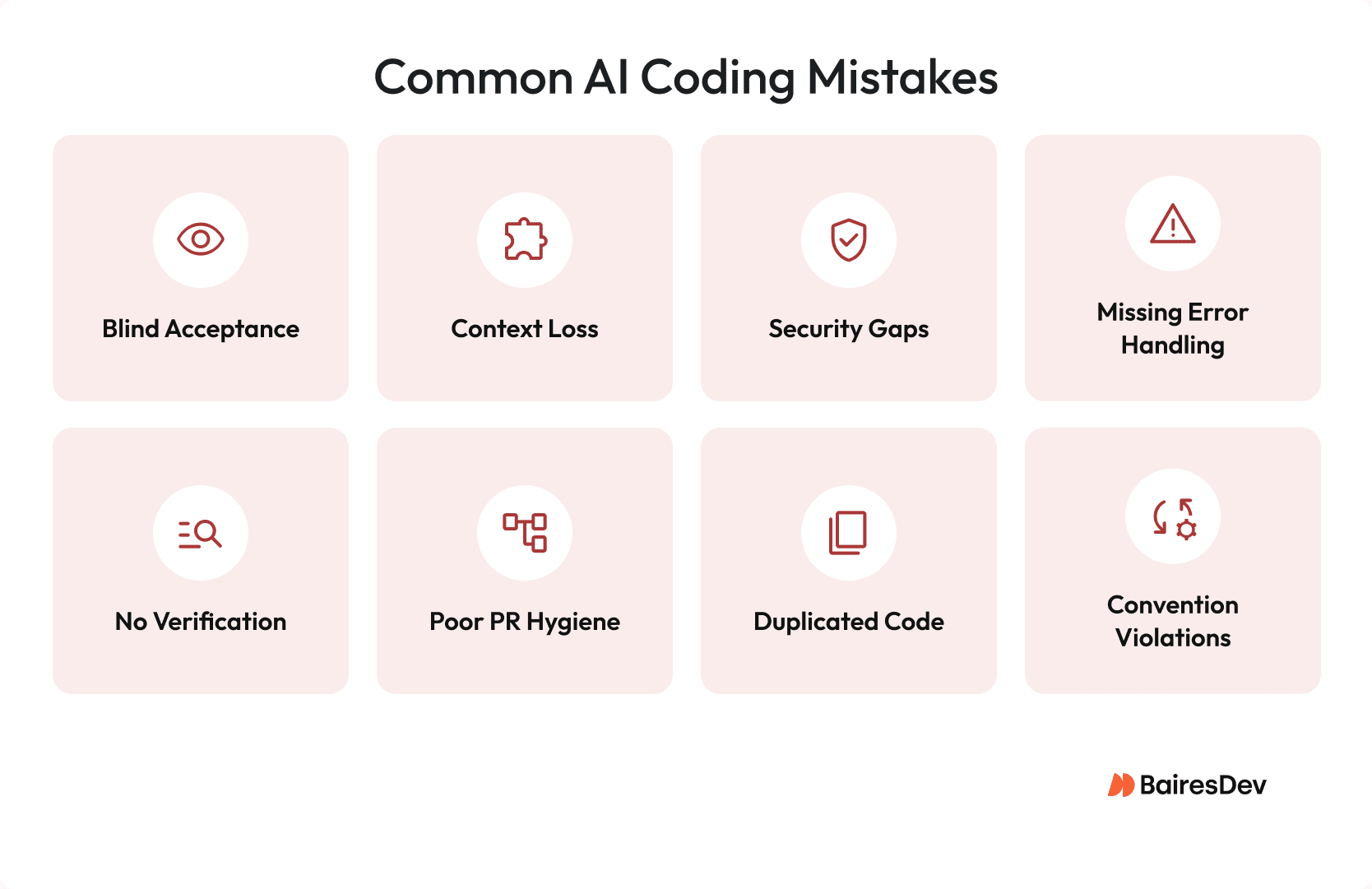
Once the context window fills up, the tool stops seeing what already exists. I treat this exactly like an onboarding failure: Your carefully built utility libraries get nudged out, and it starts reimplementing things from scratch, locally, per file, per feature. It might even follow your coding guidelines while doing it.
That doesn’t help when you end up with 14 near-identical HTTP retry wrappers scattered across the codebase. The tool doesn’t know what it doesn’t know. And unlike your newest hire, it won’t ask.
A new developer who ignores existing patterns and reinvents everything is a problem. The same rules should apply to LLMs.
Architectural Drift
Now, let’s talk about your architecture and, oh, by the way, consistent architecture is a good thing. It’s the thing that keeps everyone moving in the right direction. But, AI tools don’t always grok the overall vision. We’re back to picking on AI’s surgical view of things, and that AI creativity might not always color within the lines.
Case in point: I had my AI tool write what looked like a “perfectly reasonable” new API endpoint. Clean code. Good structure. One problem: it completely bypassed the service mesh authentication layer. Not good.
Remember that AI falls back to its training when it doesn’t have explicit instructions to follow, and sometimes still does even when you ask for something specifically. At a cursory glance, everything worked great in dev. A security audit found it after two sprints into production, and untangling it took the better part of a week. Nobody was happy.
Convention Violations
Let’s name a few things that aren’t the fun part of software development: style guides, naming conventions, error handling idioms, service boundary rules.
Not fun, but really important when you have a team size greater than one. The model skipped those meetings. It can’t see any of it unless you paste it into the prompt, every single time, for every single request. Most developers don’t.
A CMU study of 807 open-source repositories confirmed what most experienced teams already suspect: these tools generate code faster, but not necessarily better software. Faster and better are not equal. Too many teams figure that out after the fact.
Security: What Happens When Nobody’s Looking
Now, the part where we talk about making our code and systems production safe: security. The failures here are predictable and grow linearly with the pain. These are not obscure CVEs or untraveled attack surfaces. These are the main culprits, those on the OWASP Top 10. Your CISO and software lead force you to sit through orientation and brown bags to know this stuff.
Veracode’s 2025 GenAI Code Security Report says that 45% of AI coding tasks came back with at least one OWASP Top 10 vulnerability. That’s a lot, and very, very unacceptable. A coin flip’s chance of introducing a major security hole is present when the AI tool writes anything security-adjacent.
Remember that LLMs train on public repositories full of insecure code, and they remember exactly what they learned.
Missing Error Handling: The Happy-Path Problem
I’ve spent way too many late nights and weekends debugging production failures that traced back to a missing null check or an overlooked exception handler.
The real cause is the happy-path problem. The bane of junior developers, and what separates junior developers from more seasoned staff. AI tools, like those fresh interns, write code for when everything goes right: inputs are clean, services respond, the database is up, the network is fast. What they haven’t experienced yet are the extra-long crunch sessions. Those are the sessions that teach you to program defensively, with a healthy dose of paranoia.
Null checks get skipped, early returns get left out, and exception logic is incomplete or just missing entirely. I’ve seen AI-authored PRs with nearly 8 times more I/O operations than human-written ones. Stack Overflow’s Engineering blog reports that pull request volume is up 20% per author, but incidents per pull request climbed 23.5%. More code, more incidents. The “productivity” is real. The quiet rot is too.
Here’s the thing about happy-path code: it’s a survivor. Gets through CI, gets through smoke tests, looks great in demo. Then production does what production always does and the whole thing falls apart.
No Verification Discipline: The Gap That Eats Your Gains
Sometimes, I sound like a broken record. I hear myself saying that it’s “almost right, but not quite” where AI coding has crept in.
The fix is verification discipline.
This is the biggest gap I’ve had to address. Two-thirds of my developer colleagues say they should have just written it themselves rather than slogging through the AI output. And, unfortunately, fewer than half bother to verify AI output before hitting commit. I’ll let you sit with that. Complacency is the new trend.
I lived this one last quarter. One of the developers was using Claude Code heavily and honestly, the velocity numbers looked fantastic. Sprint reviews were great. Then we discovered three endpoints returning stale cached data under concurrent load. The caching layer, which was AI-generated (naturally), had a race condition that nobody caught because all the tests ran sequentially. After that incident, I put a hard rule in place: concurrent load testing before merge for anything touching caching or concurrency. No exceptions. Nobody gets to say “it’s probably fine.”
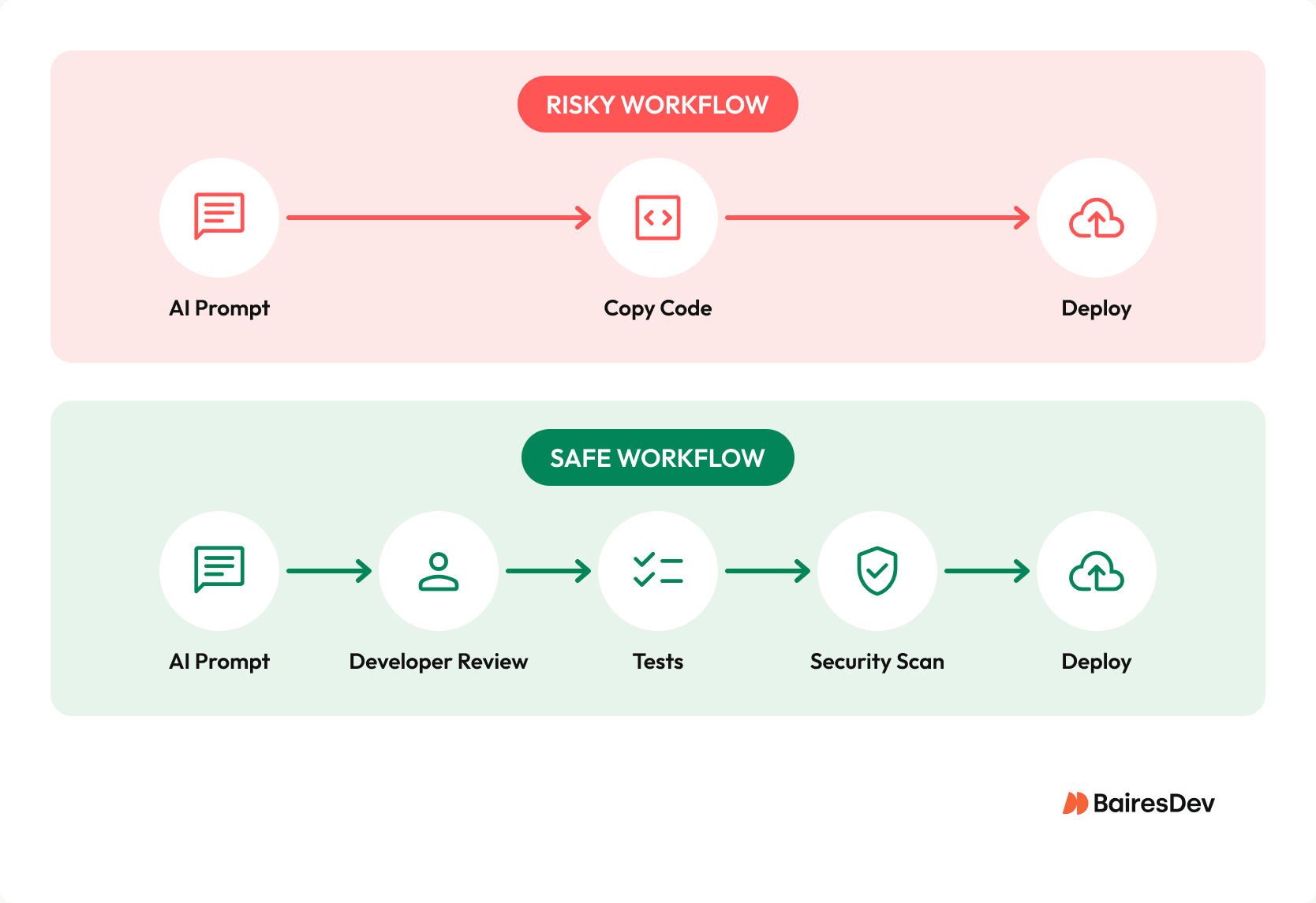
If you’re looking for a place to start, this is the minimum I’d build into every AI-assisted workflow:
| Workflow Stage | Minimum Check | Why It Matters |
| Prompting | Include ADRs, style guide snippets, error handling examples | Context the model can’t see otherwise |
| Reviewing output | Read it like it was written by a confident stranger | Automation bias is real and it will get you |
| Before commit | Does this handle failure states? Concurrent load? | Happy-path code ships constantly |
| Before merge | Has a human traced the execution path end to end? | AI-written tests are not independent verification |
| Before deploy | Dependency audit, security scan, integration test on real data | Not optional, not “we’ll do it next sprint” |
The structural problem isn’t going away. These tools accelerate writing, but what about testing? Your team cranks out 2 to 3 times more code, but reviewers stay the same. Same pipe, more pressure, same number of inspectors.
You’ve probably already run into hallucinated logic-code the model generated with complete confidence that is just logically wrong. Spelling mistakes and syntax errors are basically a thing of the past, but logic errors are getting worse. There’s no test that catches a hallucination unless somebody specifically wrote that test expecting it. Most teams haven’t built that muscle yet.
PR Hygiene: What Your Metrics Are Trying to Tell You
Your PR volume is up, probably significantly. AI coding tools are letting developers push 2 to 3 times more code, and your review queue is feeling it. PRs are bigger, too. Commit messages describe what got done, but not why. If this sounds like your Monday morning, keep reading.
I started paying close attention to these signals after a quarter where our review cycles were quietly inflating and nobody could put their finger on why. Once I dug in, the patterns were consistent: roughly 25% longer review cycles for AI-heavy pull requests. The findings in those PRs are far more likely to be logic or correctness issues, and business logic errors show up more than twice as often.
| Signal | What It Tells You | How to Track It |
| PR volume per author up 20%+ | Output accelerating without verified delivery | Git analytics, weekly |
| Code churn rate increasing | Premature merges being fixed within two weeks | GitClear or custom metric |
| Average diff size growing | AI-generated PRs getting larger | PR analytics |
| Logic/security defect rate rising | AI-specific categories trending worse | Defect tagging by category |
| Review time inflating | Reviewers absorbing missing context | Time-to-merge tracking |
| Repeated pattern violation comments | Context loss, not individual carelessness | Review comment categorization |
The table tells you what to track. What it can’t tell you is what the patterns mean when you see them. For example, a 20-30% jump in PRs without matching story delivery isn’t a productivity signal. Churn climbing means premature merges.
Teams usually find that their AI-assisted PRs are 2-3 times more likely to be reverted. And repeated review comments about existing patterns (“this utility already exists,” “this doesn’t follow our error handling idiom”) are context-loss signatures, not individual carelessness. That’s a prompt engineering problem, and you can fix it.
The Takeaway
I’ve collaborated with teams that got burned, and experienced a few issues on my own team. I’ve watched genuinely talented engineers, people I’d trust to architect a critical system from scratch, ship vulnerabilities, and pile up technical debt because they trusted the output without interrogating it. Not because they were careless, but because the output looked right. The code was plausible, and that’s the key issue.
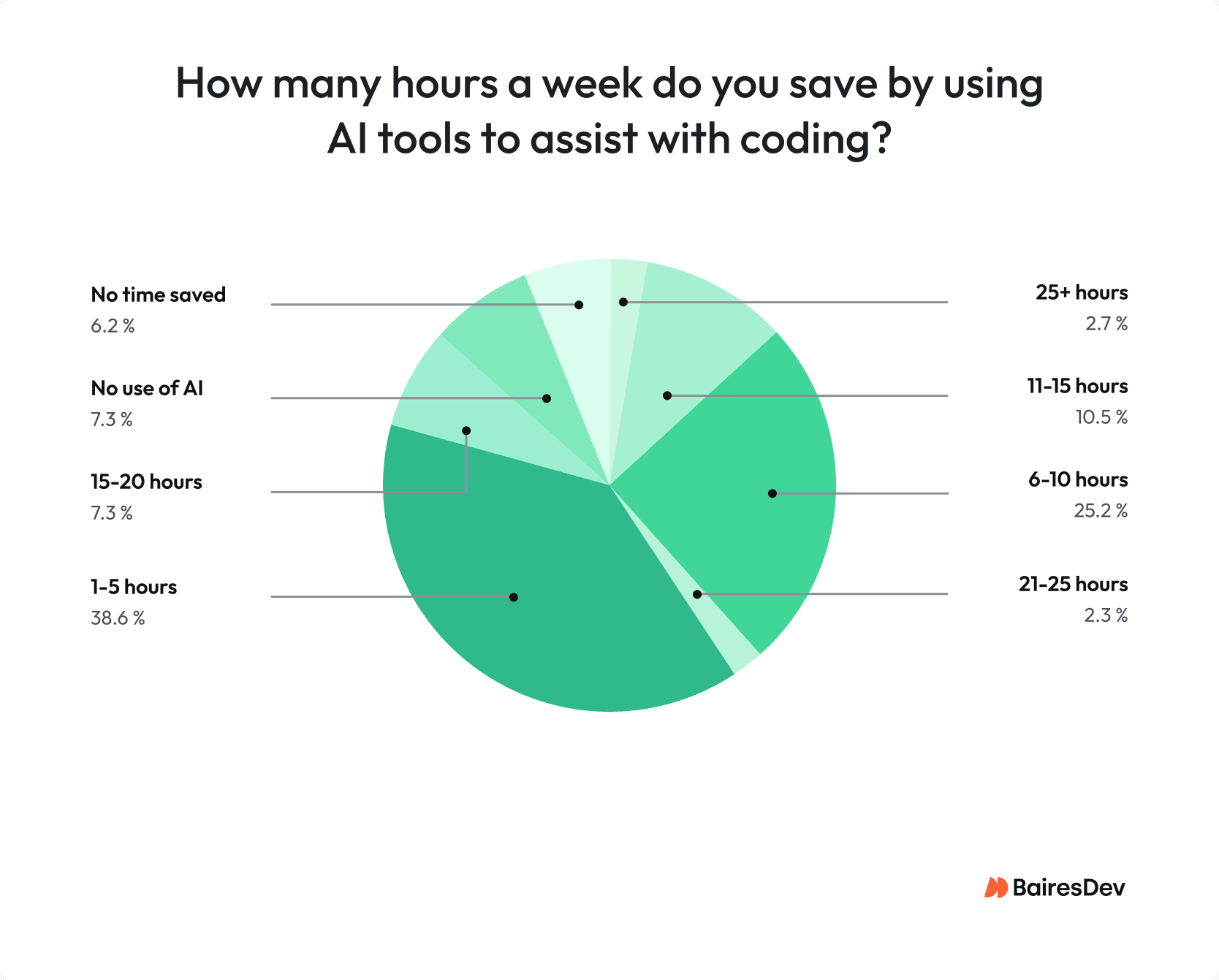
AI tools aren’t going away, and I wouldn’t want them to. The productivity gains are real. BairesDev’s Q3 2025 Dev Barometer found that developers save an average of 7.3 coding hours per week when using AI tools.
The developer experience is legitimately good, too, and the teams that figure out how to use them well are going to have a real edge. What I keep telling engineers is to stop treating AI tool adoption as a tooling decision and start treating it as a process and culture problem.
The model isn’t the risk. The gap between how much code it produces and how rigorously your team reviews it… That’s the risk.
If I had to name one trait the winning teams share, it’s this: they built verification habits before they scaled AI usage, not after. They decided what “done” looks like when AI is in the loop, wrote it into PR templates and onboarding docs, and held the line. The teams that struggled decided to figure it out later.
Later always costs more.