

AI coding tools are everywhere now. Your team is shipping faster. But the security findings tripled last quarter, story completion stayed flat, and nobody can explain where the productivity actually went.
Key Points
- AI coding tools work best on bounded, well-scoped tasks like boilerplate, tests, documentation, and repetitive patterns.
- Teams should define where AI is allowed, where it requires review, and where it should be restricted.
- Specifications, prompt discipline, code reviews, automated testing, and traceability should be part of every AI-assisted workflow.
- The goal is faster delivery without lowering engineering standards, not LoC vanity metrics.
AI Coding and the Productivity Question
The numbers look phenomenal on a slide deck. GitHub’s controlled study showed developers completing tasks 55.8% faster with Copilot. A multi-company study across 5,000 developers showed a 26% productivity increase. Your board loved those numbers.
At the industry level, recent data shows a similar pattern. AI coding adoption is widespread, although measurable productivity gains are inconsistent and highly dependent on task type, developer experience, and system complexity. Gains tend to concentrate in narrow tasks, while system-level work shows more variability.
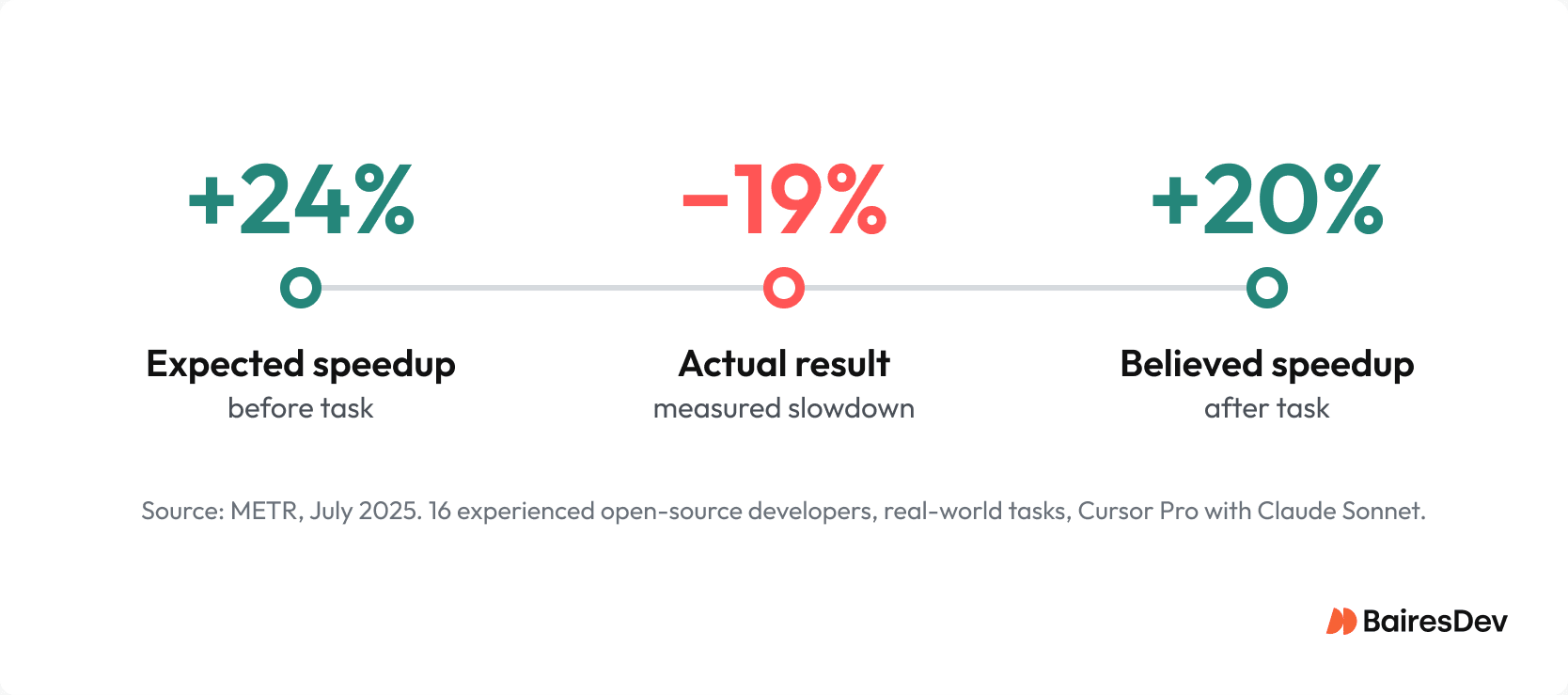
Now here’s the one they didn’t see. The METR study from July 2025 took sixteen experienced open-source developers, handed them real-world issues, gave them full access to Cursor Pro with Claude Sonnet, and measured what actually happened. Experienced developers took 19% longer with AI tools than without.
Here’s the part that should genuinely unsettle you: Before starting, those developers forecasted AI would speed them up by 24%. After finishing, having actually taken 19% longer, they still believed AI had sped them up by 20%. The forecast barely moved. They experienced the slowdown and didn’t register it. They felt faster while being slower, demonstrating a common blind spot in how we evaluate our own productivity.
AI coding assistants are not uniformly productive. They speed up boilerplate, scaffolding, documentation, and test generation.
But they can slow down architecture, security-sensitive code, and anything that requires deep understanding of your system. Stack Overflow’s 2025 survey confirmed what many software engineering teams already suspected: 76% of developers won’t use AI tools for deployment or monitoring. Developers have already figured out where AI-assisted coding works and where it creates more problems than it solves. The question is whether engineering leadership has caught up.
There’s also a quality dimension the productivity studies don’t capture. GitClear analyzed 211 million lines of changed code and found that code duplication grew 4x between 2021 and 2024, while refactoring dropped from 25% of changed lines to under 10%. AI generates more code. That code is increasingly duplicated and decreasingly likely to get cleaned up. That’s not a velocity problem. It’s maintainability debt that compounds every quarter.
AI-Assisted Coding: Where It Works and Where It Doesn’t
You need to draw a line, and you need to make it explicit. AI-assisted coding belongs in the repetitive, well-scoped parts of your software engineering workflow. It does not belong anywhere the cost of getting it wrong is measured in security incidents, architectural rework, or a phone call from your CISO.
Where your AI coding assistant adds value:
- Boilerplate and scaffolding code
- Test generation (unit tests, integration tests, test cases)
- Documentation and code comments
- Refactoring well-understood patterns
- Prototyping and proof-of-concept work
- Debugging assistance with error handling and edge cases
Where your engineers remain essential:
- Authentication and authorization logic
- Cryptographic implementations
- Sensitive data handling and business logic
- Architecture decisions and system design
- Infrastructure and deployment configurations
- Security-critical code paths
The Qodo State of AI Code Quality report found that 65% of developers say AI misses relevant context during critical tasks. Among those who report AI-generated code degrading quality, 44% blame missing context as the primary cause.
Your LLM doesn’t understand your auth model. It doesn’t know your data classification rules. It has no idea that a particular pattern is safe in your user profile service but dangerous in your payment flow.
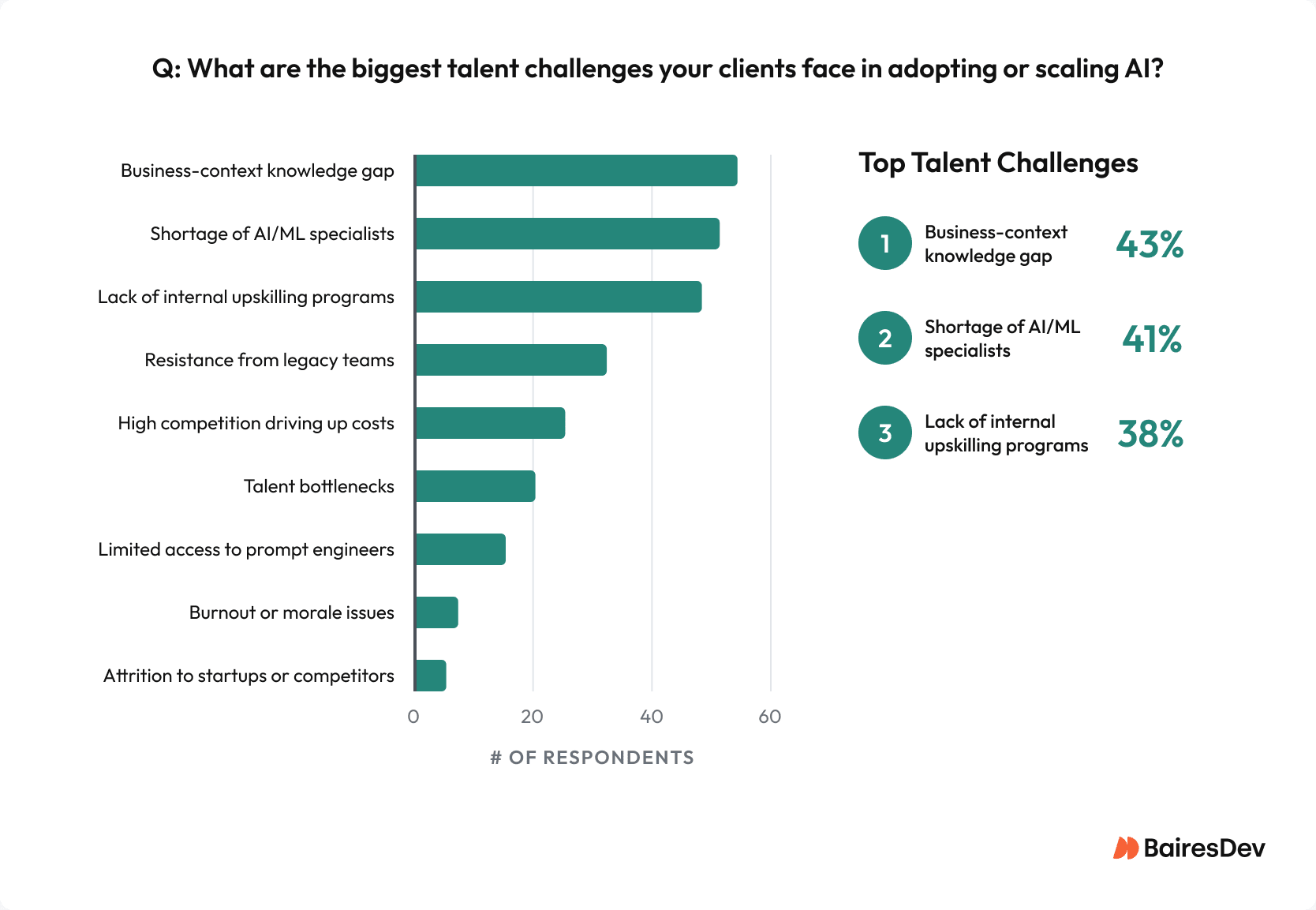
And let’s not forget business context, either. In BairesDev’s Q3 2025 Dev Barometer, 43% of surveyed project managers identified business-context knowledge gaps as the top talent challenge in AI adoption, ahead of AI/ML specialist shortages (41%) and lack of upskilling programs (38%).
The Numbers That Matter
- 45% of AI coding tasks introduce OWASP Top 10 vulnerabilities (Veracode 2025)
- AI-assisted developers produce 4x more commits but 10x more security findings (Apiiro 2025)
- Junior developers (< 2 years) are 60% confident shipping AI code without review. Seniors (10+ years): only 26% (Qodo 2025)
Writing Specifications Before AI Generates Code
Andrej Karpathy coined “vibe coding” in February 2025, and by December it was Collins English Dictionary’s Word of the Year.
The term describes what happens when developers describe behavior to an AI coding assistant and accept what it generates without thorough review. It’s fast. It’s also how you end up with 2.74 times higher security vulnerability rates in AI-generated code versus human-written code.
The fix isn’t rocket science. Before your team generates code with any AI coding tool, require a short specification: what the code should do, what it should not do, and what the acceptance criteria look like. Break tasks into small, reviewable chunks. A 2,500-line AI-generated diff is not a pull request, but a liability.
Engineers should write at least a three-sentence plan before they even open their coding assistant: what the change does, what it touches, and how they’ll verify it works. It sounds absurdly simple. Yes, but it cuts the “AI went in the wrong direction for 45 minutes” problem in half. The AI coding tool doesn’t know where it’s going unless you tell it, and telling it after it has already generated a thousand lines of code is too late.
Prompting discipline matters just as much. The developers getting the best results from their AI assistant are not writing “build me a login page” like vibe coders.
They’re providing stack constraints, naming conventions, approved libraries, and explicit “don’t do” rules. They ask the coding assistant to explain its assumptions and identify edge cases before generating the implementation. They treat each AI coding session like an onboarding conversation with a new contractor who is technically brilliant but knows absolutely nothing about your system.
Qodo’s research showed teams using persistent, stored context saw context miss rates drop from 54% to 16%. That is a fundamentally different category of output.
Human Review and Code Reviews for AI-Generated Code
Every piece of AI-generated code should be treated as untrusted input until a human says otherwise.
Stack Overflow found that 46% of developers actively distrust AI tool accuracy, and 66% struggle with AI solutions that are “almost right, but not quite.” The “almost right” part is what makes code from a coding assistant harder to review than clearly broken code. It looks like it was written by someone who knows your system. The patterns are familiar. The syntax is clean. And buried three functions deep is an authorization check that doesn’t actually verify ownership.
Code reviews for AI-assisted coding need explicit standards:
- Every pull request includes intent, scope, tradeoffs, and tests
- Review specifically for architecture alignment, error handling, input validation, and dependency choices
- AI-generated code touching auth, crypto, or sensitive data gets mandatory senior review
- No generated code ships without running the full test suite
Here’s what should keep you up. Qodo found that junior developers with less than two years of experience are the most confident (60%) about shipping AI code without review, while senior developers with ten-plus years are the least confident (26%). The people least equipped to catch the problems are the most likely to skip the step that catches them. You can’t fix that with a wiki page. You fix it by building code reviews into the process so they happen regardless of who wrote the code or what AI coding agent generated it.
Automated Verification for AI-Assisted Development
There’s a gap between what organizations say they want to do with AI testing and what they’ve actually done.
Tricentis found that 75% of organizations identified AI-driven testing as a pivotal 2025 strategy, but only 16% had actually adopted it. That gap is where the bugs from AI-generated code live.
Among the 1,129 BairesDev engineers surveyed in our Dev Barometer, only 15% cited streamlined testing as a top benefit of AI tools, and just 12% said AI helped them catch bugs earlier.
So how do you mitigate this gap? For starters, your automated verification needs to cover:
- Unit tests and integration tests run before every merge
- Static code analysis and linting enforced across the code base
- Build gates that fail on test failures and coverage regressions
- SAST and SCA integrated into CI, with mandatory scanning for all generated code
- Dependency validation that checks against actual package registries
Security scanning is where AI-generated code creates the most risk. Veracode’s 2025 GenAI Code Security Report tested over 100 large language models and found that 45% of AI coding tasks introduced OWASP Top 10 vulnerabilities. Java had a failure rate over 70%. XSS defenses failed 86% of the time. These are not exotic attack vectors. These are the vulnerabilities your security team has been drilling developers on for years, and AI coding assistants are reintroducing them at the speed AI generates code.
Dependency validation deserves its own focus. A university study of 2.23 million generated packages found that 19.7% were hallucinated by the AI assistant. They didn’t exist in any registry. And 43% of those hallucinated names repeated consistently across queries, making them predictable targets for slopsquatting attacks. Your software composition analysis tooling needs to catch this before any of it reaches production.
Version Control and Traceability in AI-Assisted Development
Clean git history matters more when AI generates a significant portion of your code. Copilot now writes 46% of the average developer’s code, and that number is climbing.
When nearly half of your code base comes from AI-assisted coding, the ability to trace what was generated, what was reviewed, and what was modified becomes a prerequisite for maintaining the codebase.
Keep commits small and focused. When AI-assisted coding produces a change, the commit message should reflect what the AI coding tool generated and what was modified by hand. I’ve had teams set up commit hooks that tag AI-assisted commits with metadata about which coding assistant produced the initial generation.
When an auditor asks how a particular change was created and reviewed, you need an answer that goes beyond “the AI assistant wrote it.” In regulated environments, this isn’t just good software engineering practice. It’s an audit trail requirement that determines whether your team passes the next compliance review.
For teams subject to SOC 2, ISO 27001, HIPAA, or PCI-DSS: AI-generated code doesn’t exempt you from change control, vulnerability management, or access control requirements. It raises the bar. Every AI-assisted change needs the same evidence trail as human-written code: pull request records, review approvals, test results, and deployment logs. AI coding agents that commit code directly to mainline without flowing through the same CI gates as human developers are a compliance gap waiting to be found.
64% of surveyed BairesDev engineers identified data privacy and security concerns as the biggest barrier to AI adoption at client companies, with 42% citing restrictive or unclear AI usage policies. The compliance infrastructure simply hasn’t caught up to the tooling.
Tooling Integration for AI-Assisted Development
Your AI coding tools need to fit your existing software engineering controls, not bypass them.
Whether your team uses IDE assistants like GitHub Copilot or Claude Code, PR-level coding agents, or standalone AI coding tools, the same principle applies: no AI-generated code reaches mainline without passing through the same review, testing, and scanning gates as human-written code.
Standardize on one or two coding assistants to reduce context switching and tooling sprawl. The specific AI tools matter less than whether they integrate with your CI pipeline, your code review workflow, and your security scanning. If a coding agent can commit code directly to a branch without triggering your test suite, that’s a gap in your software engineering process, not a feature of the tool.
AI Coding Best Practices: The Decision Framework
| Practice | What It Means | Why It Matters |
| Define boundaries | Separate AI-safe tasks from restricted zones | Prevents AI from generating security-critical code without human oversight |
| Specification first | Require specs before AI generates code | Reduces vibe coding and architectural drift |
| Prompting discipline | Provide context, constraints, and rules to the AI assistant | Drops context miss rates from 54% to 16% |
| Mandatory code reviews | Every AI-generated PR gets human review | Catches the 45% vulnerability rate before production |
| Automated verification | SAST, SCA, tests in CI for all generated code | Safety net when review misses something |
| Traceability | Clean git history, audit trails | Compliance requirement in regulated software engineering |
The pattern across all of these AI coding best practices: AI-assisted coding works when it fits into your existing software engineering discipline. When an AI coding assistant bypasses that discipline, the velocity gains turn into security debt. Staff for it.
The Takeaway
AI coding tools are productivity accelerators, not engineering replacements. The teams building discipline around their AI-assisted development workflows will succeed: clear boundaries, specification-first collaboration, mandatory code reviews, automated verification, and clean traceability.
The ones who treat every AI coding assistant as a trusted senior engineer will quickly discover that productivity without discipline is just faster delivery of technical debt.