


AngularJS migrations rarely fail because of framework syntax. They fail because long-lived enterprise applications accumulate operational complexity, shared state, and delivery pressure over time. This guide explains how enterprise teams approach AngularJS-to-Angular migration, when hybrid strategies make sense, and where modernization projects typically stall.
Key Points
- Migrating from AngularJS to Angular is a full application migration between two incompatible architectures, not a version upgrade, and no automated tool does the work for you.
- Most enterprise teams choose between hybrid migration using the Angular Upgrade Module, targeted modernization with Angular Elements, or a full rebuild; coupling and shared-state complexity matter more than app size.
- AngularJS has been officially end-of-life since December 2021, and over 1.2 million production sites still run it, accumulating unpatched CVEs with every passing month.
- A controlled migration protects delivery by moving in verifiable slices, measuring progress in business workflows rather than component counts, and enforcing an Angular-first rule for all new development.
Migrating from AngularJS to Angular rarely starts because engineers want cleaner syntax. It starts because delivery is slowing down, hiring is getting harder, security reviews are taking longer, or the existing AngularJS code has become expensive to change safely.
That’s what most migration guides miss. An AngularJS to Angular migration isn’t primarily a front-end modernization project. It’s a long-running operational change that happens while product teams still need to ship features, support customers, and hit release targets.
The pressure isn’t hypothetical. AngularJS officially reached end-of-life in December 2021, yet more than 1 million public-facing sites still rely on it. At the same time, Angular continues shipping on a six-month major release cycle with active security support windows and regular CVE remediation. Meanwhile, Stack Overflow’s 2024 Developer Survey showed Angular usage continuing to skew toward larger enterprise environments rather than small greenfield startups.
For many engineering organizations, the migration question is no longer whether AngularJS should be replaced. It’s whether the organization can keep absorbing the operational drag of delaying it.
Most teams want practical answers on migrating from AngularJS to Angular. Can the migration run incrementally? Can both frameworks coexist in production? When does hybrid migration stop making sense? Where do projects actually stall?
Four realities usually shape AngularJS migration planning:
- No command or manual conversion tool turns an AngularJS application into a modern Angular application.
- The three practical options are incremental migration with the Angular Upgrade Module, partial modernization with isolated Angular components, or a full rebuild strategy.
- Coupling matters more than app size.
- A controlled migration strategy starts with assessment and parity testing, not generating components.
A 90-route AngularJS app with clean feature boundaries can be easier to migrate than a 20-route application built around $rootScope, shared mutable state, and DOM-heavy AngularJS directives. The rest of this guide covers how to evaluate the existing AngularJS codebase, choose the right migration strategy, and execute without freezing product delivery for a year.
Why Angular Isn’t Just AngularJS With a New Version Number
AngularJS and Angular share a name and a lineage. They don’t share an architecture.
Modern Angular is a separate framework with its own component-based architecture, dependency injection system, Angular router, build pipeline, optimized change detection, template syntax, and TypeScript-first development process. AngularJS applications rely on controllers, scopes, digest cycles, and patterns that don’t map directly into equivalent Angular code.
That’s why teams asking whether AngularJS can be upgraded directly to Angular are surprised by the answer. There’s no automatic upgrade path between them because they’re fundamentally different frameworks.
The differences appear fast in real applications. A controller that stores UI state on $scope, watches multiple values, mutates parent state through nested directives, and coordinates async behavior through $http and route resolves doesn’t have a one-to-one Angular equivalent waiting behind a migration utility. Someone still has to decide:
- Where shared state belongs
- Which Angular services own data
- How routing responsibilities change
- Which behaviors deserve preservation
- Which workflows should finally be redesigned
Angular ships bridge tooling for incremental migration. The Angular Upgrade Module allows AngularJS and Angular to run together inside the same Angular app while connecting both dependency injection systems. That bridge matters operationally because it enables slice-by-slice migration instead of forcing a single cutover. But it isn’t a translator, it can downgrade Angular components into AngularJS templates and support frameworks simultaneously during migration, but it won’t redesign application architecture for you.
As of early 2025, AngularJS still powers over 1.2 million live websites and sees roughly 419,000 weekly npm downloads, a decline of only 33% from its peak, despite reaching official end-of-life in December 2021. These aren’t abandoned hobby projects. They’re enterprise applications running on software that receives no security updates.
The Three Angular Migration Paths That Actually Work
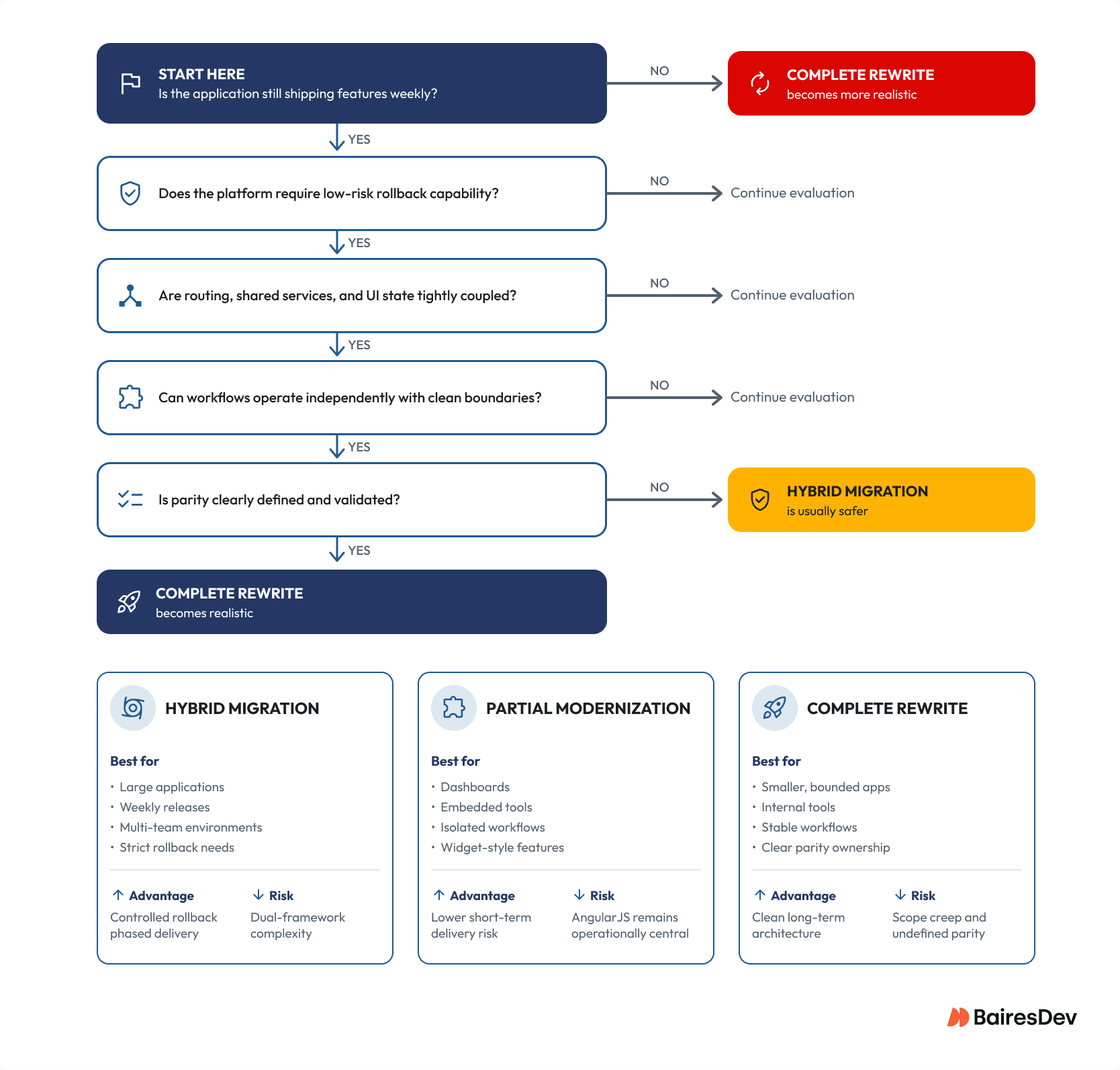
Most Angular migration projects fall into three broad approaches. None is universally correct. Each trades delivery continuity against temporary complexity, staffing requirements, and rollback risk.
1. Hybrid Migration With ngUpgrade
Hybrid migration uses the Angular Upgrade Module so AngularJS and Angular run together during transition. This is the most common strategy for large enterprise applications that can’t pause feature delivery. Teams gradually migrate Angular routes, Angular services, and user interfaces while the AngularJS framework continues running alongside the new Angular project.
A common sequence:
- Keep the AngularJS shell initially
- Build new Angular components
- Downgrade Angular components into legacy templates
- Move routing and shared services gradually
- Retire AngularJS modules incrementally
The main advantage is controlled rollback. If one migrated route fails in production, teams can often revert a slice rather than rolling back an entire release. The cost is real complexity: two rendering models, two dependency injection systems, two debugging paths, and two testing patterns running simultaneously. Without strong migration governance, the bridge layer becomes permanent architecture instead of temporary infrastructure.
Hybrid migration usually fits large AngularJS applications, customer-facing platforms, multi-team environments, products with weekly releases, and systems with strict rollback requirements.
2. Partial Modernization With Angular Elements
Some teams don’t need a full Angular migration immediately. Instead, they isolate high-value functionality and modernize only those surfaces using Angular Elements or embedded Angular components. This works best when the boundary is genuinely isolated, reporting dashboards, charting panels, upload workflows, embedded admin tools, or standalone user interfaces.
Angular Elements can package Angular components as custom elements that run inside an AngularJS app with limited coupling. The approach breaks down when the “isolated widget” quietly depends on shared route state, parent-scope mutation, AngularJS services, or digest-cycle timing behavior. This path can reduce immediate delivery risk, but it’s not a substitute for broader modernization if the AngularJS app remains operationally central.
3. Complete Rewrite
A ground-up rebuild works when old behavior is more liability than asset. This path makes sense for smaller bounded applications, internal tools, stable workflows, systems with well-defined parity requirements, or products already undergoing UX redesign.
Most rewrite failures start before anyone defines parity clearly. By month four, “we’ll rebuild it better” often means nobody agrees on intended behavior, support teams discover missing workflows, and timelines drift continuously. The safer rewrite is brutally scoped. Someone owns parity. Users validate workflows. The migration scope is constrained before development begins.
How to Evaluate an Existing AngularJS Application
Choosing a migration strategy gets easier once you understand where coupling actually lives. The important variable isn’t code volume, it’s behavioral dependency. A practical assessment of an AngularJS app usually examines six areas.
Routes and Ownership Boundaries
Map Angular routes by active development status, business criticality, operational complexity, and retirement likelihood. An 80-route AngularJS application may only have 25 routes receiving active product investment. Those routes should shape the migration plan, not the abandoned admin screens nobody has opened in two years.
AngularJS Directives
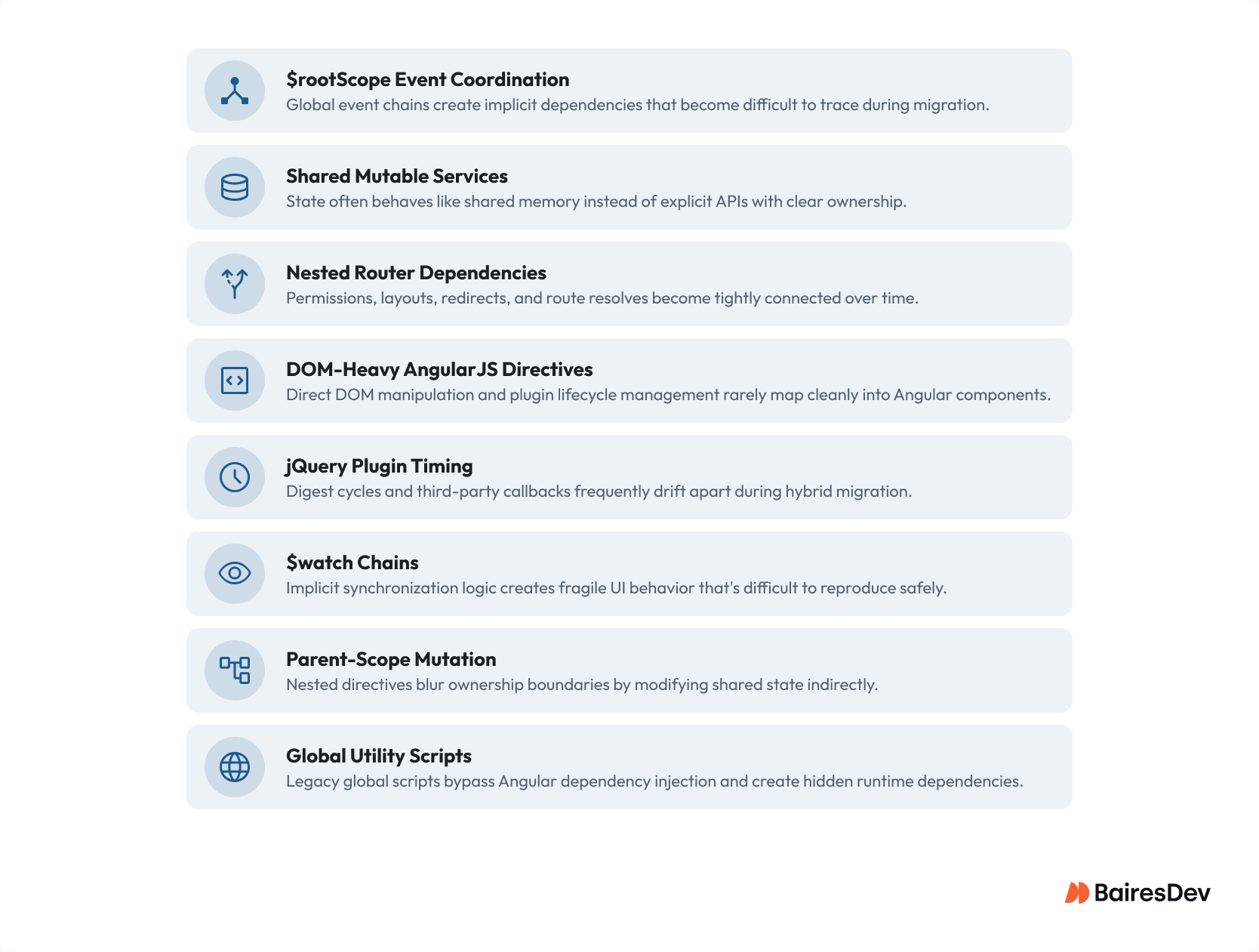
Separate simple AngularJS components from directives that rely on compile functions, transclusion, direct DOM manipulation, jQuery plugins, or hidden parent-scope contracts. Simple component-style directives usually migrate cleanly. DOM-heavy directives often require redesign rather than direct translation.
Shared Services and State Ownership
Migration projects consistently underestimate shared-state complexity. AngularJS services frequently behave like shared memory rather than explicit APIs, and that’s where hidden coupling lives. Search for $rootScope, $broadcast, $watch, and $compile. A static analysis tool can surface migration hot spots quickly, but even a straightforward text search often reveals architectural pressure points.
Third-Party Dependencies
Older AngularJS applications commonly depend on abandoned libraries, unsupported AngularJS modules, global scripts, outdated grid libraries, and legacy charting frameworks. Those dependencies often determine migration sequencing more than Angular code itself.
Test Coverage and Parity Validation
Most successful migrations depend less on unit testing and more on parity validation. Golden-flow testing matters because migration failures usually appear inside authentication workflows, permissions behavior, checkout paths, reporting flows, and support operations. Teams increasingly rely on integration-heavy testing using tools like Playwright or Cypress during incremental migration because they validate production behavior across both frameworks simultaneously.
Delivery and Organizational Constraints
Migration planning should also assess release cadence, staffing availability, platform-team ownership, architecture governance, and product roadmap pressure. A technically clean migration strategy can still fail operationally if nobody owns standards, deletion criteria, or Angular-first enforcement.
Why Many Enterprise Teams Are Migrating Now
The pressure to migrate AngularJS applications has become more operational than technical.
AngularJS support officially ended December 31, 2021. Since then, multiple vulnerabilities have been disclosed with no upstream patches, including CVE-2022-25844 (ReDoS), CVE-2022-25869 (XSS), CVE-2024-8372, and CVE-2024-8373 (content spoofing). The open-source project receives fixes for none of them.
Modern Angular, by contrast, ships on a defined release schedule with active support windows of 18 months per major version, six months of active updates followed by twelve months of LTS with critical and security fixes only.
That distinction matters in enterprise environments where security review cycles and compliance requirements increasingly affect roadmap planning. In late 2025, three high-severity CVEs were disclosed affecting Angular’s template compiler, HTTP client, and SSR pipeline (CVE-2025-66412, CVE-2025-66035, CVE-2025-59052). Supported versions, Angular 19, 20, and 21, received patches quickly. Unsupported versions did not.
For many organizations, the migration trigger isn’t developer preference anymore. It’s operational sustainability and compliance posture.
Most enterprise migrations also fail when teams underestimate the staffing overlap required to support both modernization work and ongoing product delivery simultaneously.
A Migration Sequence That Protects Delivery
Successful migrations reduce risk in stages while preserving normal product delivery. Freezing feature work for a year rarely survives executive scrutiny, especially in customer-facing systems.
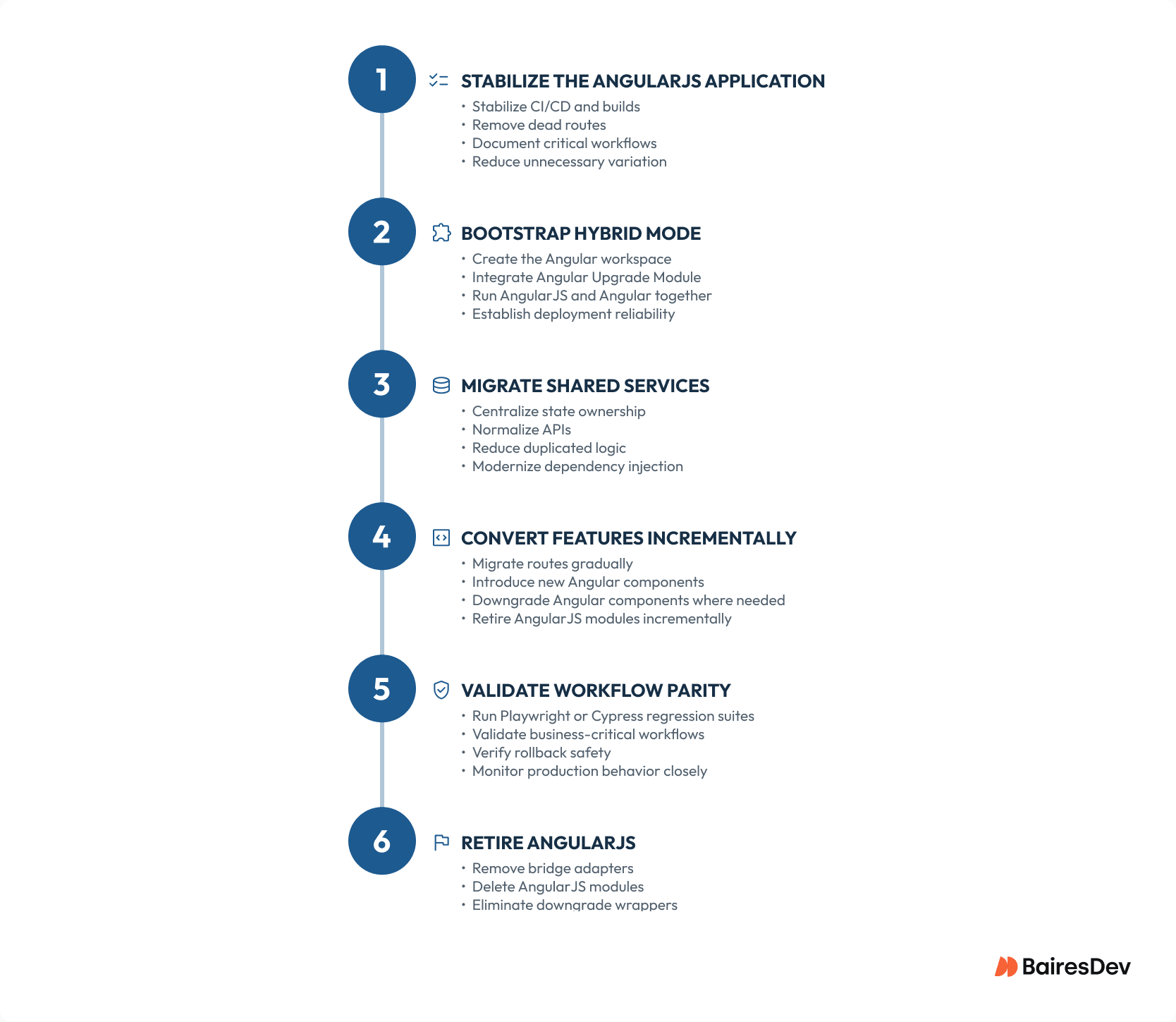
1. Stabilize the AngularJS Codebase. Before migrating: make builds repeatable, stabilize CI, remove dead routes, document critical workflows, and reduce unnecessary variation. Stabilization can feel wasteful when the goal is replacement. Unstable legacy systems are dramatically harder to migrate safely.
2. Create the New Angular Project. Use Angular CLI to scaffold the new Angular workspace and review the generated configuration carefully. Modern Angular increasingly favors standalone components, but hybrid migration patterns still commonly rely on NgModule bootstrapping because the Angular Upgrade Module integrates more naturally with that structure. This distinction matters during incremental migration planning.
3. Bootstrap Hybrid Mode. A hybrid Angular app imports BrowserModule and UpgradeModule, then bootstraps the AngularJS module through ngDoBootstrap. The first meaningful milestone usually isn’t visual modernization. It’s proving the old AngularJS application runs reliably inside the new Angular architecture without changing user behavior.
4. Migrate Shared Services Early. Service migration usually matters more than component migration. Migrating Angular services first centralizes ownership, reduces duplicated state, simplifies dependency injection boundaries, and improves long-term modular architecture. A clean UserService migration often delivers more architectural value than converting dozens of presentational AngularJS components.
5. Convert Components by Feature Boundary. Simple Angular components should move before highly coupled directives, but teams should still migrate at least one representative ugly workflow early. Otherwise, migration plans become dangerously optimistic. One permissions-heavy route with custom directives, async callbacks, route guards, and third-party integrations teaches more than twenty static screens.
6. Migrate Routing Carefully. Routing complexity deserves earlier attention than many teams expect. Nested AngularJS router configurations often hide shared permissions, implicit redirects, inherited layouts, and global state assumptions. Migrate route groups rather than isolated screens when the AngularJS router structure itself represents the behavioral boundary.
7. Implement Lazy Loading After Parity. Implement lazy loading after workflow parity is proven. Teams that optimize too early often end up debugging Angular zone timing behavior, async callback inconsistencies, hybrid rendering issues, and state synchronization bugs. Performance improvements matter, but parity comes first.
Code Examples Worth Keeping Short
Migration code should remain temporary, understandable, and easy to delete. This hybrid bootstrap pattern still appears frequently because the Angular Upgrade Module works through NgModule-based bootstrapping.
1import { DoBootstrap, NgModule } from '@angular/core';
2import { BrowserModule } from '@angular/platform-browser';
3import { UpgradeModule } from '@angular/upgrade/static';
4
5@NgModule({
6  imports: [BrowserModule, UpgradeModule],
7})
8export class AppModule implements DoBootstrap {
9  constructor(private upgrade: UpgradeModule) {}
10
11  ngDoBootstrap() {
12this.upgrade.bootstrap(document.body, ['legacyApp']);
13  }
14}
Once hybrid bootstrapping works, teams can downgrade Angular components into AngularJS templates.
1import { downgradeComponent } from '@angular/upgrade/static';
2import { BillingPanelComponent } from './billing-panel.component';
3
4angular
5  .module('legacyApp')
6  .directive(
7'billingPanel',
8downgradeComponent({ component: BillingPanelComponent }) as angular.IDirectiveFactory
9  );
10
11Bindings still require explicit translation.
12
13@Component({
14  selector: 'app-billing-panel',
15  template: `<button type="button" (click)="save.emit(account)">Save</button>`,
16})
17export class BillingPanelComponent {
18  @Input() account!: Account;
19  @Output() save = new EventEmitter<Account>();
20}
An AngularJS component using bindings: { account: ‘<‘, onSave: ‘&’ } doesn’t automatically become equivalent Angular code just because corresponding properties share similar names. Lifecycle assumptions and ownership boundaries still need redesign.
Where Angular Migration Projects Quietly Fail
The failures that damage trust usually aren’t compile errors. They’re behavioral differences that only surface inside real workflows.
Shared Mutable State
$scope sprawl remains one of the most common migration problems. A parent controller updates shared state, nested directives watch it, and multiple workflows mutate the same object through implicit contracts. Modern Angular architecture forces explicit ownership: Angular services for shared state, inputs and outputs for component communication, route-level state only where route behavior belongs. That clarity is healthy, but uncovering hidden coupling often expands migration scope unexpectedly.
DOM-Heavy AngularJS Directives
Some AngularJS directives migrate cleanly into Angular components. Others shouldn’t. Directives tightly coupled to plugin timing, DOM mutation, jQuery behavior, or manual event handling often deserve redesign rather than direct translation. The phrase “upgrade AngularJS directives” sounds simpler than it usually is.
Dual-Framework Drift
Running AngularJS and Angular together creates governance risk. Without enforcement, teams accidentally add new AngularJS services, duplicate state ownership, preserve temporary adapters permanently, and rebuild coupling inside the bridge layer. Simple rules help: new features go Angular-first, downgrade wrappers require deletion criteria, and AngularJS services can’t gain new responsibilities. Migration governance matters as much as technical implementation.
Testing Gaps
Visual QA alone rarely catches migration failures. Hybrid applications can pass basic testing while still failing when async callbacks fire outside Angular zone behavior, digest cycles differ, stale shared state persists, or third-party integrations update incorrectly. Modern migration programs increasingly rely on Playwright, Cypress, integration-heavy regression suites, workflow-based validation, and visual regression testing. That strategy matters more than preserving old AngularJS unit tests that already struggle to reflect production behavior.
Hybrid Migration vs. Complete Rewrite
Most enterprise teams land somewhere in the middle. Reporting screens may stay AngularJS until retirement. Customer onboarding flows may be rewritten entirely because the UX already needs redesign. Shared shell functionality may use incremental migration because rollback requirements are strict. The wrong strategy is usually the one nobody has operational authority to finish.
| Factor | Hybrid Migration | Complete Rewrite |
| App size & activity | Large app, frequent releases, multiple teams | Small to medium, bounded scope |
| Parity requirements | High; every old workflow must survive | Defined; parity is a list someone owns |
| Domain knowledge | Mixed; some workflows undocumented | Strong; users available to validate |
| Rollback story | Slice-by-slice, reversible per release | Side-by-side validation, single cutover |
| Primary risk | Dual-framework overhead and drift | Scope creep and undefined parity |
| Best fit example | Customer-facing portal, 150+ routes, weekly releases | Internal tool, 7 screens, stable APIs |
Before You Commit, Run the Discovery Slice First
Run a representative discovery slice before committing to a path. Pick one simple route, one complex workflow, one shared service, and one problematic directive. Then push that slice far enough to expose build friction, testing gaps, release coordination problems, dependency conflicts, and organizational bottlenecks.
That exercise usually reveals more about migration risk than architecture diagrams or route counts. Scope what you learn into the plan before you ask for budget.
Measure progress in business workflows, not component counts. “Checkout permissions migrated and old $rootScope dependencies removed” tells leadership more than “47 Angular components converted.”
The real target isn’t simply a new Angular app. It’s an Angular application where normal product delivery no longer depends on preserving AngularJS behavior through hidden side doors.